web
You’re offline. This is a read only version of the page.
close
Skip to main content

Announcements

No record found.

News and Announcements icon
Community site session details

Community site session details

Session Id :
Microsoft Dynamics AX (Archived)

Multiple Portals on same server using different AOSs issue

(0) ShareShare
ReportReport
Posted on by

Hello Everyone, 

We have setup EP in a SharePoint Farm with 4 WFEs. It was installed and configured successfully with no issues. Then we proceed to install another EP in a different SPWebApplication to use another AOS connection. We have been following this TechNet: https://technet.microsoft.com/en-us/library/hh328926.aspx. A new configuration has been created and exported. This configuration points to another AOS instance.

So far everything goes as expected. I have added <Session Configuration="path_to_config_file.axc" and site shows the following message: "The site http://mywebapp/sites/axsite/ is not registered with Microsoft Dynamics AX"
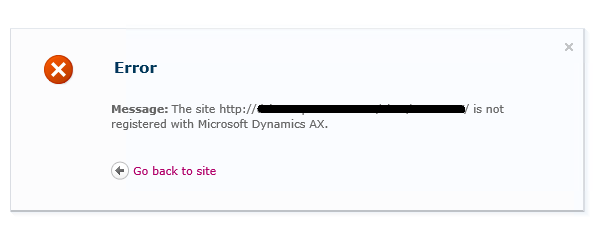
AXEPError.png

Which is fine, since we have not registered the URL yet.

Moving forward, in AX Client, when we attemp to register site, we  typed site's URL and immediatelly we get this error:

"Setup could not find the Web site at URL http://mywebapp/sites/axsite."
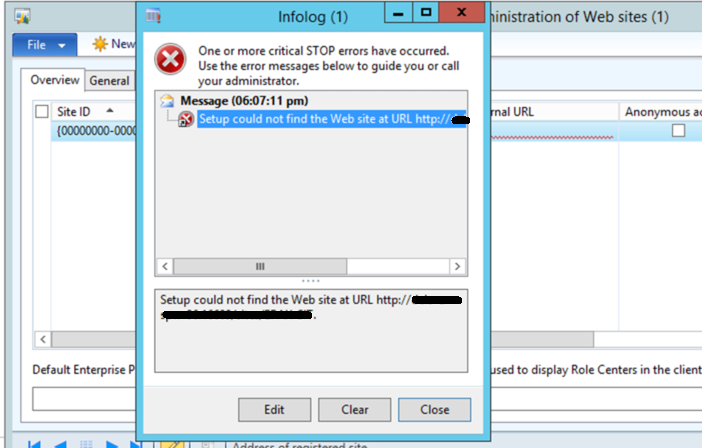
AXEPError2.png

We are using Dynamics AX 2012, but I do not have more details about version used.

Any hint / clue on where to look at will be highly appreciated.

*This post is locked for comments

I have the same question (0)
  • Suggested answer
    A.Prasanna Profile Picture
    8,225 on at

    Are you using same web site name and same port number for all 4 sites ?, if not check whether you added Internal and External URLs under Website administration on AX application.I assume that you have already configured External Internal URL for all 4 sites Separately.any way you cant use same site name and same port numbers for all 4 sites.

    Hope this information will help.

    Thanks & Regards

    Amith Prasanna

  • Community Member Profile Picture
    on at

    Thanks Amith,

    Same site name and port is used. We have a AX UAT Environment and AX SIT Environment. We installed and configured EP to connect to our AX UAT. It was configured in all 4 servers and works with no issues. Then we installed EP again and now we are trying to have this to connect to our AX SIT. However AX SIT Client reports the above error.

    EP UAT points to port1 and EP SIT points to port2

    Kind regards,

  • Community Member Profile Picture
    on at

    Thanks Amith,

    Same site name and port is used. We have a AX UAT Environment and AX SIT Environment. We installed and configured EP to connect to our AX UAT. It was configured in all 4 servers and works with no issues. Then we installed EP again and now we are trying to have this to connect to our AX SIT. However AX SIT Client reports the above error.

    EP UAT points to port1 and EP SIT points to port2

    Kind regards,

  • Suggested answer
    A.Prasanna Profile Picture
    8,225 on at

    So you mean to say that you have 4 Front end Web Servers and you deployed 4 Enterprise portal sites and configured to one site per AOS, is it ?.

    Thanks & Regards,

    Amith Prasanna

  • Community Member Profile Picture
    on at

    Well, First EP installation (the one using UAT AOS) was installed in all 4 WFE's. This second installation (the one to be using SIT AOS) has been only installed in server hosting Central Admin.

  • Suggested answer
    A.Prasanna Profile Picture
    8,225 on at

    My advise is to again check your SharePoint Site URL Configuration Site and Port , Specially when you are adding URL to the AX don't forget to add relevant port number.

    Eg: http://mywebapp;<PortNumber>/sites/axsite."

    Hope this will help.

    Thanks & Regards,

    Amith Prasanna

  • Community Member Profile Picture
    on at

    Thanks Amit. We are using http://url:port/sites/axsite. At the begining, when we setup UAT environment, we told EP to store connection in Windows Registry instead of a config file. When setting up SIT environment, I went ot AX Config Tool, created a new configuration and exported it, to be used by the new EP installation.

    Should that be OK? or Should I (as first step) create all connections using AX Config Tool, and then install EP and selecting  configurations depending on the AOS instance I want to use?

    Kind Regards,

  • Suggested answer
    A.Prasanna Profile Picture
    8,225 on at

    Assuming all other steps you have completed without issue on Technet Article technet.microsoft.com/.../hh328926.aspx

    I'm take you to the point 4 and 5 , according to me yes it is better to create all connections using AX Confiuration and export config file for each AOS instance

    then you can place config files in shared folder and Add /Modify configuration file path as step 5.

    Hope this will help.

    Thanks & Regards,

    Amith Prasanna

  • Suggested answer
    A.Prasanna Profile Picture
    8,225 on at

    Assuming all other steps you have completed without issue on Technet Article technet.microsoft.com/.../hh328926.aspx

    I'm take you to the point 4 and 5 , according to me yes it is better to create all connections using AX Configuration and export config file for each AOS instance

    then you can place config files in shared folder and Add /Modify configuration file path as step 5.

    Hope this will help.

    Thanks & Regards,

    Amith Prasanna

Under review

Thank you for your reply! To ensure a great experience for everyone, your content is awaiting approval by our Community Managers. Please check back later.

Helpful resources

Quick Links

Introducing the 2026 Season 1 community Super Users

Congratulations to our 2026 Super Stars!

Meet the Microsoft Dynamics 365 Contact Center Champions

We are thrilled to have these Champions in our Community!

Congratulations to the April Top 10 Community Leaders

These are the community rock stars!

Leaderboard > 🔒一 Microsoft Dynamics AX (Archived)

#1
CP04-islander Profile Picture

CP04-islander 44

#2
Michel ROY Profile Picture

Michel ROY 14

#3
imran ul haq Profile Picture

imran ul haq 8

Last 30 days Overall leaderboard

Featured topics

Product updates

Dynamics 365 release plans
