web
You’re offline. This is a read only version of the page.
close
Skip to main content

Notifications

Announcements

No record found.

Community site session details

Community site session details

Session Id :
Small and medium business | Business Central, N...
Suggested Answer

Issue with Email Sending via Web Service – Graph API Authorization Error

(4) ShareShare
ReportReport
Posted on by 66

Hi,

We are trying to send emails via a web service call by using the standard "Enqueue" function from codeunit 8901 "Email", which enqueues emails to be sent in the background.

However, we are encountering the following error: "You are not authorized to access this resource: https://graph.microsoft.com/.default. Contact your system administrator."

Azure AD App Configuration: We have registered an application in Azure AD and granted all necessary permissions. 
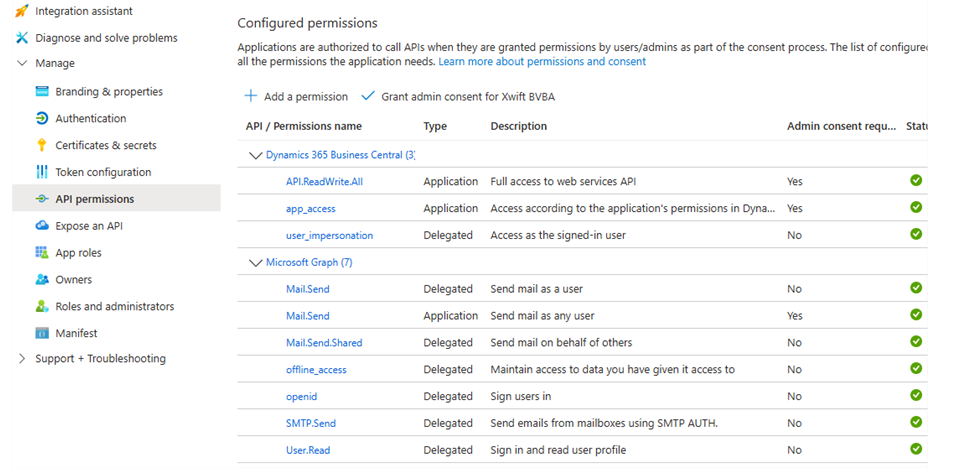

Despite this configuration, we are still unable to send emails via the web service. Any advise what might be missing or misconfigured?

I have the same question (0)
  • Suggested answer
    KP - Solution Architect Technical Profile Picture
    658 on at
    Hi,
     
    Can you check the extension management setup 
    If allowHttp Client is enabled.
     
    This can help you resolve.


    Thanks,
    KP
  • Khushbu Rajvi. Profile Picture
    20,643 Super User 2025 Season 2 on at
  • Suggested answer
    Ramesh Kumar Profile Picture
    7,529 Super User 2025 Season 2 on at

    Under API Permissions, ensure the following Application Permissions are granted (not just Delegated):

    • Mail.Send
    • User.Read
    • Optional: Mail.ReadWrite, MailboxSettings.Read
    Thanks you
    Ramesh Kumar
     
    If this was helpful, please check the "Does this answer your question?" box and mark it as verified.
  • Gerardo Rentería García Profile Picture
    25,369 Most Valuable Professional on at
  • Suggested answer
    YUN ZHU Profile Picture
    95,741 Super User 2025 Season 2 on at
    Hi, If you use standard functions to send emails, you do not need to set permissions in Azure.
    You just need to make sure that the Email Account has been set up in BC.
    For example,
     
     
    If you use the Graph API completely, you should send an HTTP request. Please confirm your approach first.
     
    Hope this helps.
    Thanks.
    ZHU
     

Under review

Thank you for your reply! To ensure a great experience for everyone, your content is awaiting approval by our Community Managers. Please check back later.

Helpful resources

Quick Links

Responsible AI policies

As AI tools become more common, we’re introducing a Responsible AI Use…

Neeraj Kumar – Community Spotlight

We are honored to recognize Neeraj Kumar as our Community Spotlight honoree for…

Leaderboard > Small and medium business | Business Central, NAV, RMS

#1
OussamaSabbouh Profile Picture

OussamaSabbouh 2,066

#2
YUN ZHU Profile Picture

YUN ZHU 658 Super User 2025 Season 2

#3
Sumit Singh Profile Picture

Sumit Singh 595

Last 30 days Overall leaderboard

Featured topics

Product updates

Dynamics 365 release plans
