web
You’re offline. This is a read only version of the page.
close
Skip to main content

Notifications

Announcements

No record found.

Community site session details

Community site session details

Session Id :
Microsoft Dynamics CRM (Archived)

Run Custom Workflow Activity from Entity List in D365 Portals

(0) ShareShare
ReportReport
Posted on by

Hi All,

I have created a custom workflow which removes Marketing List Members and it works fine on D365 CRM. 

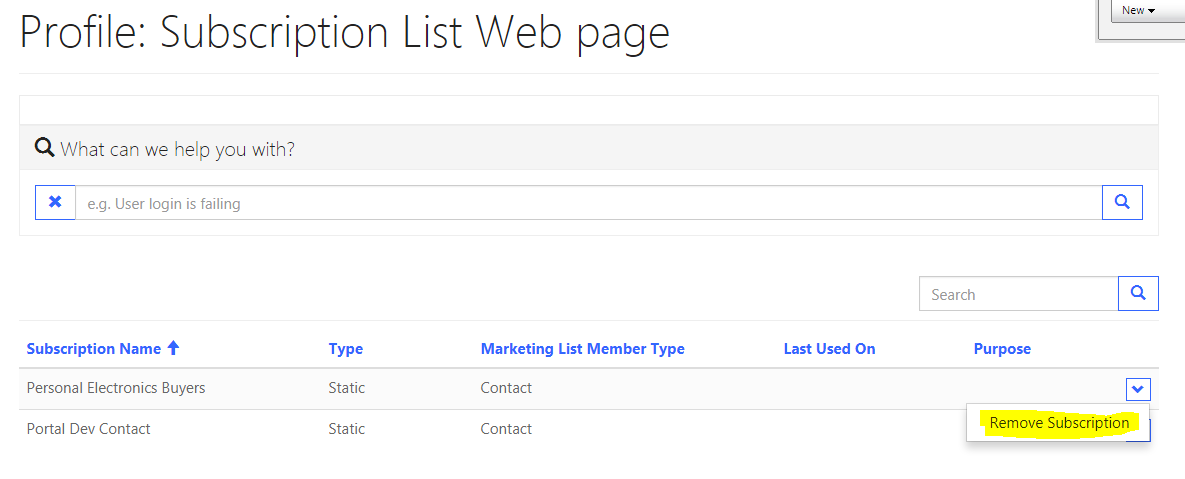
I have an entity list on Portal that displays all the Marketing list the current contact is member of. Now on this list I have created a button to run this workflow.
6354.1.PNG

Now when i click on this button it says workflow has been initiated. 

I need to know how can we get current contact guid and selected record (Marketing List) Guid from C# for which we are running the workflow.

Regards,
Saad

*This post is locked for comments

I have the same question (0)
  • ashlega Profile Picture
    34,477 on at

    Hi,

    workflows are per "entity", so, if that one is for marketing lists, it will have marketing list in the PrimatyEntityId attribute:

             IWorkflowContext context = executionContext.GetExtension<IWorkflowContext>();

             context.PrimaryEntityId

     (might be stating the obvious)

      I've no idea how to get the contact, though, because that would have to be a parameter for the custom worfklow activity - there is only one "PrimaryEntityId".

     How does it work in CRM?

  • Community Member Profile Picture
    on at

    I am using below code in my custom workflow activity.

            protected override void Execute(CodeActivityContext executionContext)
            {
                //IOrganizationService for communication with CRM
                IWorkflowContext workflowContext = executionContext.GetExtension<IWorkflowContext>();
                IOrganizationServiceFactory serviceFactory = executionContext.GetExtension<IOrganizationServiceFactory>();
                IOrganizationService service = serviceFactory.CreateOrganizationService(workflowContext.UserId);
    
                Entity Members = service.Retrieve(workflowContext.PrimaryEntityName, workflowContext.PrimaryEntityId, new ColumnSet() { AllColumns = true });


                var portalContext = Microsoft.Xrm.Portal.PortalContext.Current;
                var contactId = portalContext.User.Id;
                
                RemoveMemberListRequest req = new RemoveMemberListRequest();
    
                req.EntityId = contactId;
    
                req.ListId = Members.Id;
                RemoveMemberListResponse resp = (RemoveMemberListResponse)service.Execute(req);
    
            }


    But I am unable to get current contactid of the logged in user via above as Microsoft.Xrm.Client and Portal are not in use for Dyanmics 365. Can anyone help me get the current portal context ? or current logget in user(contact) in portal in C#

  • Community Member Profile Picture
    on at

    anyone??

  • bik@inturi Profile Picture
    75 on at

    Hi I know this has been long standing .. But did you manage to find out .. How to get the contact..  who has initiated the workflow from portal.. I have a similar situation. I need to change the modified by  with the contact in portal..

    Currently by default it is putting SYSTEM as modified by..

    Thanks in advance.

Under review

Thank you for your reply! To ensure a great experience for everyone, your content is awaiting approval by our Community Managers. Please check back later.

Helpful resources

Quick Links

Responsible AI policies

As AI tools become more common, we’re introducing a Responsible AI Use…

Neeraj Kumar – Community Spotlight

We are honored to recognize Neeraj Kumar as our Community Spotlight honoree for…

Leaderboard > 🔒一 Microsoft Dynamics CRM (Archived)

#1
SA-08121319-0 Profile Picture

SA-08121319-0 4

#1
Calum MacFarlane Profile Picture

Calum MacFarlane 4

#3
Alex Fun Wei Jie Profile Picture

Alex Fun Wei Jie 2

Last 30 days Overall leaderboard

Featured topics

Product updates

Dynamics 365 release plans
