web
You’re offline. This is a read only version of the page.
close
Skip to main content

Notifications

Announcements

Community site session details

Community site session details

Session Id :
Business Central forum

The following field must be included into the table's primary key: Field: Description Table: G/L Account Category ?

(0) ShareShare
ReportReport
Posted on by 339

Hello all ,

"The following field must be included into the table's primary key: Field: Description Table: G/L Account Category."When adding the description in the respective field got error please find below screenshot
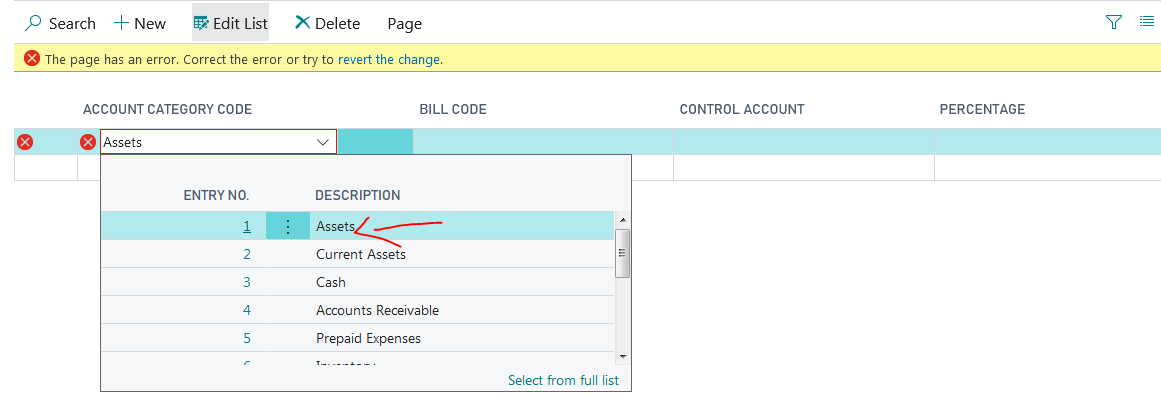
primarykeyField.PNG

please see below my vs code

table 50105 CutBackTable
{
DataClassification = ToBeClassified;

fields
{

field(1; "Account Category Code"; Text[250])
{
DataClassification = CustomerContent;
TableRelation = "G/L Account Category".Description;
//TableRelation = "G/L Account Category".Description;


}
field(2; "Bill code"; Code[20])
{
DataClassification = CustomerContent;
//TableRelation = "Dimension Value".Code where ("Dimension Code" = field ("Bill code"));
TableRelation = "Dimension Value".Code;
//where ("Dimension Code" = field ("Bill code"), Code = field ("Control Account"));

}
field(3; "Control Account"; Code[20])
{
DataClassification = CustomerContent;
TableRelation = "G/L Account";
}
//field(4; "Percentage"; Decimal)
//{


//DecimalPlaces = 2 : 2;
//DataClassification = CustomerContent;
//OptionMembers =default;
// MinValue = 0;
//MaxValue = 100;

//}
field(4; "Percentage"; Option)
{
//DataClassification = ToBeClassified;
Caption = 'Percentage';
OptionMembers = " ","Working Interest","Paying Interest","Revenue – Cost Oil","Revenue – Profit Oil";
}
//field(id; MyField; Option)
//{
// DataClassification = ToBeClassified;
// OptionMembers =

//}


}

keys
{
key(PK; "Bill code")
{
//Clustered = true;
}
}

}

have any solution for this

I have the same question (0)
  • Suggested answer
    NAV_BC_Developer Profile Picture
    4 on at

    it is more helpful...

    I was facing with same problem.

    through this my issue is resolved

    very thanx

  • Nadeem Shah Profile Picture
    10 on at

    Hi SABIH

    You will add Description field into Keys 
    click on Views select keys and add Description as a primary key .5468.Capture22.PNG  

  • jor1hp Profile Picture
    80 on at

    HI, you can try with on the field

    ValidateTableRelation = false;
  • SABIH Profile Picture
    339 on at

    Hi Stefano Demiliani ,

    Actually i dont know how to find table of "G/L Account Category table" from the respective form (G/L Account Category)

    could you please tell me how to find table of respective forms ,for example i want to find G/L Account Category forms table

    glaccnt.PNG

  • SABIH Profile Picture
    339 on at

    HI Stefano Demiliani ,

    But our client need "description" what will do ,have any other solution for this

  • Suggested answer
    Stefano Demiliani Profile Picture
    37,166 Most Valuable Professional on at

    TableRelation cannot be set as TableRelation = "G/L Account Category".Description because Description is not a key field.

    I don't know how your G/L Account Category table is defined but I suspect that you have a key field like No. or Code and so your tablerelation should be set as:

    TableRelation = "G/L Account Category"."No.";

Under review

Thank you for your reply! To ensure a great experience for everyone, your content is awaiting approval by our Community Managers. Please check back later.

Helpful resources

News and Announcements

Season of Giving Solutions is Here!

Quick Links

November Spotlight Star - Khushbu Rajvi

Congratulations to a top community star!

Forum Structure Changes Coming on 11/8!

In our never-ending quest to help the Dynamics 365 Community members get answers faster …

Dynamics 365 Community Platform update – Oct 28

Welcome to the next edition of the Community Platform Update. This is a status …

Leaderboard > Business Central

Last 30 days Overall leaderboard

Featured topics

Product updates

Dynamics 365 release plans
