web
You’re offline. This is a read only version of the page.
close
Skip to main content

Announcements

No record found.

News and Announcements icon
Community site session details

Community site session details

Session Id :
Microsoft Dynamics GP (Archived)

Open AP Transactions - INSERT SQL from One Company to another

(0) ShareShare
ReportReport
Posted on by 766

We are consolidating 4 companies into 1.

July 1, we need to move all OPEN Invoices over to the new company, without affecting General Ledger.

I am testing this now, to see what needs to take place early 7/1.

I have tested using INSERT statement for two tables. PM20000 for the OPEN invoice and PM10100 for the OPEN Invoice DISTRIBUTION.

Our goal is to be able to see the invoice to pay and be able to see the expense account along with old payables clearing account (this may be the issue).

Here is an image of what I have imported. It does not bring in the Purch account (I confirmed it is setup in new company), and the PAY account is grabbing a random account.

As I am writing this up, I am thinking we can't bring over the distributions because we would be cutting checks with the offset of our new AP Control account 100-000-2100-001 rather than the old one 200-000-2100-001.

Since we are not moving over History, Is there any other way to see from our new company, the GL distribution that was entered, that I might be missing?
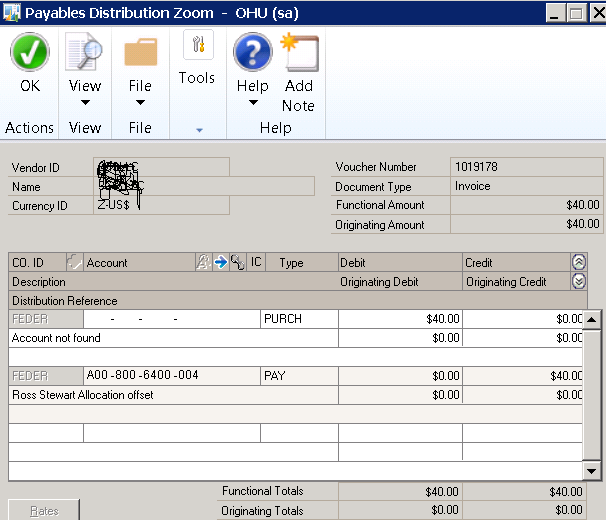
OPEN-AP-ISSUE.png

*This post is locked for comments

I have the same question (0)
  • L Vail Profile Picture
    65,271 on at

    Hi,

    There is a tool from Corporate Renaissance Group called Combiner www.crgroup.com/company-combiner that can combine your databases without the time and pain of doing it manually.

    Kind regards,

    Leslie

  • Napolo Profile Picture
    766 on at

    p.s. If we need to VOID an open invoice in our new company, we were hoping to be able to see how it was charged rather than going to the old companies to track down the inv. distributions.

  • Napolo Profile Picture
    766 on at

    We did evaluate that option. We are not bringing over historical information, so we are doing this manually.

  • Verified answer
    Victoria Yudin Profile Picture
    22,769 on at

    Hi Nicole,

    Just my 2 cents on this.

    Putting transaction information directly into SQL tables is not something to be taken lightly. You would have to check every ID (not just vendor ID, but address ID, payment terms, tax schedules, etc.) for validity. You would need to validate and translate all the account indexes. And there could be many other considerations, depending on the details in your transactions.

    Long story short, it's something I would strongly recommend against for a one time need. There is just too much work involved for the data validation and testing required. Depending on how many open transactions you are bringing over, your best bet may be to either type them in manually or import them using Integration Manager. 

  • Suggested answer
    Beat Bucher  GP Geek  GPUG All Star Profile Picture
    28,061 Moderator on at

    Fully agree with Victoria,

    Your biggest issue here are the account indexes that are used and certainly don't match between the companies.

    We do have over a dozen companies and I've never seen a single GL accounts # match the index # from another one.

    Exporting and using IM to recreate your open invoices is probably your best bet,  as your dealing with real GL numbers.

  • Richard Wheeler Profile Picture
    75,852 Moderator on at

    I cast my vote against doing it this way. The simpler and more complete way is to use IM to import the transactions and then turn off posting to the ledger. Either way you will not have the zoom feature back from the ledger to the PM transactions but at least this way you have allowed GP to post the transactions so you know all the tables will be updated correctly.

  • Napolo Profile Picture
    766 on at

    Thank you all.  This makes sense. IM seems to be most logical, I think I am obsessed to see what else SQL can do:)

    Integrate and "Kill" the batch, so it doesn't post to GL. SOLD

    Thank you all.

Under review

Thank you for your reply! To ensure a great experience for everyone, your content is awaiting approval by our Community Managers. Please check back later.

Helpful resources

Quick Links

Introducing the 2026 Season 1 community Super Users

Congratulations to our 2026 Super Stars!

Meet the Microsoft Dynamics 365 Contact Center Champions

We are thrilled to have these Champions in our Community!

Congratulations to the April Top 10 Community Leaders

These are the community rock stars!

Leaderboard > 🔒一 Microsoft Dynamics GP (Archived)

#1
Shravan Attelli Profile Picture

Shravan Attelli 1

Last 30 days Overall leaderboard

Featured topics

Product updates

Dynamics 365 release plans
