web
You’re offline. This is a read only version of the page.
close
Skip to main content

Announcements

No record found.

News and Announcements icon
Community site session details

Community site session details

Session Id :
Customer experience | Sales, Customer Insights,...
Answered

Workflow doesn't send email

(0) ShareShare
ReportReport
Posted on by 30

Hi,

I have a workflow with many condition. I set to Send email when Case created for different customer specified. But 4-5 conditions worked and other doesn't work.

Please help me. Thank you

I have the same question (0)
  • a33ik Profile Picture
    84,331 Most Valuable Professional on at

    Hello,

    Can you please provide a screenshot of your workflow and description what doesn't work it should?

  • Hoang Lan Le Profile Picture
    30 on at

    Hi,

    below is my Workflow

    2020_2D00_01_2D00_02_5F00_23_2D00_49_2D00_36.png

  • a33ik Profile Picture
    84,331 Most Valuable Professional on at

    Are you fully sure that referenced accounts in non-worky conditions are the same that you have in your record?

  • oliver.rodrigues Profile Picture
    4,052 on at

    this doesn't look to have any relation with Portals, can you please untag

  • gdas Profile Picture
    50,091 Moderator on at

    Hi ,

    I believe you are aware about how to check monitor workflow process , what about process session , can you see whether workflow meet condition for that customer or not.

    docs.microsoft.com/.../monitor-manage-processes

  • Hoang Lan Le Profile Picture
    30 on at

    Hi Andrew,

    Yes, It was work correctly until I added one more condition

  • Hoang Lan Le Profile Picture
    30 on at

    Hi Goutam,

    Thanks for your reply. I have checked and the workflow was succeeded. But no email sent

  • Verified answer
    Neeraj Pawar Profile Picture
    Microsoft Employee on at

    Hi Hoang,

    Though the workflow would have succeeded, the email would have not been sent if the conditions in the workflow was not met. By the workflow screenshot it looks like a real-time workflow, kindly convert the workflow to background workflow for time being so that we can analyze the related system job and understand if the condition is being met or not when the issue occurs.

    You can convert the workflow to background by opening the workflow and then clicking on "Convert to a background workflow". 

    pastedimage1578038375057v2.png

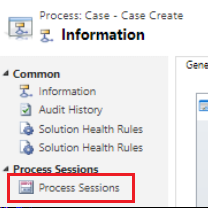
    Once the above step is done, repro the scenario so that the required (non-working) condition is achieved. After repro, go to your workflow and then select "Process Sessions" to see the systems job that was created for the repro.
    pastedimage1578038410897v3.png

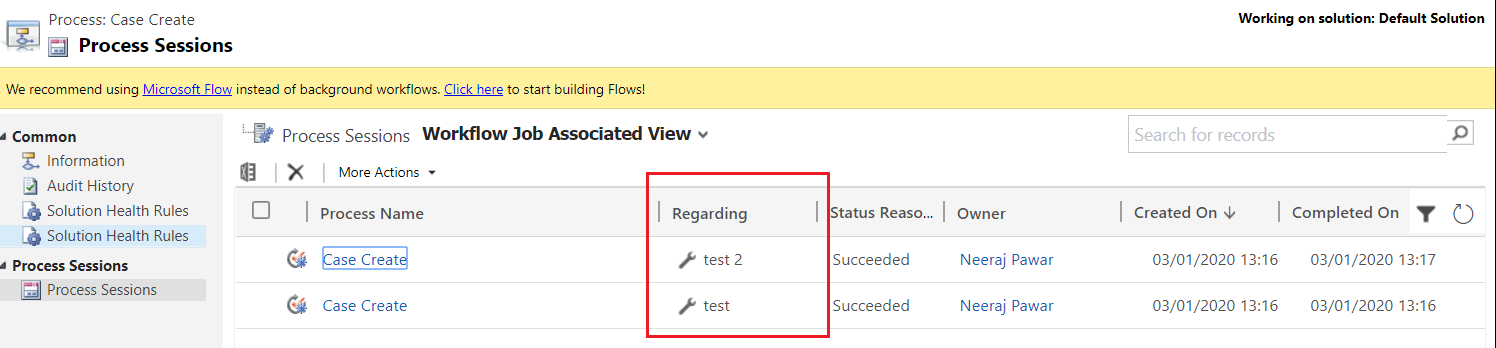
    By the regarding field you can identify the system job that is associated with your record created for repro.
    pastedimage1578038446713v4.png

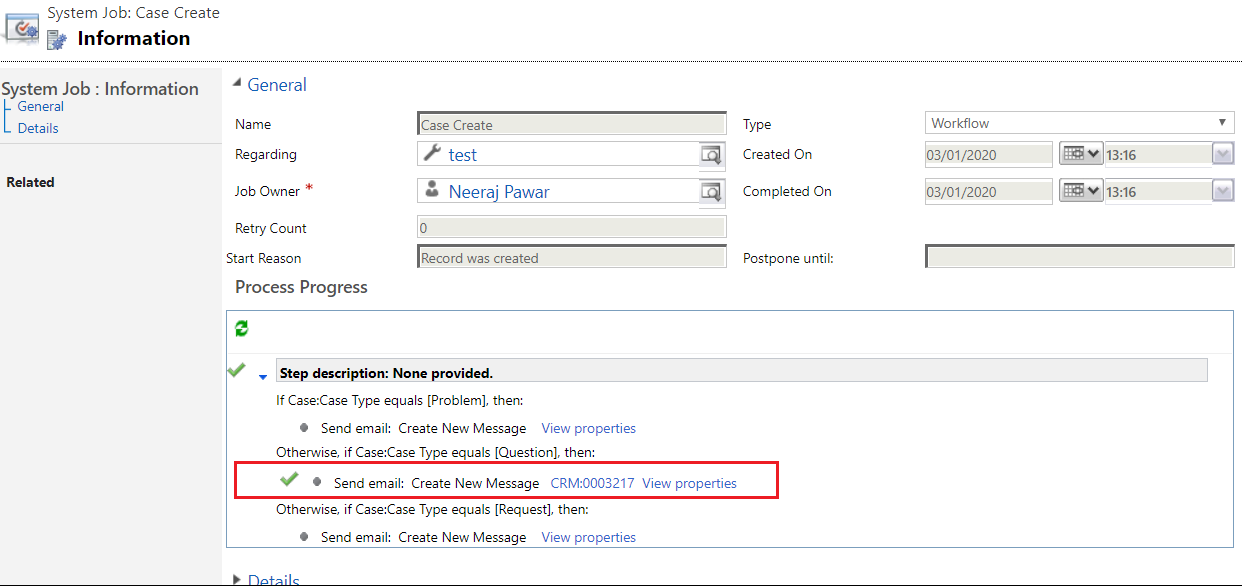
    Once you open the associated record's system job, you can see if the conditions were met or not for your repro. If the condition is met, then you would see green check mark next the condition.

    Here in below system job, condition 2 was met hence the email was triggered and there is a green check mark before the send email step.
    pastedimage1578038513626v5.png

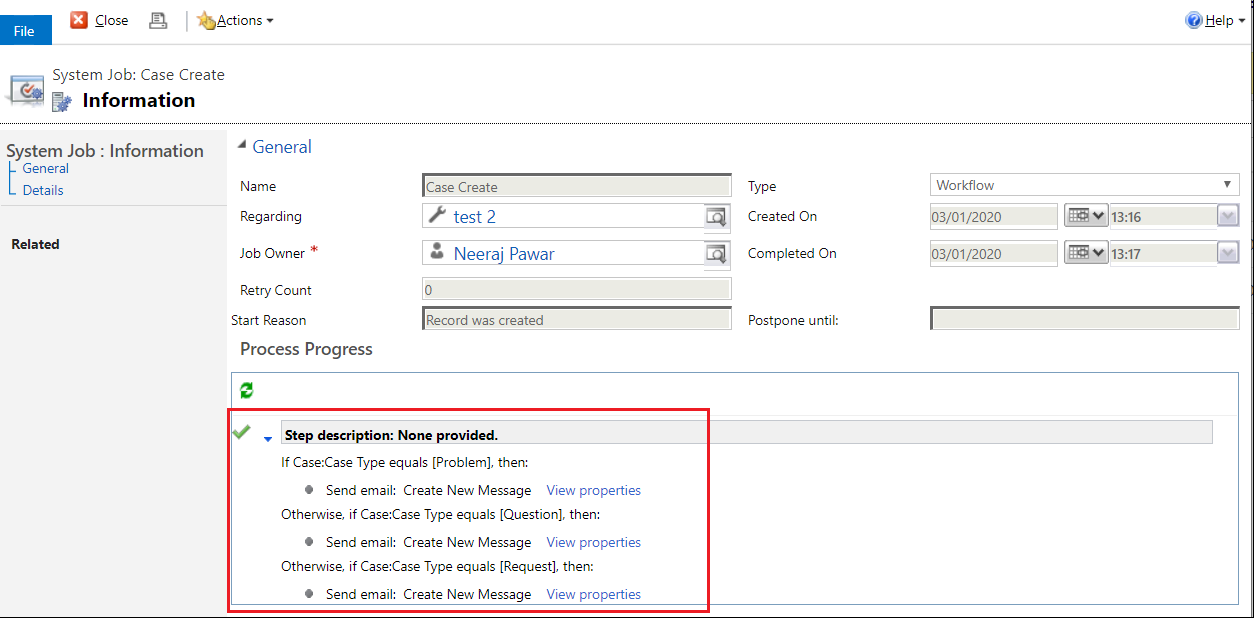
    Here in below scenario, none of the conditions were met, hence there is no green check mark next to any of the send email step. If this is the result that you see in your case, then you would need to check if the condition is achieved by the related record or alter the condition in the workflow accordingly.
    pastedimage1578038545065v6.png

  • Verified answer
    Roma Gupta Profile Picture
    725 on at

    Hi

    Please check once if the queue you are referring to is in active state. Also check for that particular customer in active state or not. Post please check your test data which matches the condition for your workflow to trigger.

    Regards

    Roma

  • Verified answer
    Pawar Pravin Profile Picture
    5,237 on at

    Have you tried to send email directly from CRM without use workflow ?

Under review

Thank you for your reply! To ensure a great experience for everyone, your content is awaiting approval by our Community Managers. Please check back later.

Helpful resources

Quick Links

Introducing the 2026 Season 1 community Super Users

Congratulations to our 2026 Super Stars!

Meet the Microsoft Dynamics 365 Contact Center Champions

We are thrilled to have these Champions in our Community!

Congratulations to the March Top 10 Community Leaders

These are the community rock stars!

Leaderboard > Customer experience | Sales, Customer Insights, CRM

#1
11manish Profile Picture

11manish 175

#2
ManoVerse Profile Picture

ManoVerse 142 Super User 2026 Season 1

#3
Jimmy Passeti Profile Picture

Jimmy Passeti 59 Most Valuable Professional

Last 30 days Overall leaderboard

Product updates

Dynamics 365 release plans
