web
You’re offline. This is a read only version of the page.
close
Skip to main content

Announcements

No record found.

News and Announcements icon
Community site session details

Community site session details

Session Id :
Small and medium business | Business Central, N...
Suggested Answer

How to Insert record in Posting Preview of Purchase Order Button ?

(0) ShareShare
ReportReport
Posted on by 256

Hi All,

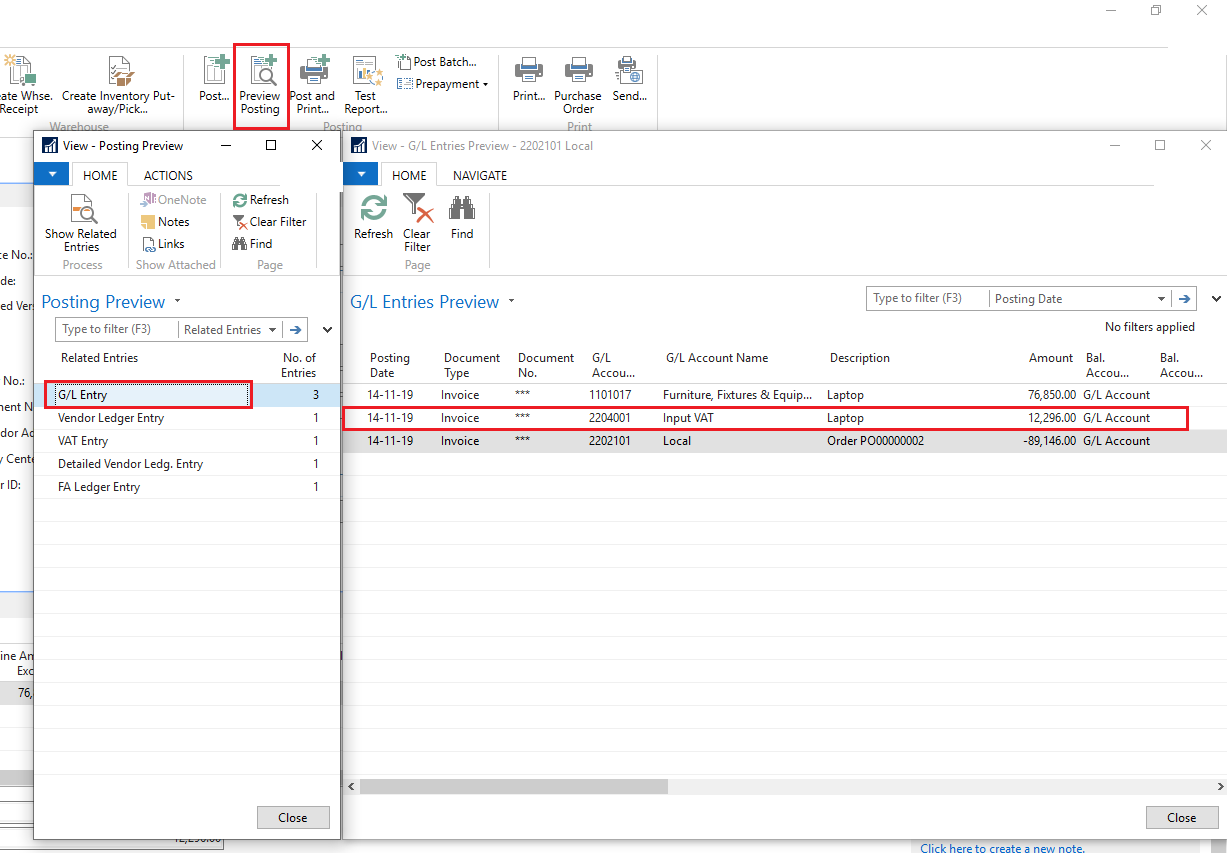
I am Posting one General Journal entry After Posting Purchase Invoice. In Navision Purchase Order, Page there is the "Preview Posting button".so I want to Insert the same entry in "G/L Entry Preview". see the below screenshot.

Please help me out with this issue. How to Insert record in the "Preview Posting button" of Purchase Order.
4667.PNG

  • Suggested answer
    Suresh Kulla Profile Picture
    50,280 Super User 2026 Season 1 on at

    Do you want to post another GL Entry for the same Invoice?  Please remember the entries should balance out otherwise you will inconsistency error. You can insert GL by creating a GL Line review the code in the codeunit 90

  • NeoMatrix Profile Picture
    256 on at

    Thanks for Reply. Yes. I want to Create another GL Entry of the same Purchase Invoice. Because I want show this entry before post  Purchase Invoice . Could you specify the Function of codeunit 90, where I can insert "General Journal entry" and that will be shown in GL entry Preview?

  • Suggested answer
    Suresh Kulla Profile Picture
    50,280 Super User 2026 Season 1 on at

    Why you want only in the preview? so you don't want to post it but just want to see it in the preview? Example check PostVendEntry function for preview the PreviewMode is set to true so no entries are committed to the database, so you need to make sure you add that to your code.

Under review

Thank you for your reply! To ensure a great experience for everyone, your content is awaiting approval by our Community Managers. Please check back later.

Helpful resources

Quick Links

Season of Sharing Community Challenge Winners!

Congratulations to our community stars!

Women in Power Builds Momentum

Expanding mentorship, skilling, and AI innovation

Congratulations to the July Top 10 Community Leaders

These are the community rock stars!

Leaderboard > Small and medium business | Business Central, NAV, RMS

#1
OussamaSabbouh Profile Picture

OussamaSabbouh 748 Super User 2026 Season 2

#2
YUN ZHU Profile Picture

YUN ZHU 354 Super User 2026 Season 2

#3
AndrewThomas81 Profile Picture

AndrewThomas81 351 Super User 2026 Season 2

Last 30 days Overall leaderboard

Featured topics

Microsoft Training Manuals

Product updates

Dynamics 365 release plans



