web
You’re offline. This is a read only version of the page.
close
Skip to main content

Announcements

No record found.

News and Announcements icon
Community site session details

Community site session details

Session Id :
Microsoft Dynamics NAV (Archived)

Check Voided in Bank Account, but Open in Vendor Ledger Entries

(0) ShareShare
ReportReport
Posted on by

This is something that happened before I came to the company, so I am not sure exactly what was done to cause this. This initially happened in our old Navision system, but is still there in our current upgrade to 2016.


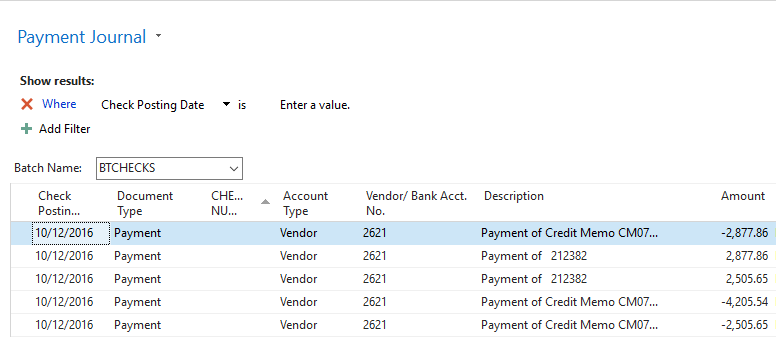
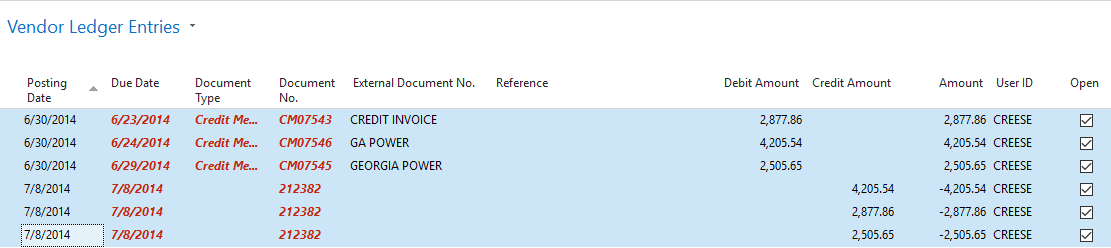
We have a situation where a credit memo was taken when we weren't supposed to take it, so we voided the check. The check is showing as financially voided and closed in our Bank Account in Navision, but in the Vendor Ledger Entries, the check is showing as open (see photo 1 Document No. 212382). In the Chart of Accounts, everything is correct and balances. When we run a Suggest Vendor Payments on this vendor, the Credit Memos and 2 of the 3 checks show up and make the transaction not balance (see photo 2).


Is there a way to close the items in the Vendor Ledger Entries without running a transaction that would affect the G/L? Maybe some way to close it on the backside?

Thank you in advance!

1.
8802.Capture2.PNG

2.

6354.Capture.PNG

*This post is locked for comments

I have the same question (0)
  • Verified answer
    Tharanga Chandrasekara Profile Picture
    23,118 on at

    With a help of a partner you will be able to close the entries from the development environment. However it is not a good practice.

    Just want to clarify with you that, why there is 3 documents in the same document number? That is not a good practice too. (As per my knowledge)

  • Community Member Profile Picture
    on at

    why is there no "document type" for the last 3 entries in screen shot 1 above?

    why is there no "check number" for ANY payment in screen shot 2 above?

    Is this an example of the second method available for voiding a check?  Did someone choose the wrong "void" from the ribbon (not hard to do since the full description of what that button does doesn't appear in the ribbon, even if hovered over)?

  • Community Member Profile Picture
    on at

    We were wanting to see if there was a way to do this outside of using our partner. I guess that will not be an option.

    This would just be a one time fix not a reoccurring thing. We have 2-3 of these occurrences over the past 7 years.

    The 3 documents with the same document number are the voided checks. We use 1 check per vendor and put all invoices/credits on said check.

  • Community Member Profile Picture
    on at

    The last 3 entries in screen shot 1 are the voided checks that are still showing open. If we had not voided them, they show as a payment.

    There are no check numbers for screen shot 2 because I did not print any checks, they appear after I print.

    This could be an example of the second method available for voiding a check. This happened before I came onto the company so my manager and I are unsure of what happened.

  • Suggested answer
    Suresh Kulla Profile Picture
    50,278 Super User 2026 Season 1 on at

    As Tharanga mentioned it is not a good practice to update the ledger entries, you should contact your partner so that they can review those entries and check if there is another way to close the entries or the last resort is to update the entries using a process report but even for that you need to make sure you are updating all the appropiate values of the ledger entry just not Open Field.

  • Community Member Profile Picture
    on at

    Sorry, but this is a major failing of NAV.

    If a user can get themselves into a position as described above, the user should be able to get themselves out of the position, WITHOUT needing a partner to stick his hands into the guts of the program to haul out the gizzard.

    I have never worked with such a delicate flower program before, perpetually teetering on the brink of lockup.

Under review

Thank you for your reply! To ensure a great experience for everyone, your content is awaiting approval by our Community Managers. Please check back later.

Helpful resources

Quick Links

Introducing the 2026 Season 1 community Super Users

Congratulations to our 2026 Super Stars!

Meet the Microsoft Dynamics 365 Contact Center Champions

We are thrilled to have these Champions in our Community!

Congratulations to the April Top 10 Community Leaders

These are the community rock stars!

Leaderboard > 🔒一 Microsoft Dynamics NAV (Archived)

#1
TAHER_El_Mehdi Profile Picture

TAHER_El_Mehdi 2

#1
sliderxb Profile Picture

sliderxb 2

#1
broberts Profile Picture

broberts 2

Last 30 days Overall leaderboard

Featured topics

Product updates

Dynamics 365 release plans