web
You’re offline. This is a read only version of the page.
close
Skip to main content

Notifications

Announcements

No record found.

Community site session details

Community site session details

Session Id :
Microsoft Dynamics CRM (Archived)

"An Unknown error occurred while synchronizing data to Outlook" for Contact entity

(0) ShareShare
ReportReport
Posted on by 6,211

Hello,

I am trying to create contact from outlook and set parent for the same but i am getting error "An Unknown error occurred while synchronizing data to Outlook" while saving the record. Please see below screen shot.
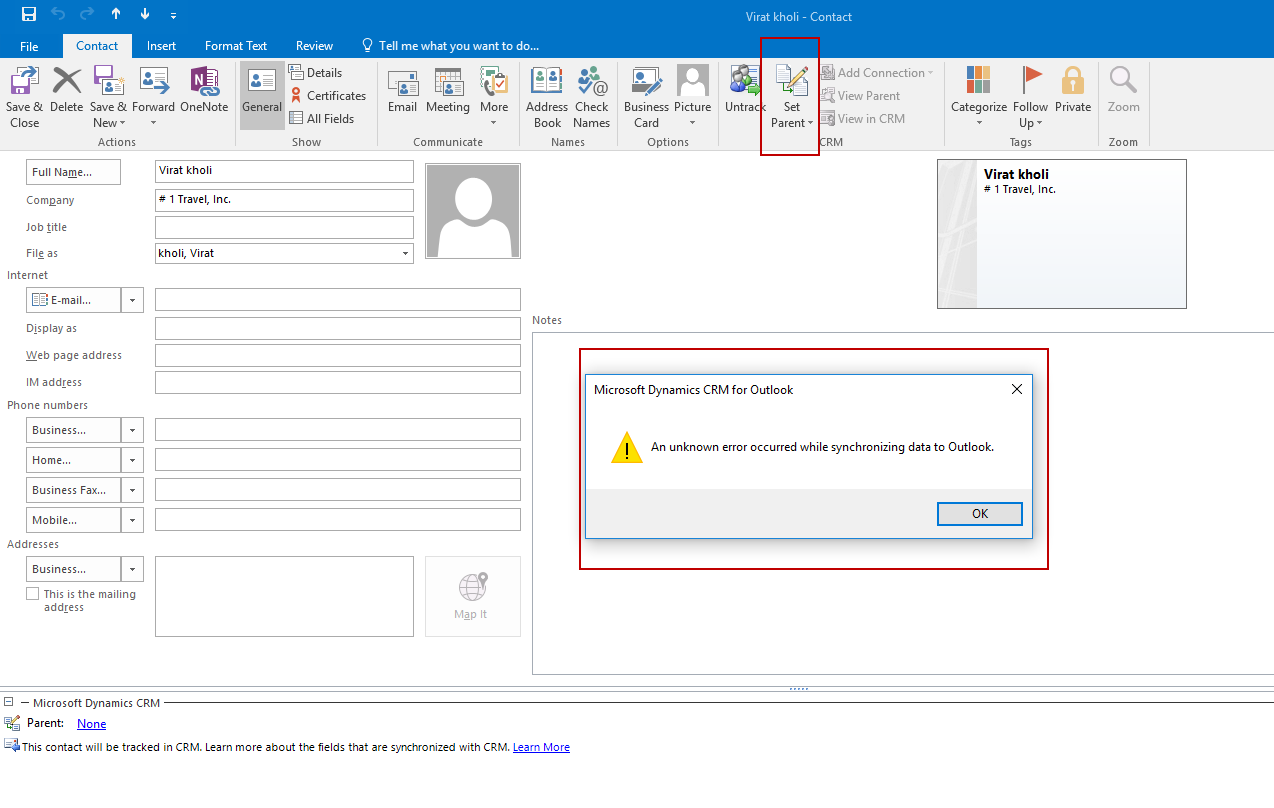
Contact_2D00_Sync_2D00_Error.png

Thanks,

Shahbaaz

*This post is locked for comments

I have the same question (0)
  • tpeschat Profile Picture
    4,930 on at

    Did you already activate tracing for the Outlook Client and tried to reproduce that error, to get more details? Without any details, it'll be hard to locate the error.

  • Shahbaaz Ansari Profile Picture
    6,211 on at

    Thank you thomas for your reply. I tried to reproduce the error and i was able to reproduce it, i think this is due to duplicate record that already exist in crm. In my case contact name with "Virat kholi" already exists in my crm contact list. But the problem is with the error message that is not giving exact what is the error.

    Thanks

    Shahbaaz

  • tpeschat Profile Picture
    4,930 on at

    Did you activate tracing. Any error showing up in the trace?

  • Shahbaaz Ansari Profile Picture
    6,211 on at

    I have activated tracing but no error log there.

  • SyedAkhter Profile Picture
    45 on at

    What version of CRM you are working with?

  • Shahbaaz Ansari Profile Picture
    6,211 on at

    I am using Dynamic 365 online (8.2 version).

  • MAJBlackburn Profile Picture
    80 on at

    If this error message was displayed, a trace log would be created. You say that you enabled tracing, but do you mean you enabled it on the server? Because Outlook has its own tracing for tracking down client errors. This link will provide more details (content copied here because MS likes to break links).
    https://support.microsoft.com/en-us/help/2862031/how-to-enable-tracing-for-the-microsoft-dynamics-crm-for-outlook-clien

    How to enable tracing for the Microsoft Dynamics CRM for Outlook client

    1. Go to Start, click All Programs, click Microsoft Dynamics CRM, point to Diagnostics, and select the Advanced Troubleshooting tab
    2. Click to mark the Tracing box and click Save


    The traces are located in the following directory for Windows 7 and Windows 8:

    %Userprofile% \AppData\Local\Microsoft\MSCRM\Traces


    The traces are located in the following directory for Windows XP:

    C:\Documents and Settings\<username>\Local Settings\Application Data\Microsoft\MSCRM\traces

Under review

Thank you for your reply! To ensure a great experience for everyone, your content is awaiting approval by our Community Managers. Please check back later.

Helpful resources

Quick Links

Responsible AI policies

As AI tools become more common, we’re introducing a Responsible AI Use…

Neeraj Kumar – Community Spotlight

We are honored to recognize Neeraj Kumar as our Community Spotlight honoree for…

Leaderboard > 🔒一 Microsoft Dynamics CRM (Archived)

#1
SA-08121319-0 Profile Picture

SA-08121319-0 4

#1
Calum MacFarlane Profile Picture

Calum MacFarlane 4

#3
Alex Fun Wei Jie Profile Picture

Alex Fun Wei Jie 2

Last 30 days Overall leaderboard

Featured topics

Product updates

Dynamics 365 release plans



