web
You’re offline. This is a read only version of the page.
close
Skip to main content

Announcements

No record found.

News and Announcements icon
Community site session details

Community site session details

Session Id :
Microsoft Dynamics AX (Archived)

How i can set a value of specific column in a lookup?

(0) ShareShare
ReportReport
Posted on by 578

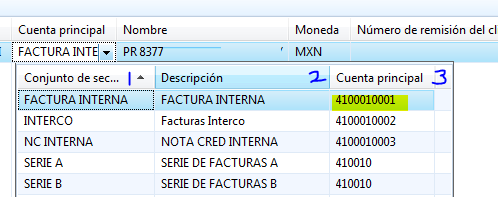
Fact.PNG

Good day, I want to get the value of column 3 (MainAccountId)

when selecting the line.

I get the lookup con this code...

    SysTableLookup sysTableLookup = SysTableLookup::newParameters(tableNum(NumberSequenceGroup), this);


    sysTableLookup.addLookupField(fieldNum(NumberSequenceGroup, NumberSequenceGroupId));
    sysTableLookup.addLookupField(fieldNum(NumberSequenceGroup, Description));
    sysTableLookup.addLookupField(fieldNum(NumberSequenceGroup, MainAccountId));


    queryBuildDataSource = query.addDataSource(tableNum(NumberSequenceGroup));


    sysTableLookup.parmQuery(query);
    sysTableLookup.performFormLookup();

Thanks in advance!!

*This post is locked for comments

I have the same question (0)
  • shariff Profile Picture
    20 on at

    Try adding range on the query

    qbds = query.addDatasource(Tablenum(tablename));

    qbr = qbds.addrange(fieldnum(tablename,MainAccountID);

    qbr.value(queryvalue(value));

  • Suggested answer
    Anton Venter Profile Picture
    20,678 Super User 2026 Season 1 on at

    Because the SysTableLookup class uses the first column as the selection return field, you have to set MainAccountId as the first field/column in the lookup. If you don't want to have the MainAccountId as the first column, create your own lookup form. See www.axaptapedia.com/Lookup_Form on how to do that or search the internet. The code example in the Axaptapedia article is old but will probably still work fine.

  • Karthickks Profile Picture
    100 on at

    Hi ismaelivan,

    As per my understanding you need to select mainAccountId in your form control. Please use below modified code.

    sysTableLookup.addLookupField(fieldNum(NumberSequenceGroup, MainAccountId));

    sysTableLookup.addLookupField(fieldNum(NumberSequenceGroup, NumberSequenceGroupId));

    sysTableLookup.addLookupField(fieldNum(NumberSequenceGroup, Description));

    This will work as per your requirement

  • Verified answer
    Martin Dráb Profile Picture
    239,208 Most Valuable Professional on at

    I think this should be sufficient:

    sysTableLookup.addLookupField(fieldNum(NumberSequenceGroup, NumberSequenceGroupId));
    sysTableLookup.addLookupField(fieldNum(NumberSequenceGroup, Description));
    sysTableLookup.addLookupField(fieldNum(NumberSequenceGroup, MainAccountId), true);


    Notice the additional parameter on the last line.

Under review

Thank you for your reply! To ensure a great experience for everyone, your content is awaiting approval by our Community Managers. Please check back later.

Helpful resources

Quick Links

Introducing the 2026 Season 1 community Super Users

Congratulations to our 2026 Super Stars!

Meet the Microsoft Dynamics 365 Contact Center Champions

We are thrilled to have these Champions in our Community!

Congratulations to the March Top 10 Community Leaders

These are the community rock stars!

Leaderboard > 🔒一 Microsoft Dynamics AX (Archived)

#1
CP04-islander Profile Picture

CP04-islander 16

#2
GiacomoRovai Profile Picture

GiacomoRovai 4

#3
Douglas Noel Profile Picture

Douglas Noel 2

Last 30 days Overall leaderboard

Featured topics

Product updates

Dynamics 365 release plans
