web
You’re offline. This is a read only version of the page.
close
Skip to main content

Announcements

Community site session details

Community site session details

Session Id :
Microsoft Dynamics AX (Archived)

How to refresh/Synch View based on a Query with dynamic range?

(0) ShareShare
ReportReport
Posted on by 110

Hi all,
I have a simple View with a Query , my custom Query has a Dynamically Range.

In class SysQueryRangeUtil I have insered a my custom public static method and copy it in my Custom Query. This range, work well. But I have a problem, when the range condition change, if I want to see the new view(with new selected record) I have to Synch, in AOT my View.

But this operation can't do a simple SystemUser.

There is a way to use a dynamic range in a View and not constantly synchronize ?

My dynamic range relates to curUserId() when change the user who open the Form/View the view has to change the record displayed. If I want to see de difference I have to synch every time, but for me it's not an usable solution.

My Query with dynamic range:
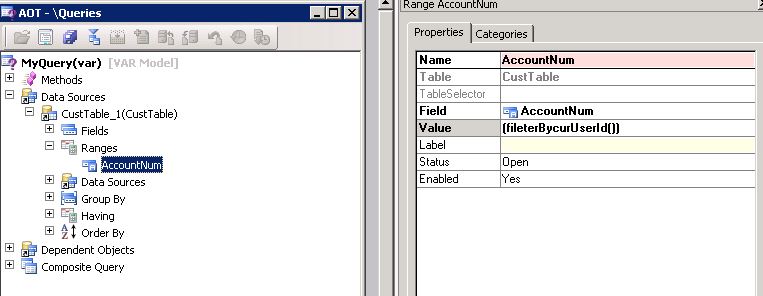
6403.Filter.jpg

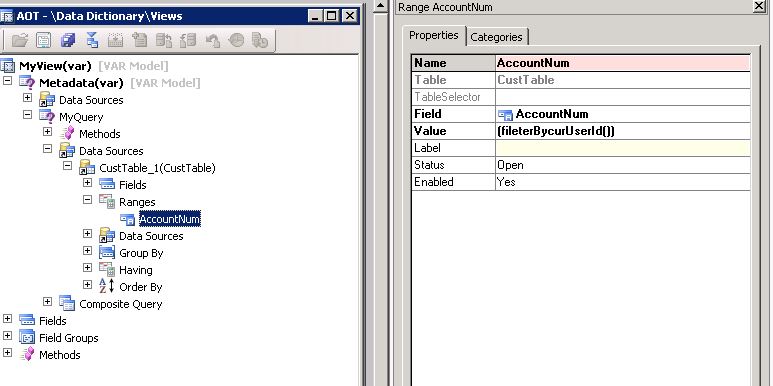
My View based on query:
View.jpg

Thanks all!

*This post is locked for comments

I have the same question (0)
  • Mea_ Profile Picture
    60,286 on at

    Hi DanielePax,

    No there is no way (at least I am not aware of). On sync AX will create a view and put range into view definition. You can look at computed columns msdn.microsoft.com/.../gg845841.aspx or use query instead of view if its possible.

  • Verified answer
    Martin Dráb Profile Picture
    238,651 Most Valuable Professional on at

    That's a wrong design - your method is interpreted only on synchronization and the value is stored in the view definition in database. Let's say I synchronize the view, so the view definition contains my user ID. If you look at the view, you'll see values filtered by my user ID (not by your ID). If you synchronize the view, you'll start getting good results, but it will stop working for me. It clearly can't show right values for more than one user at the same time.

    Remove the range from the view definition and apply it when fetching data from the view (e.g. in a form).

  • daniele scr Profile Picture
    110 on at

    Thanks Martin, I have taken this way. work well.

Under review

Thank you for your reply! To ensure a great experience for everyone, your content is awaiting approval by our Community Managers. Please check back later.

Helpful resources

Quick Links

Introducing the 2026 Season 1 community Super Users

Congratulations to our 2026 Super Stars!

Congratulations to our 2025 Community Spotlights

Thanks to all of our 2025 Community Spotlight stars!

Leaderboard > 🔒一 Microsoft Dynamics AX (Archived)

Last 30 days Overall leaderboard

Featured topics

Product updates

Dynamics 365 release plans