web
You’re offline. This is a read only version of the page.
close
Skip to main content

Notifications

Announcements

No record found.

Community site session details

Community site session details

Session Id :
Microsoft Dynamics CRM (Archived)

Parameter on Option Set shows long pick list in SSRS

(0) ShareShare
ReportReport
Posted on by 552

Hi together,

I was building a Report and everything's fine with this.
I integrated a parameter on option set "lead source".
When I start the report I get a long large list with multiple values like shown in the screenshot.
As don't want to set pre-defined values and still want to take the values from database, I want to find a solution for this.
Does anybody have an idea how to solve this?
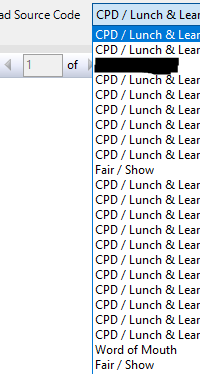
OptionList.PNG

Best regards
Mick

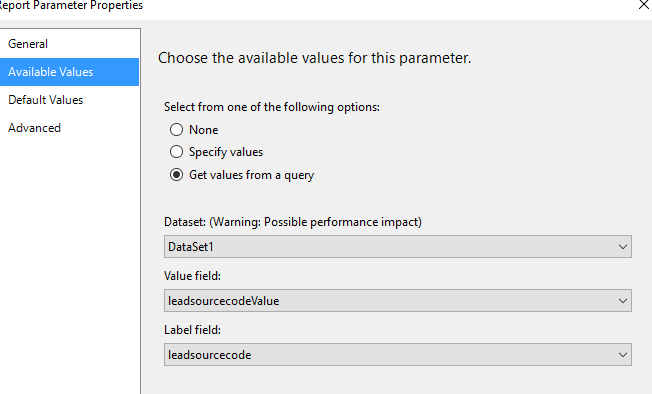
This is my parameter

1715.parameter.PNG

DataSet1 is the pre-filtering dataset:
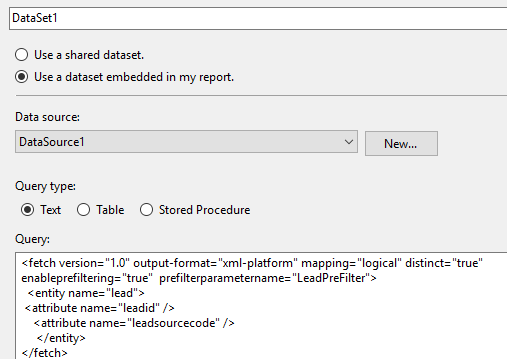
8662.DataSet.PNG

*This post is locked for comments

I have the same question (0)
  • Suggested answer
    Alex Fun Wei Jie Profile Picture
    33,628 on at

    Hi,

     I am using account as an example.

    I have many account records with classification = "Default value"

    4810.23.PNG

    I am using below code

    4810.23.PNG

    and the result would be only one data

    6076.25.PNG

    Code for you to copy

    <fetch version="1.0" output-format="xml-platform" mapping="logical" distinct="true">
    
     <entity name="account"><!-- Replace this with your entity name -->
    
       <attribute name="accountclassificationcode" /> <!-- Replace this with your optionset name -->
    
     </entity>
    
    </fetch>


  • Mick_4711 Profile Picture
    552 on at

    H8780.DataSet.PNG"prettyprint linenums"><fetch version="1.0" output-format="xml-platform" mapping="logical" distinct="true"> <entity name="lead"> <attribute name="leadid" /> <attribute name="leadsourcecode" /> </entity> </fetch>


  • Verified answer
    Alex Fun Wei Jie Profile Picture
    33,628 on at

    Hi,

    you have to remove the leadid

  • Suggested answer
    Alex Fun Wei Jie Profile Picture
    33,628 on at

    Hi,

    please also take note .

    if your optionset has value a,b and c.

    and your records only using a and b. c will not show up

  • Mick_4711 Profile Picture
    552 on at

    Many many thx.

    The removal of leadid did it!

  • Community Member Profile Picture
    on at

    Hi, 

    i am getting both label and values of Option set (Lead Source). I need only label to be displayed. How to do this..?

    Dataset:

    pastedimage1577682054256v2.png

    pastedimage1577682010144v1.png

    Output:

    pastedimage1577682149499v3.png

  • Under review

    Thank you for your reply! To ensure a great experience for everyone, your content is awaiting approval by our Community Managers. Please check back later.

    Helpful resources

    Quick Links

    Responsible AI policies

    As AI tools become more common, we’re introducing a Responsible AI Use…

    Neeraj Kumar – Community Spotlight

    We are honored to recognize Neeraj Kumar as our Community Spotlight honoree for…

    Leaderboard > 🔒一 Microsoft Dynamics CRM (Archived)

    #1
    SA-08121319-0 Profile Picture

    SA-08121319-0 4

    #1
    Calum MacFarlane Profile Picture

    Calum MacFarlane 4

    #3
    Alex Fun Wei Jie Profile Picture

    Alex Fun Wei Jie 2

    Last 30 days Overall leaderboard

    Featured topics

    Product updates

    Dynamics 365 release plans