web
You’re offline. This is a read only version of the page.
close
Skip to main content

Notifications

Announcements

No record found.

Community site session details

Community site session details

Session Id :
Microsoft Dynamics AX (Archived)

Security: Set new entry point permission - create new privilege

(0) ShareShare
ReportReport
Posted on by 1,261

hello there,

I am new to the security, i have been using the Security development tool, which is usefull when it works.

I have created various new privileges et modified some entry points, but some i can't.

I have a specific case scenario where i don't know what to do next.

For an example: I have a CustomerSalesManager which is a customer role, created from standard AX roles. I added som purchasing roles in there too, but i want to only give access to View Purchase orders, not full control.

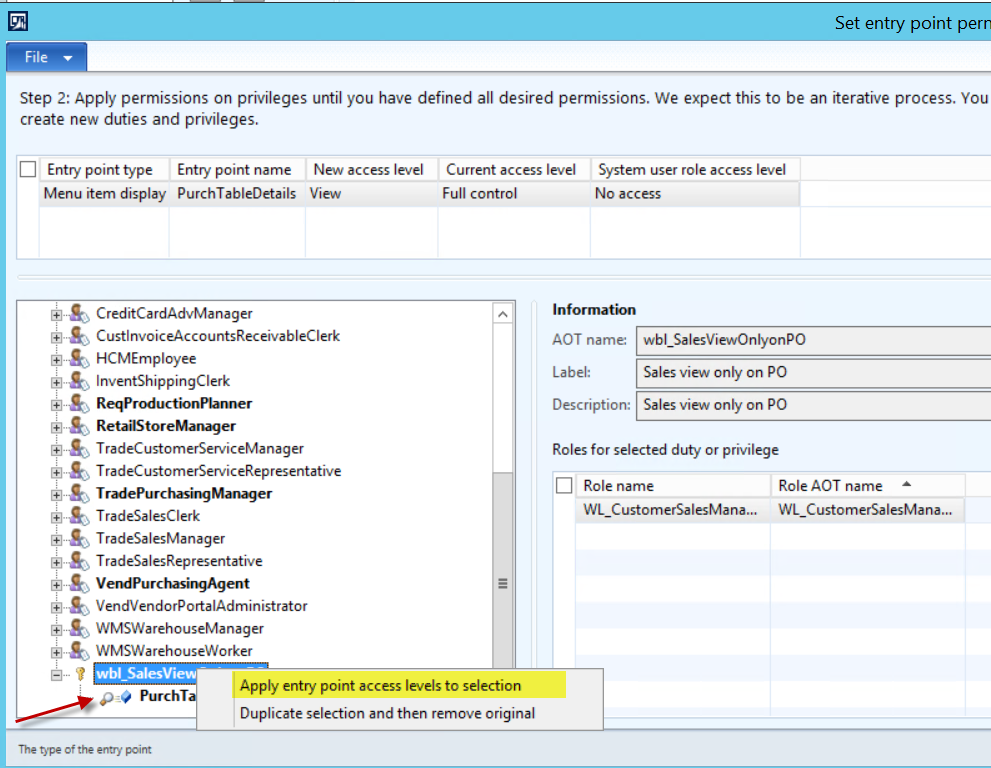
My problem is when i a modify the entry point which is PurchTableDetails and try to update the permissions, from Full access to View, it says not all entry points of my role have be updated with this new privilege. It looks like there is a conflict somewhere, but it won't give me any details.
41131.1.png

After applying the point access to the selection, i click 'Close' and the work is done.

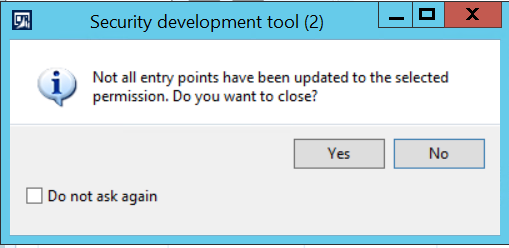
When there is a conflict, i get the following message and i don't know where to go form there.
6036.2.png

*This post is locked for comments

I have the same question (0)
  • Verified answer
    Sohaib Cheema Profile Picture
    49,438 User Group Leader on at

    The warning/message is telling you “still there are menu items which must be fixed before closing the form”

    When you apply changes on an existing role using SDT, there are two steps

    1. Choose “duplicate selection and remove original”

    2. Click on “Apply changes”

      Coming back to waning message which is being shown by SDT to you, to fix that, you need to go through each BOLD role/privilege. The Bold Black color represents that “still I need to be fixed”. How to fix?? Same two steps mentioned above. Keep on doing step #1 and #2, unless there is no remaining Bold Node


  • Veronika Filonenko Profile Picture
    1,261 on at

    Hi,

    thanks Sohaib, it is interessting information about the bold roles. I have questionned that!

    I though it would work,

    1) i created the new privilege at the bottom

    2) i duplicated all the bold roles (see 2 at the end)

    3) Try to close and hit the same error

    3362.3.png

  • Sohaib Cheema Profile Picture
    49,438 User Group Leader on at

    expand each bold again and try to find where culprit is still existing that is needed to work on.

    there is some bold object at any level of tree, which is resulting in this warning.

    try to find the culprit, if you don't find, get back to us, so we can share some other techniques as well

  • Veronika Filonenko Profile Picture
    1,261 on at

    Ok i see. I will expand. I think i heard that we can't do the changes on the parent level...my mistake. I will try that now.

    It seems that it is a very different process to Give additionnal privileges, than to substract them (with which i am struggyling).

    Question: when i am udoing a permission/modifying an entry point to LESS access.... when i have to select the bold lines and Duplicate the selection/role and update with the new change.... what makes me unconfortable is that because i am working backwords trying to undo a privilege that touches multiple roles.. does this means that this permission is undone for all those roles that are bold that i am updating?

    Something that i want to only for a specific custom role is applied to all standard roles?

    Please let me know if i understand correctly?

  • Verified answer
    Sohaib Cheema Profile Picture
    49,438 User Group Leader on at
    • You cannot enter SDT, without selection of a role. I mean SDT asks you to select a role, as you select a role, it loads corresponding permissions as of that time.

    • Since, you have already selected one role, at #1, that means current permission being shown are related to that role.

    • When you are doing to modify a permission for case of reducing permission e.g. from update to read only, that moment there is an option called “Duplicate and remove original”. This is same option which I talked about in my 1st reply as option #1.

    • If you select option to ‘duplicate and remove original’, it will be good and proper way. If you directly ‘apply changes’ you can be in trouble, as it can modify Original Privileges


      For a moment forget about SDT. As you know the menu item which is responsible to show all purchase orders let say its PurchTableDetails (As we can see in your screenshot).

      No go into AOT >> Menu Items >> Display Menu Items >> PurchTableDetails

      Select this menu>> right click >> Add-ins >> Security Tool >> View security Roles.

      Now here you can list of all roles along with privileges, which are responsible to control permissions.


      Note down names of Privileges and duties from here, for your Specific Security Role.

      Now work on those Privileges or duties either using SDT or manually going into AOT.


  • Veronika Filonenko Profile Picture
    1,261 on at

    I understand all that. I am using SDT with a custom role in which i have  10 standrad roles.

    - When Ungiving permission, i need to modify all existing roles that have that privileges in my customer role. Lets say i have 4 roles that have that privilege... I have to update them all 1 by 1.

    My Custom role

    a) Standard Role 1  - privilege 1 : update privilege 1 by the tool

    b) Standard Role 2 - privilege 1 : update privilege 1 by the tool

    c) Standard Role 3 - privilege 1 : update privilege 1 by the tool


      If i need to use Std Role 1 for a different user, that needs to have Privilege 1. It won't be possible anymore as it is modified at the standard level? or just in my custom role in a silo?


    I am basically trying to really understand this function : “Duplicate and remove original” The remove original is what makes me unconfortable.

    - When Adding permission, i don't need to do that at the individual role level. I am just creating the new privilege and attaching it to the list with all other standard roles.

    8512.3.png

    Also,

    When ungiving permission, it doubles the roles in AOT starting with CopyOf... than if i have to do this 10 times, it have 40 new roles created in AOT..?? that poluates a lot the roles list.

  • Sohaib Cheema Profile Picture
    49,438 User Group Leader on at
    • If you will do changes on standard existing role, it will be applicable to all those users, who are using this role. This is reason why Modification of existing standard role is not recommended. Instead of that you should be creating a new role add content of standard role into new role.

    • The purpose of ‘duplicate and remove original’ is to remove current permission and add new permission level, by duplication. If you will apply ‘duplicate and remove original’ on a standard role, there is no benefit of doing that, because you are applying changes on original role.

    • Apply ‘duplicate and remove original’ on privilege inside a customized role, so it will duplicate privileges only.

  • Verified answer
    André Arnaud de Calavon Profile Picture
    301,035 Super User 2025 Season 2 on at

    Hi Veronica,

    I noticed this question and also your comment on my blog around the SDT. I would like to comment on several points. First of all Sohaib tried to help you in an outstanding way. You seem to be open for honest comments.

    If you have created new roles, and you use standard duties/privileges that is a good start. If you then needs to revoke some access rights, probably first try to find standard duties. E.g. there is a duty for maintaining purchase orders, but also a duty for viewing them. Try to use these instead of changing the privileges.

    If you have a privilege which is used in 7 roles all 7 roles are directly affected when you change this privilege. The same is valid for duties. The tool is very good in creating new duties and privileges, but when it comes to revoke some rights, you need to be aware of the security framework. In fact you should remove a privilege and add a new one. The tool can copy the standard privilege and indeed replace the existing on the role or duty. When you have a new privilege, it won't affect other roles.

    AS Sohaib also provided valuable feedback, I don't know which part of the question has not been answered yet. If you have further details which needs explanation, don't hesitate to update this thread.

  • Veronika Filonenko Profile Picture
    1,261 on at

    Sohaib and André,

    I am more that thankfull for your time invested in helping me! I am glad that this forum exist for this community. I learned some much from your answers.

    Sohaib, your answers were very technical and hands on, in case i do need to revote some rights!

    André, I was missing a best practice direction. And i think you gave it to me and you confirmed my concern.

    My direction now will be to give less roles to my users and add new privileges for missing accesses.

    I think this would be the less complexe and secure way to accomplish the security for me.

    Thank you so much to both of you again!

Under review

Thank you for your reply! To ensure a great experience for everyone, your content is awaiting approval by our Community Managers. Please check back later.

Helpful resources

Quick Links

Responsible AI policies

As AI tools become more common, we’re introducing a Responsible AI Use…

Neeraj Kumar – Community Spotlight

We are honored to recognize Neeraj Kumar as our Community Spotlight honoree for…

Leaderboard > 🔒一 Microsoft Dynamics AX (Archived)

#1
Martin Dráb Profile Picture

Martin Dráb 4 Most Valuable Professional

#1
Priya_K Profile Picture

Priya_K 4

#3
MyDynamicsNAV Profile Picture

MyDynamicsNAV 2

Last 30 days Overall leaderboard

Featured topics

Product updates

Dynamics 365 release plans
