web
You’re offline. This is a read only version of the page.
close
Skip to main content

Announcements

No record found.

News and Announcements icon
Community site session details

Community site session details

Session Id :
Finance | Project Operations, Human Resources, ...
Suggested Answer

How to execute in right way Case management workflow?

(0) ShareShare
ReportReport
Posted on by 110

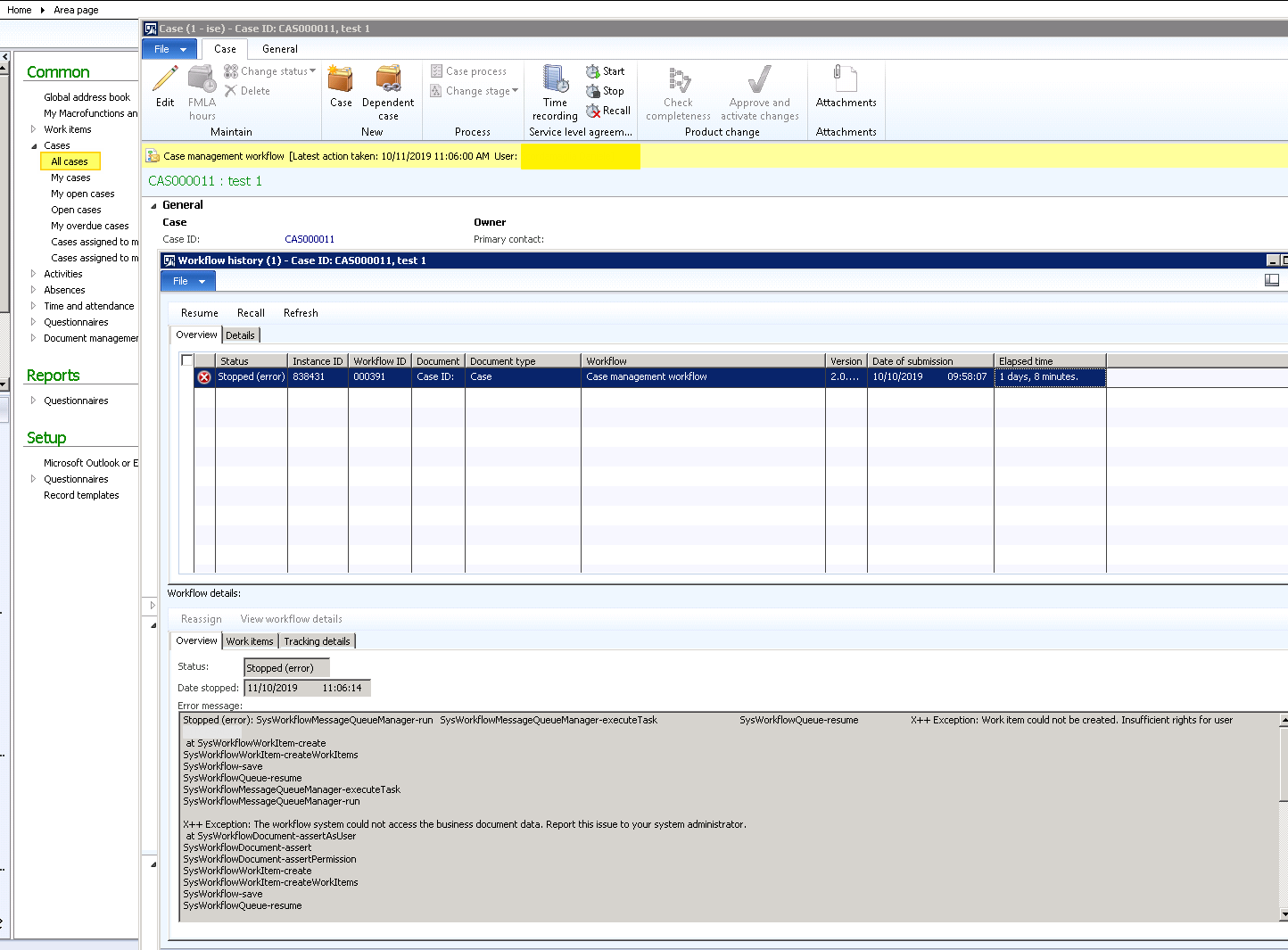
Executing the Case management workflow, I got an error:

> X++ Exception: Work item could not be created. Insufficient rights for
> user Admin.
> 
> Stopped (error):
> SysWorkflowMessageQueueManager-run    SysWorkflowMessageQueueManager-executeTask      SysWorkflowQueue-resume     X++
> Exception: Work item could not be created. Insufficient rights for
> user Admin.  at SysWorkflowWorkItem-create
> SysWorkflowWorkItem-createWorkItems SysWorkflow-save
> SysWorkflowQueue-resume SysWorkflowMessageQueueManager-executeTask
> SysWorkflowMessageQueueManager-run
> 
> X++ Exception: The workflow system could not access the business
> document data. Report this issue to your system administrator.  at
> SysWorkflowDocument-assertAsUser SysWorkflowDocument-assert
> SysWorkflowDocument-assertPermission SysWorkflowWorkItem-create
> SysWorkflowWorkItem-createWorkItems SysWorkflow-save
> SysWorkflowQueue-resume

Cases_5F00_Case-management-workflow_5F00_Error.png

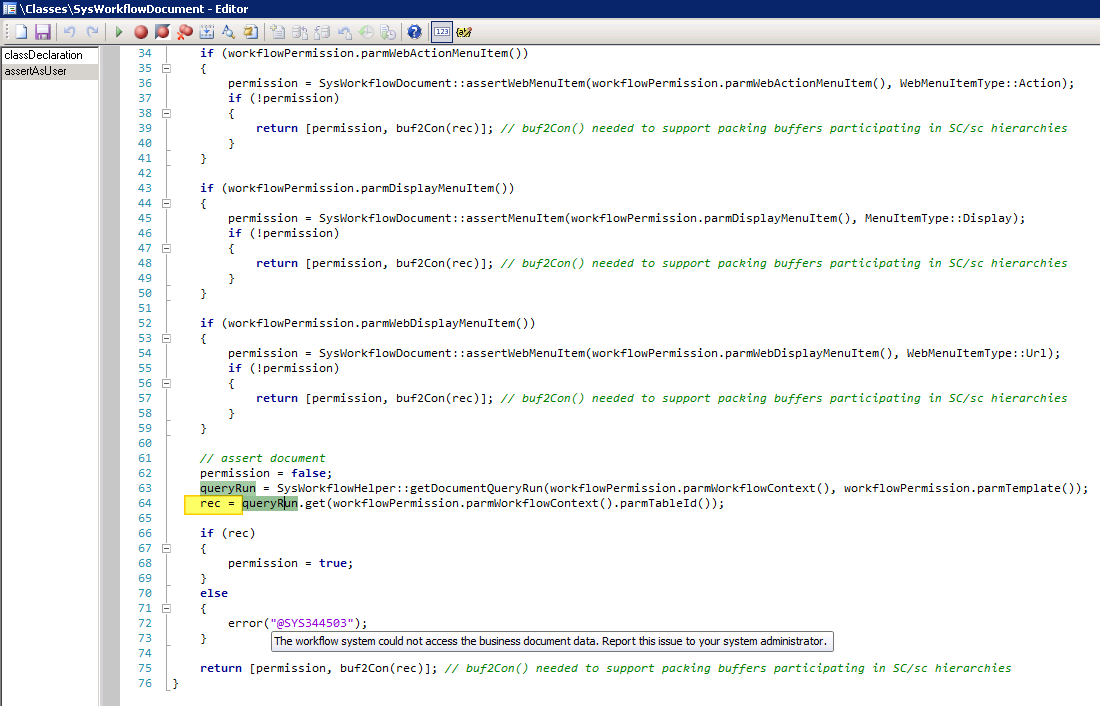
The error is related in SysWorkflowDocument\assertAsUser method
Cases_5F00_Case-management-workflow_5F00_Error_5F00_I.png

The Common rec variable at line 64 is void. The variable is populated by query:

select * from CaseDetailBase
    join CaseDetail 
    outer join CaseAssociation
    join CaseCategoryHierarchyDetail
    where CaseDetailBase.RecId == CaseDetail.RecId 
    && CaseDetailBase.RecId == CaseAssociation.CaseRecId 
    && CaseDetailBase.CategoryRecId == CaseCategoryHierarchyDetail.RecId
    && CaseDetail.RecId == 'My_Current_Case_RecId';

Missing the record in CaseDetail (child table of CaseDetailbase).

I don't have any customization about this area.

Do you have any idea how can I run the Case management workflow? Of if are there any fix?

Thanks.

I have the same question (0)
  • André Arnaud de Calavon Profile Picture
    304,484 Super User 2026 Season 1 on at

    Hi Daniele,

    You mentioned user 'admin' in your post, but on the screenshot the user itself has been wiped. Do you have issues with the admin user or another user having normal user roles?

    The workflow processing checks if the user has proper permissions on case management. As the admin has the system administrator role, it will bypass all security and should not raise this error.

  • daniele scr Profile Picture
    110 on at

    Thanks @André Arnaud de Calavon.

    I have this issue using user with SysAdm role, and the submitting user is SysAdm too.

  • Suggested answer
    guk1964 Profile Picture
    10,888 on at

    Check the User is related to  the worker id.

    Try it with System admin rights- if it does nor then work then check the relevant license keys are enabled

    If Sys admin user works then check the user security rights to the form.

  • André Arnaud de Calavon Profile Picture
    304,484 Super User 2026 Season 1 on at

    Hi Daniele,

    Have you checked if the case record is actually still available? Or did someone delete it in one way or the other?

  • daniele scr Profile Picture
    110 on at

    Thanks @magic1949 for your reply. The User has Worker and has SysAdm too.

  • Prashant Singh Profile Picture
    8,802 on at

    Dear Daniele,

    Did you get the root cause of this error ?

    Same error i am facing on PR workflow.

    Thanking you.

    Best Regards,

    Aditya Negi

Under review

Thank you for your reply! To ensure a great experience for everyone, your content is awaiting approval by our Community Managers. Please check back later.

Helpful resources

Quick Links

Introducing the 2026 Season 1 community Super Users

Congratulations to our 2026 Super Stars!

Meet the Microsoft Dynamics 365 Contact Center Champions

We are thrilled to have these Champions in our Community!

Congratulations to the March Top 10 Community Leaders

These are the community rock stars!

Leaderboard > Finance | Project Operations, Human Resources, AX, GP, SL

#1
André Arnaud de Calavon Profile Picture

André Arnaud de Cal... 632 Super User 2026 Season 1

#2
Giorgio Bonacorsi Profile Picture

Giorgio Bonacorsi 624

#3
CP04-islander Profile Picture

CP04-islander 301

Last 30 days Overall leaderboard

Product updates

Dynamics 365 release plans
