web
You’re offline. This is a read only version of the page.
close
Skip to main content

Announcements

No record found.

News and Announcements icon
Community site session details

Community site session details

Session Id :
Customer experience | Sales, Customer Insights,...
Suggested Answer

Dynamics 365 - Relationships: Account to Opportunity Mappings

(0) ShareShare
ReportReport
Posted on by 15

Hi,

I've created a custom field in both opportunities and accounts, and a mapping from opportunity to account in both of the following relationships. However, the field doesn't trasmit to the opportunity when I create an opportunity for a certain account.

pastedimage1599065633217v1.png

Any ideas on how to solve this?

Many Thanks,

Macomo

I have the same question (0)
  • a33ik Profile Picture
    84,331 Most Valuable Professional on at

    Hello Macomo,

    Mapping populates fields when child record (opportunity) is created from the context of the parent one (account) - from subgrid for example. Is it the way you use?

  • MANOMO Profile Picture
    15 on at

    Hi Andrew,

    What I'm doing is creating an opportunity and then selecting an existing account from the opportunity form.

    Thanks,

    Macomo

  • Suggested answer
    a33ik Profile Picture
    84,331 Most Valuable Professional on at

    Macomo,

    In this case mapping would not work. If you want fields to be populated on choosing of account you will have to write JavaScript that will query the data and populate required fields.

  • Suggested answer
    LuHao Profile Picture
    40,892 on at

    Hi Macomo,

    Generally there are two ways, workflow and Javascript.

    • The advantage of workflow is that it is simple to set up and has no code. The disadvantage is that it only works when the record is saved.
    • The advantage of Javascript is that it is triggered immediately when the field is changed, which is earlier than the time when the record is saved. The disadvantage is that it requires coding.

    Here I introduce how to use the workflow in this case.

    Go to Advanced Settings > Processes, new. Select Workflow and Opportunity. Uncheck "Run this workflow in the background".
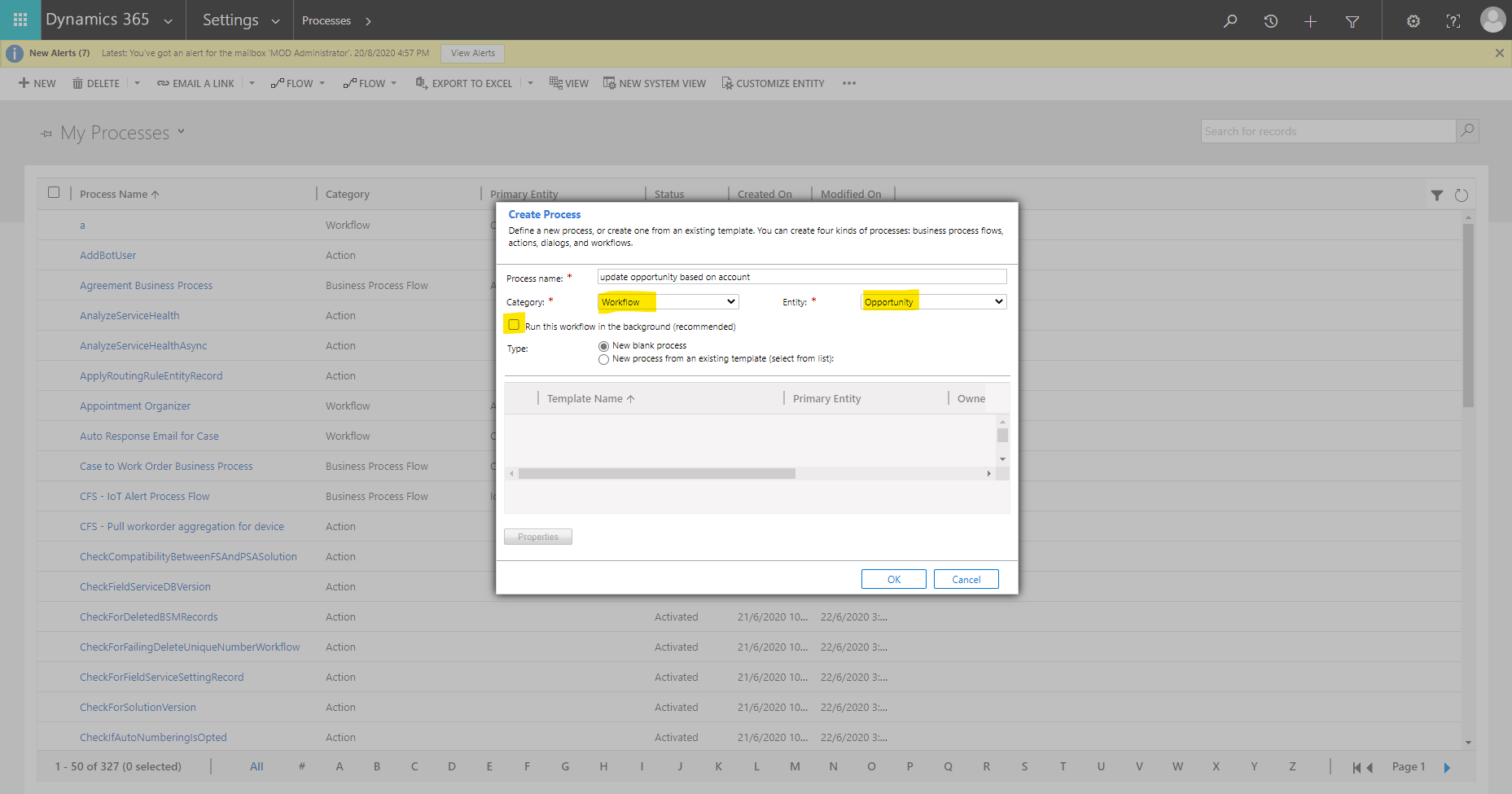
    pastedimage1599101734375v1.png

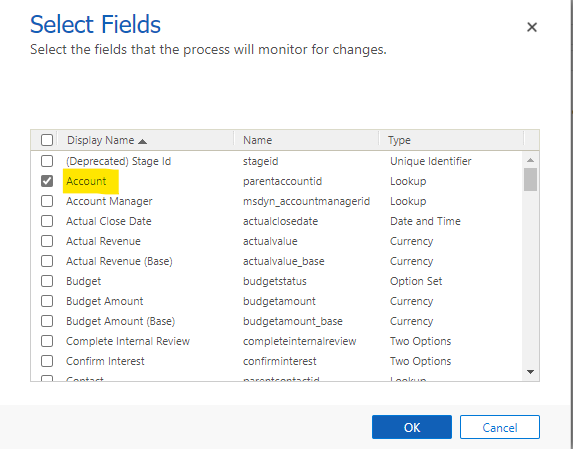
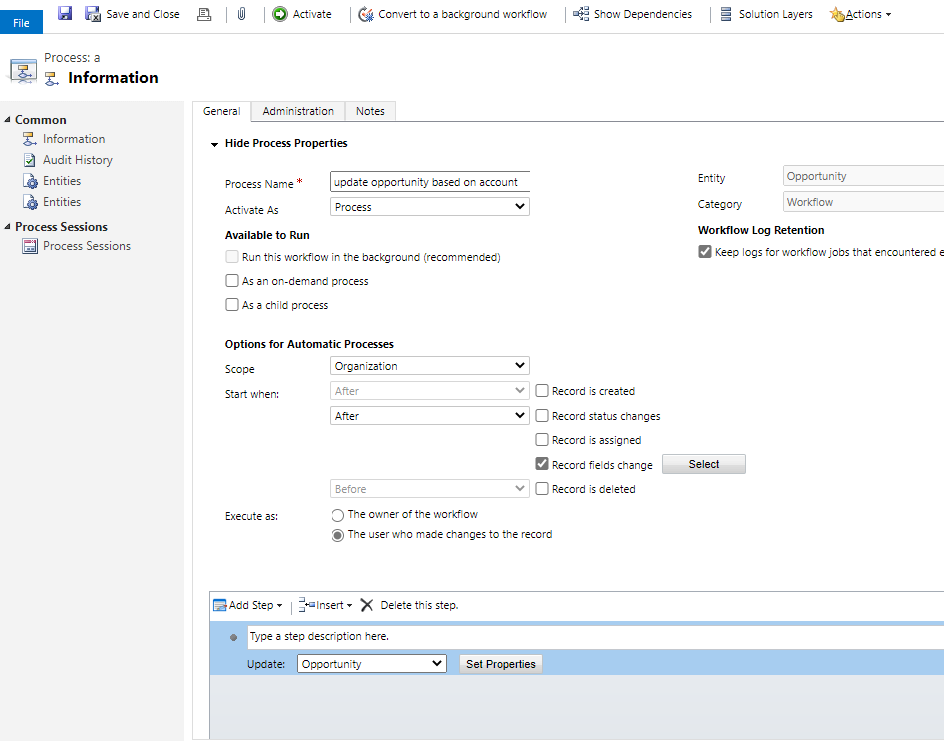
    In the workflow editor, select Scope to Organization, check Record fields change and Record is created. Then select the Account lookup field.

    pastedimage1599101923207v2.png    pastedimage1599101944231v3.png

    Add step Update Record.

    pastedimage1599102002922v5.png    pastedimage1599102427161v7.png

    Click Set Properties, then use the Form Assistant on the right to inset the dynamic values of Account.
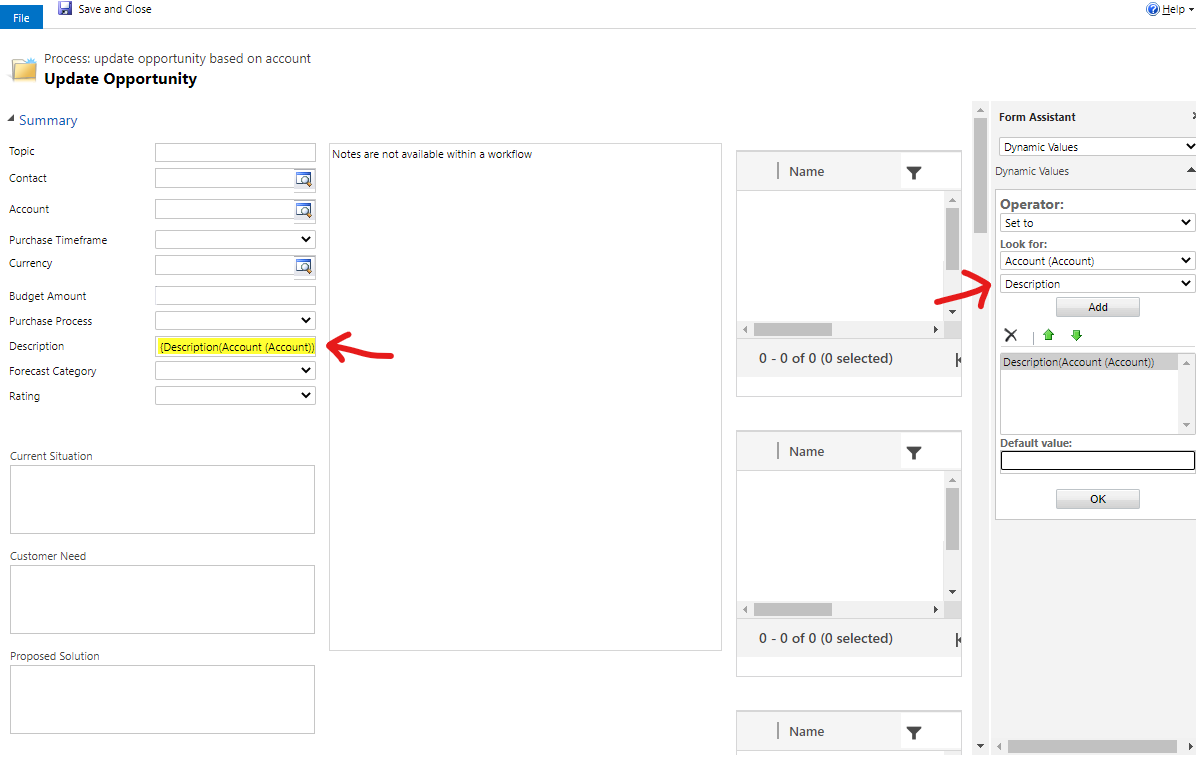
    pastedimage1599102506976v8.png

    Finally activate the workflow.

    In this way, when you create an opportunity, or change the Account lookup field and save the opportunity, the fields value of Account will be mapped to the opportunity.

  • LuHao Profile Picture
    40,892 on at

    Hi partner,

    Has your problem been solved?

    Please don't forget to click Yes under "Did this answer your question?" to close this thread.

    Thanks.

Under review

Thank you for your reply! To ensure a great experience for everyone, your content is awaiting approval by our Community Managers. Please check back later.

Helpful resources

Quick Links

Introducing the 2026 Season 1 community Super Users

Congratulations to our 2026 Super Stars!

Meet the Microsoft Dynamics 365 Contact Center Champions

We are thrilled to have these Champions in our Community!

Congratulations to the April Top 10 Community Leaders

These are the community rock stars!

Leaderboard > Customer experience | Sales, Customer Insights, CRM

#1
ManoVerse Profile Picture

ManoVerse 103 Super User 2026 Season 1

#2
11manish Profile Picture

11manish 83

#3
Muhammad Shahzad Shafique Profile Picture

Muhammad Shahzad Sh... 69 Most Valuable Professional

Last 30 days Overall leaderboard

Product updates

Dynamics 365 release plans