web
You’re offline. This is a read only version of the page.
close
Skip to main content

Notifications

Announcements

No record found.

Community site session details

Community site session details

Session Id :
Microsoft Dynamics NAV (Archived)
Suggested Answer

Error 401 Unauthorized in POSTMAN - Testing NAV 2018 API

(0) ShareShare
ReportReport
Posted on by 10

Dear experts,

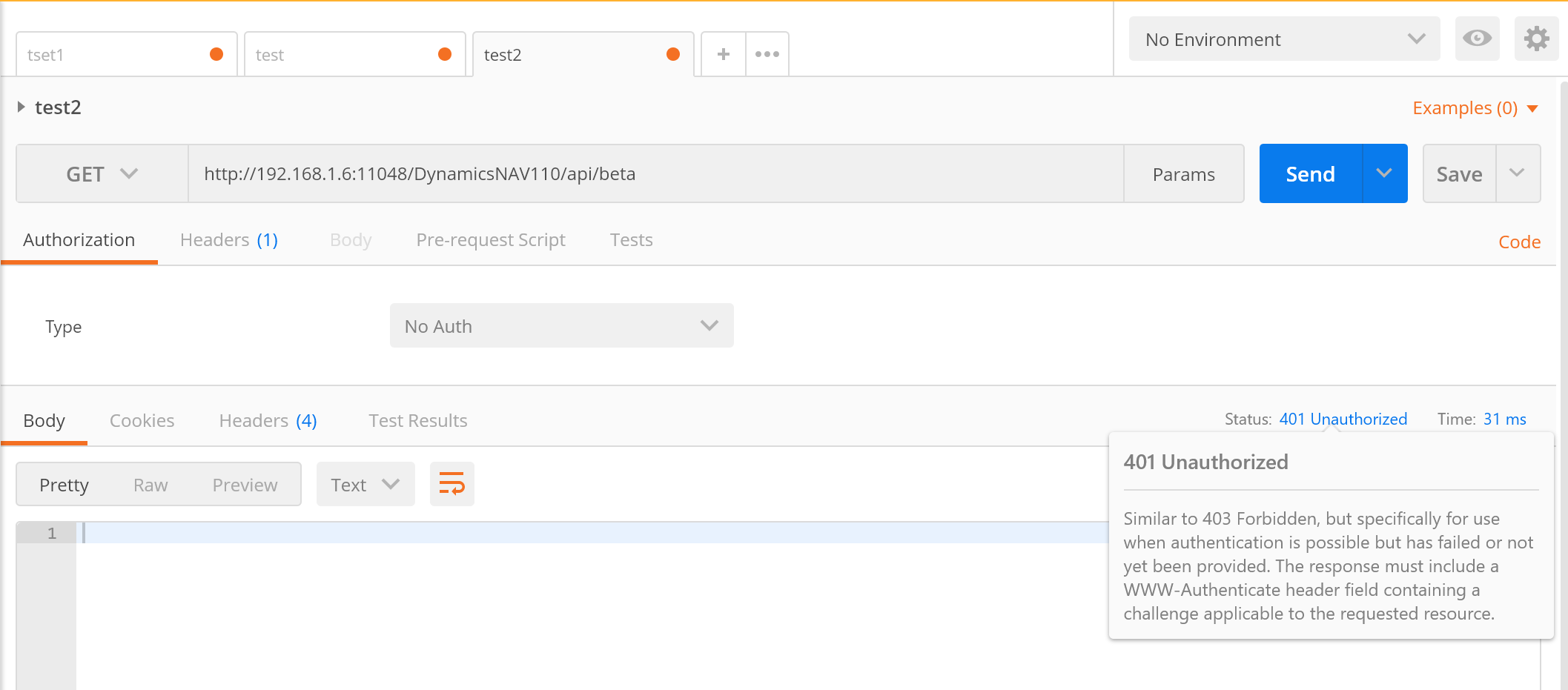
I'm testing the API NAV 2018 cu 2 to integrate with demo e-commerce website. my problem is i cannot connect to the api from using ip or computer name. with chrome everything is fine, however when i tried using POSTMAN it shows error 401. 
6170.22222.png

>>>> this image shows available api when i access via chrome

6170.22222.png

>>>> this is the error when i tried using POSTMAN. i tried to change the authentication type to basic, but not working.

I also have followed the steps in another blogpost by saurav. but the image shown in that post all shows using localhost instead of ip or computer name.

anyone can help???

*This post is locked for comments

I have the same question (0)
  • Suggested answer
    Stefano Demiliani Profile Picture
    37,166 Most Valuable Professional on at

    Is the request Header the same in all two cases (Chrome and Postman)?

  • Suggested answer
    Suresh Kulla Profile Picture
    50,243 Super User 2025 Season 2 on at

    Check the Headers and specify the Authorization properly. check this link

    www.getpostman.com/.../authorization

  • stevenleo Profile Picture
    10 on at

    @stefano, yes it is identical.

    @suresh, already tried using basicauth, with my administrator user & password. but it is not working.

    42320.4444.png

    42320.4444.png

  • Suggested answer
    Suresh Kulla Profile Picture
    50,243 Super User 2025 Season 2 on at

    For the password use the Web Service Access Key. 

    docs.microsoft.com/.../devenv-develop-connect-apps-for-fin

  • stevenleo Profile Picture
    10 on at

    still not working

    55555.png

    55555.png

    i wonder if i doing something wrong? 

    i tried to deploy another VM in azure, but i'm still facing the same problem.

  • Suggested answer
    Andrey Baludin Profile Picture
    3,941 on at

    I've run it with Postman only after changing authorization to NTLM on NAV Instance and at Postman. So try this way.

    My experience is here:

    community.dynamics.com/.../how-to-obtain-data-from-nav-standard-apis

  • Suggested answer
    Saurav.Dhyani Profile Picture
    14,380 Super User 2025 Season 2 on at

    Hope this helps!

    saurav-nav.blogspot.in/.../microsoft-dynamics-nav-2018-api-part-3.html

  • Suggested answer
    Community Member Profile Picture
    on at

    Had the same issue, Error 401 when using Postman, but everything worked fine from Chrome. 

    I used NTLM authentication to resolve it. 

    Set Service Tier to "Use NTLM Authentication" (General Section)

    Use Postman (windows application not Chrome extension) and in the Authorization tab select "NTLM Authentication". Enter correct credentials of user in the DB. 

    Hope this helps

    Dave

  • Community Member Profile Picture
    on at

    Hi,

    Do you have NST authentication as "Windows"? Try to set it as "NavUserPassword"

  • sanpatHemlock Profile Picture
    5 on at

    NTLM authentication works perfect! Thnx.

Under review

Thank you for your reply! To ensure a great experience for everyone, your content is awaiting approval by our Community Managers. Please check back later.

Helpful resources

Quick Links

Responsible AI policies

As AI tools become more common, we’re introducing a Responsible AI Use…

Neeraj Kumar – Community Spotlight

We are honored to recognize Neeraj Kumar as our Community Spotlight honoree for…

Leaderboard > 🔒一 Microsoft Dynamics NAV (Archived)

Last 30 days Overall leaderboard

Featured topics

Product updates

Dynamics 365 release plans
