web
You’re offline. This is a read only version of the page.
close
Skip to main content

Announcements

No record found.

News and Announcements icon
Community site session details

Community site session details

Session Id :
Microsoft Dynamics AX (Archived)

Master planning - Unexpected results with "Min./max." coverage type

(0) ShareShare
ReportReport
Posted on by

Hi all,

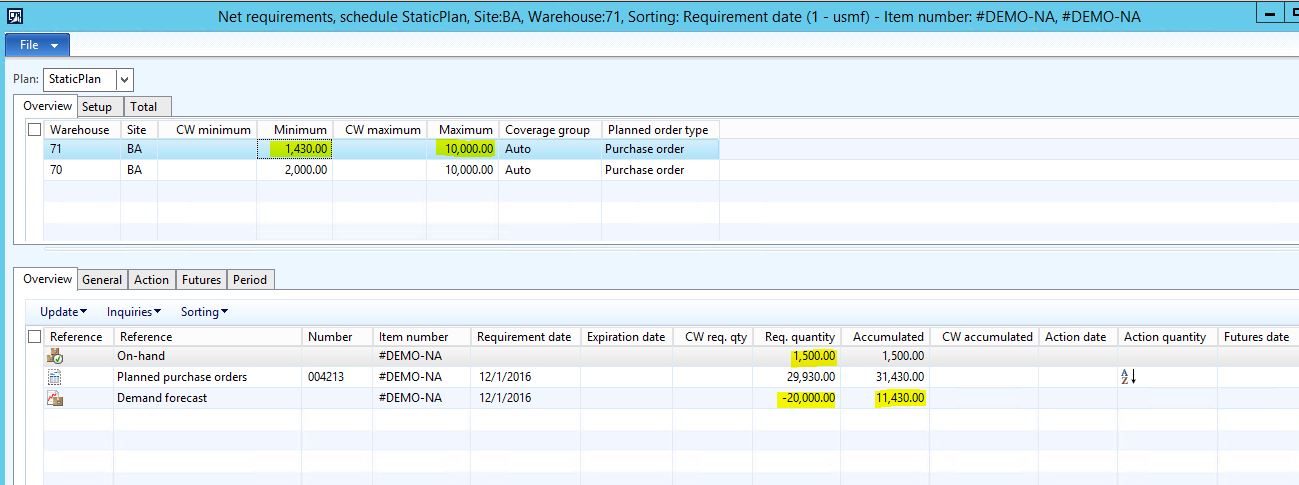
Do you think that the following results I got from a master scheduling regeneration run is expected?
mrp-min-max.JPG

As you can see in previous picture my #DEMO-NA item has "Auto" coverage group (that is the one from CONTOSO standard data and has a "min/max" coverage type).

The minimum for that item is 1.430 on warehouse 71 and maximum is 10.000 for the same warehouse.

By the day i'm running my plan my on-hand stock is over the minimum so any purchase orders should be created.

On december 1st I have a demand forecast for 20.000.

I don't know if the accumulated at the end is correct or not. I was expecting it to be the minimum or maximum quantities, but not "11.430" (which seems to be sum of both).

Hope you can help me.

*This post is locked for comments

I have the same question (0)
  • Weaveriski Profile Picture
    23,620 Moderator on at

    Any order modifiers specified?

    What are the positive and negative settings on Auto currently for you?

    Post a screen shot of the item coverage might be the best option.

  • Community Member Profile Picture
    on at

    Hi Steven, thanks for your answer.

    Here you have my configurations:

    item-cov-2.JPG

    cov-group-2.JPG

    item-cov-1.JPG

    item-cov-2.JPG

    item-cov-3.JPG

    Lead time and "Min./Max."  tabs have no configurations (as you can see I don't have any minimum or maximum key).

  • Weaveriski Profile Picture
    23,620 Moderator on at

    Apologies for not being clearer on the concept of the order modifiers, these are the order multiple, minimum quantity and maximum quantity etc. on the default order settings. If you give me these I will set it up and see if I get the same result.

  • Community Member Profile Picture
    on at

    Sorry Steven, I forgot to show you that setups.

    Every modifier on "Default order settings" or "Site specific order settings" is set to 0. So it is not affecting master planning results.

    Thank you very much for your help.

  • Tim Schofield Profile Picture
    on at

    Hi NHNC - this may not give you any comfort, but you're not alone:

    https://community.dynamics.com/ax/f/33/p/208906/553578#553578

    However, I can't reproduce your problem. I've just logged into the standard demo AX 2012 R3 CU9 hyper-v image and copied your setup and I get the expected result:

    3302.Capture.JPG

  • Weaveriski Profile Picture
    23,620 Moderator on at

    That was like having a PA, thanks Tim!

    Checking the CU and LCS will be your next step I guess. I was sure there was a similar post to this earlier than the one Tim references but I cannot find it!

  • Community Member Profile Picture
    on at

    Hi Tim and Steven, I appreciate your help very much.

    I forgot to mention (however I'm not sure if it could be affecting anyway) but I'm working on AX 2012 R3 CU11 and my product is batch-enabled (it has the "Batch-Phy" tracking dimension group associated from demo data) and is also enabled for warehouse proccesses (it has "Ware" storage dimension group associated to it from demo data too).

  • Community Member Profile Picture
    on at

    By the way, also my warehouses 70 and 71 are enabled for advanced warehouse processes.

Under review

Thank you for your reply! To ensure a great experience for everyone, your content is awaiting approval by our Community Managers. Please check back later.

Helpful resources

Quick Links

Introducing the 2026 Season 1 community Super Users

Congratulations to our 2026 Super Stars!

Meet the Microsoft Dynamics 365 Contact Center Champions

We are thrilled to have these Champions in our Community!

Congratulations to the April Top 10 Community Leaders

These are the community rock stars!

Leaderboard > 🔒一 Microsoft Dynamics AX (Archived)

#1
CP04-islander Profile Picture

CP04-islander 24

#2
Michel ROY Profile Picture

Michel ROY 14

#3
Jagadabi Profile Picture

Jagadabi 6

Last 30 days Overall leaderboard

Featured topics

Product updates

Dynamics 365 release plans
