web
You’re offline. This is a read only version of the page.
close
Skip to main content

Notifications

Announcements

No record found.

Community site session details

Community site session details

Session Id :
Microsoft Dynamics AX (Archived)

Export to Excel uses wrong IP address for Storage Emulator

(1) ShareShare
ReportReport
Posted on by 49,438 User Group Leader

Every time I hit ‘Export to Excel’ for any standard form, it produces error with following text message.

.

Could not upload to the storage location: Unable to connect to the remote server

.
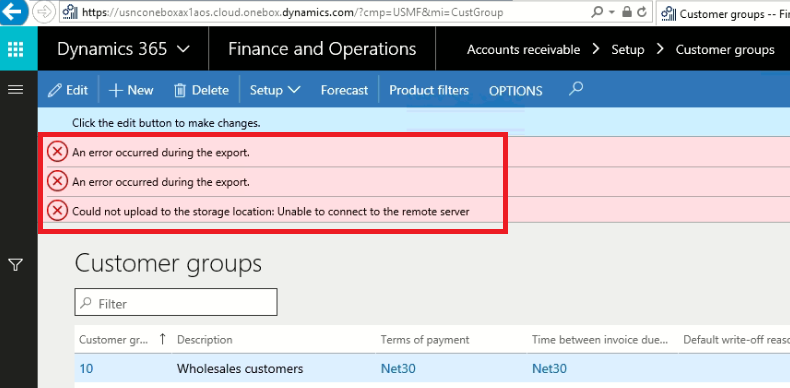
e2ev00.png


Having a look at logs, showed me that it is trying to reach 127.0.0.1(local host) for port number 10002. The port is open in Firewall. I can test that successfully using Telnet client. The full error message that appears in logs is given in next image.

.
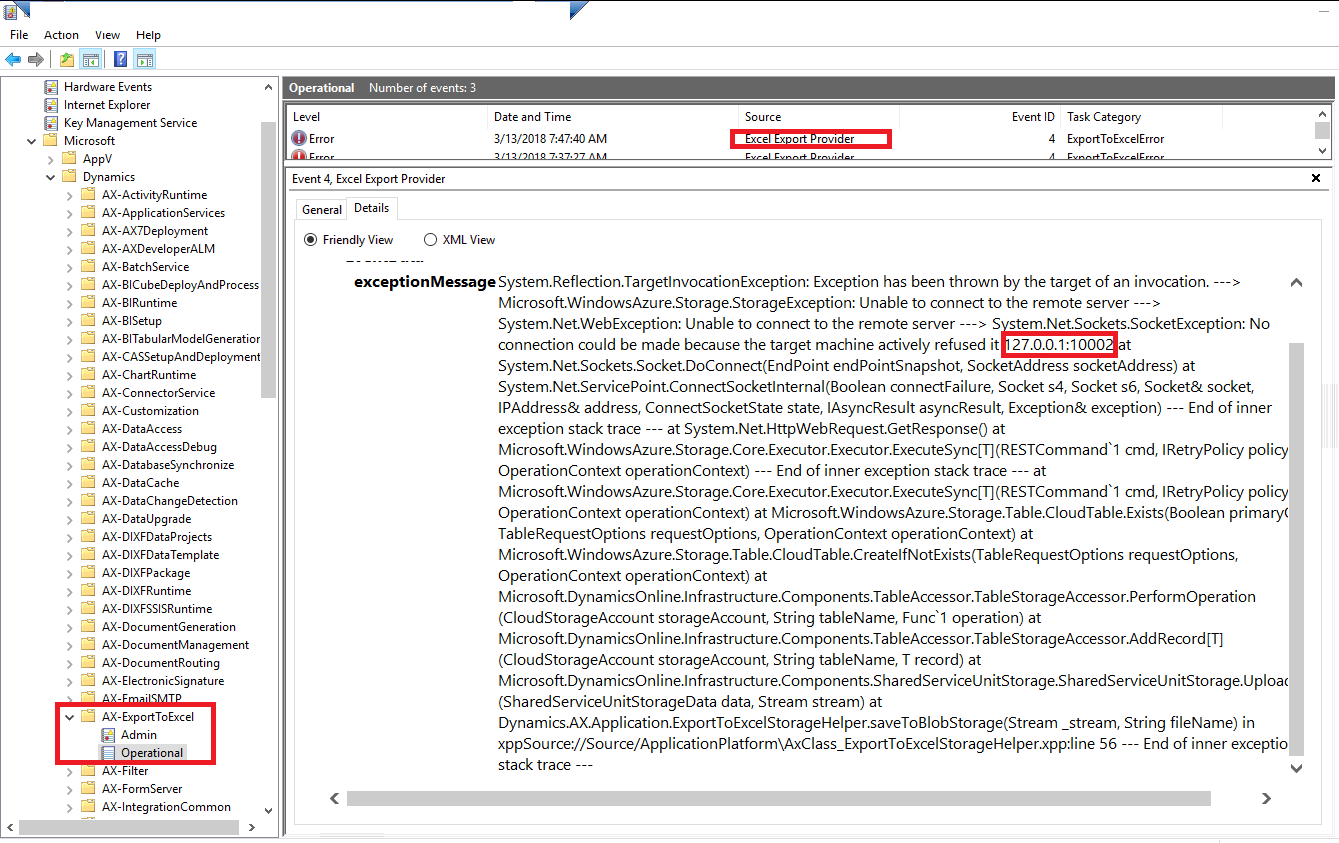
e2ev01-_2D00_-Copy.png

 .

But this error message seems wrong to me, as it is showing me that it is pointing to 127.0.0.1 ; whereas I have configured my azure emulator to local IP of class C (192.168.100.100) [Local IP of machine/VHD]

This looks like a joke to me when I have configured my Azure Emulator to be on Local IP and in logs it is showing that it is trying to reach Local Host (127.0.0.1)

.

 e3ev00.png

.

Has someone got clue about this, how I can remind my D365 to pick correct Azure Emulator configuration. At moment it seems to take wrong and trying to push files at 127.0.0.1.

Please Note that 'Export To Excel'  works perfectly if I change back my Azure Emulator configuration to localhost (127.0.0.1) . I want to route this to IP of my choice, for some experimentation,  I am browsing locally deployed VHD box over LAN.  If I paste back IP (127.0.0.1) in azure emulator, it will work but it will work only for user who is using D365 on the VHD/Machine only. As a remote user I will keep getting error, as I will try to export any data to excel. This is platform 12 Version 7.3.

*This post is locked for comments

I have the same question (0)
  • Sohaib Cheema Profile Picture
    49,438 User Group Leader on at

    Thank you Lane for showing me right direction, that is workable.

     https://community.dynamics.com/ax/b/microsoftdynamicsaxextensions/archive/2018/03/27/export-to-excel-using-local-vhd-over-lan-local-area-network

  • Eugen Glasow Profile Picture
    6,359 on at

    See my latest remark to my blog erconsult.eu/.../exposing-dynamics-365-onebox-lan

  • Sohaib Cheema Profile Picture
    49,438 User Group Leader on at

    Hi Eugen,

    Thank you for your interest on the thread.

    I have went through your blogpost and it is not suggesting anything new to me, I am sure I did the same process, which failed, as you can see in my original question.

    This made us with no choice left, other than to use a workaround, which works. I would suggest you to try the process, that is suggested in your blogpost, with new versions of App. :)

  • Eugen Glasow Profile Picture
    6,359 on at

    Hello, I performed steps 16-19 two days ago on the version 7.3 PU12. It's the most recent one available, isn't it?

  • Sohaib Cheema Profile Picture
    49,438 User Group Leader on at

    Yes correct app 7.3 PU12 is the latest available  at moment.  

    I tested this on two VHD(s) and failed every time. I would like to give it another try on a fresh downloaded VHD.

Under review

Thank you for your reply! To ensure a great experience for everyone, your content is awaiting approval by our Community Managers. Please check back later.

Helpful resources

Quick Links

Responsible AI policies

As AI tools become more common, we’re introducing a Responsible AI Use…

Neeraj Kumar – Community Spotlight

We are honored to recognize Neeraj Kumar as our Community Spotlight honoree for…

Leaderboard > 🔒一 Microsoft Dynamics AX (Archived)

#1
Martin Dráb Profile Picture

Martin Dráb 4 Most Valuable Professional

#1
Priya_K Profile Picture

Priya_K 4

#3
MyDynamicsNAV Profile Picture

MyDynamicsNAV 2

Last 30 days Overall leaderboard

Featured topics

Product updates

Dynamics 365 release plans
