web
You’re offline. This is a read only version of the page.
close
Skip to main content

Announcements

No record found.

News and Announcements icon
Community site session details

Community site session details

Session Id :
Customer experience | Sales, Customer Insights,...
Suggested Answer

create an entity

(0) ShareShare
ReportReport
Posted on by 45

is it possible to import a marketing list without having to create an entity?  I don’t seem to have access to Dynamics 365 Customer Engagement (on-premises) instance.

I have the same question (0)
  • cloflyMao Profile Picture
    25,210 on at

    Hi Poppy10,

    Could you let me know why you have no access to Dynamics 365 instance? Do you have access to insert records into D365 database?

    Regards,

    Clofly

  • Poppy10 Profile Picture
    45 on at

    I can't see Dynamics 365 instance when I open the Marketing Module so thinking it might be an access level issue or is it something that needs to be downloaded.  Tried to import a list before but it didn't work.

  • cloflyMao Profile Picture
    25,210 on at

    Could you share a sceenshot about "I can't see Dynamics 365 instance when I open the Marketing Module"?

    Regards,

    Clofly

  • Poppy10 Profile Picture
    45 on at

    MarketingModuleScreenPrint.docx

  • Suggested answer
    cloflyMao Profile Picture
    25,210 on at

    Hi Poppy10,

    You could take method below as reference:

    1. Open Advanced Settings:

    pastedimage1589877371777v1.png

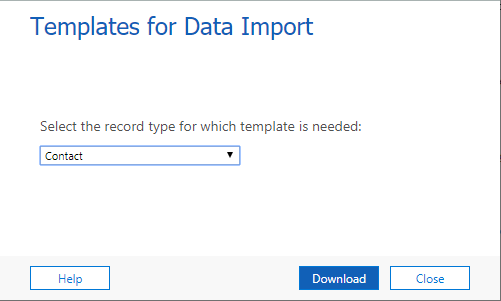
    2. Navigate to Settings > Data Management > Templates for Data Import, download Contact Import Template.
    pastedimage1589877524271v2.png

    3. Copy contact records from your original marketing list excel file into template file, set any column(field) as flag to identify imported contacts.

    e.g: I set Job Title as flag field.

    pastedimage1589877773404v3.png

    4. Settings > Data Management > Imports, import new contacts into Dynamics.

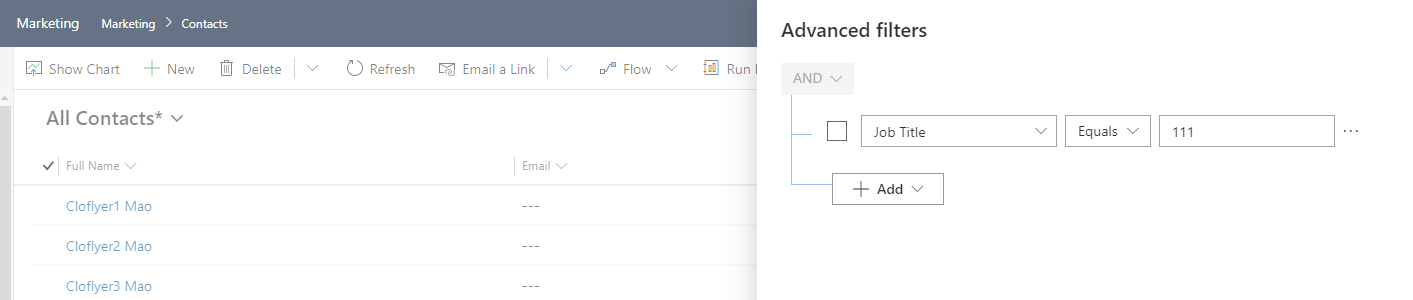
    5. Find the imported contacts by Advanced filters and flag field.

    (Advanced filters: funnel icon at top right of entitylist)
    pastedimage1589878236893v4.png

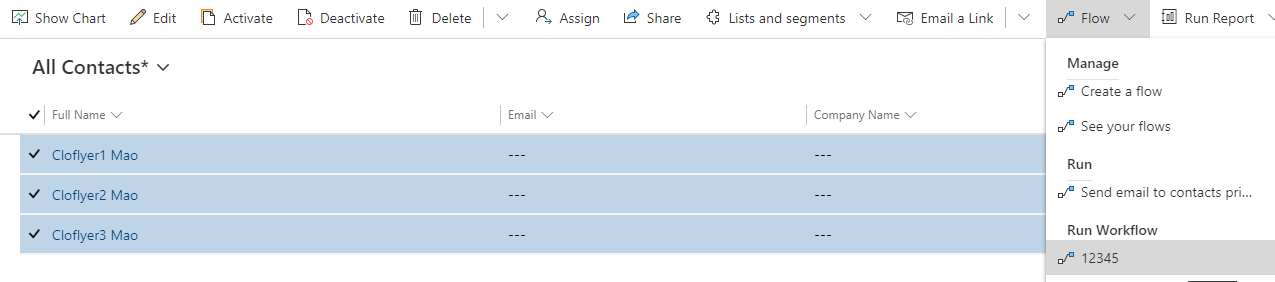
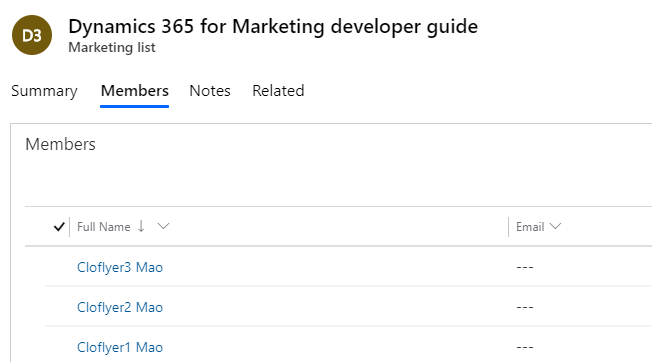
    6. Add those contacts into a specific marketing list in bulk
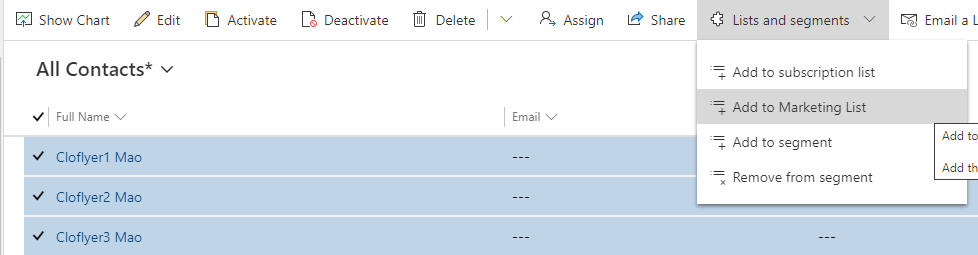
    pastedimage1589878305999v5.png

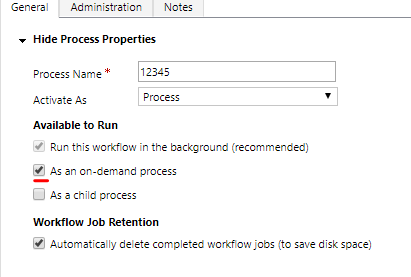
    7. After those contacts have been added to a list, create an on-demand workflow to clean value in flag field.
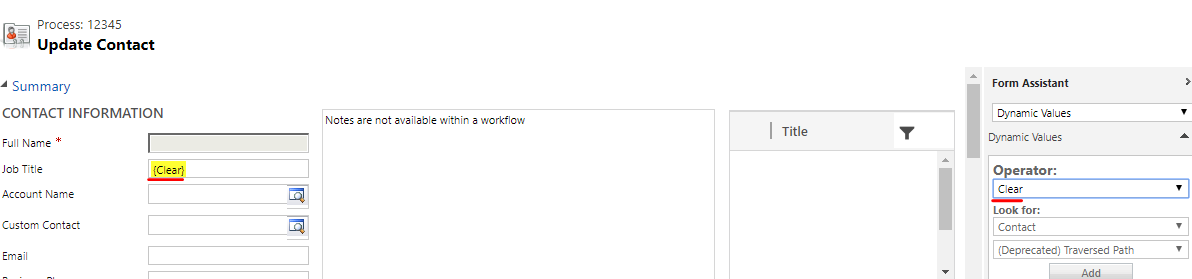
    pastedimage1589878416088v6.png

    pastedimage1589878550349v7.png

    pastedimage1589878570699v8.png

    pastedimage1589878655778v9.png

    Regards,

    Clofly

  • cloflyMao Profile Picture
    25,210 on at

    Hi Poppy10,

    Could it work for you?

    Regards,

    Clofly

  • Poppy10 Profile Picture
    45 on at

    I couldn't find Templates for data import but I did find Power App and Upload Data File (see images). Can I use one of these?Import-Data.pptx

  • cloflyMao Profile Picture
    25,210 on at

    Hi Poppy10,

    Please follow steps below to get template for import.

    pastedimage1589963133387v1.png

    pastedimage1589963157941v2.png

    Regards,

    Clofly

  • Poppy10 Profile Picture
    45 on at

    I can't access that view.  Could this be a permissions thing and that is why I can't see that view?

  • cloflyMao Profile Picture
    25,210 on at

    Please run as System Administrator role to access the view.

    Or ask to your manager that whether he/she could assign necessary privileges for data import to your current user role.

    https://www.powerobjects.com/blog/2015/08/18/data-import-privileges/

    Regards,

    Clofly

Under review

Thank you for your reply! To ensure a great experience for everyone, your content is awaiting approval by our Community Managers. Please check back later.

Helpful resources

Quick Links

Introducing the 2026 Season 1 community Super Users

Congratulations to our 2026 Super Stars!

Congratulations to our 2025 Community Spotlights

Thanks to all of our 2025 Community Spotlight stars!

Leaderboard > Customer experience | Sales, Customer Insights, CRM

#1
ManoVerse Profile Picture

ManoVerse 213 Super User 2026 Season 1

#2
CU11031447-0 Profile Picture

CU11031447-0 100

#3
NeerajPawar Profile Picture

NeerajPawar 71

Last 30 days Overall leaderboard

Product updates

Dynamics 365 release plans