web
You’re offline. This is a read only version of the page.
close
Skip to main content

Announcements

No record found.

News and Announcements icon
Community site session details

Community site session details

Session Id :
Microsoft Dynamics NAV (Archived)

Veriants List is not showing inventory

(0) ShareShare
ReportReport
Posted on by 444

Hi,

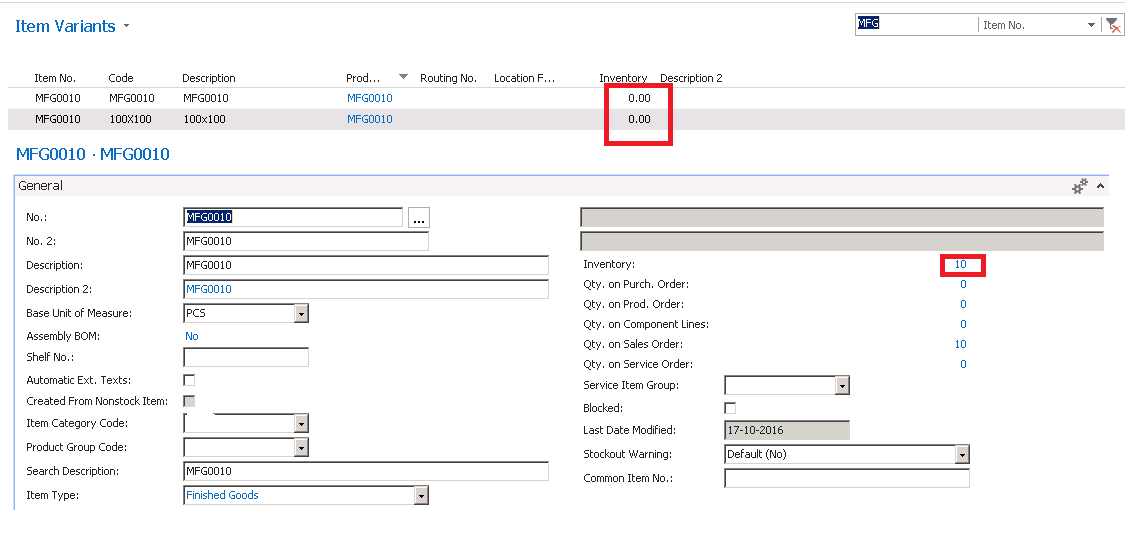
Please refer the attachment Inventory quantity is 10 in item card. But when we are in the item variants list inventory field showing 0 quantity. Why..? and let me know how to bring this quantity in list.
Inven.png

*This post is locked for comments

I have the same question (0)
  • Suggested answer
    Mohana Yadav Profile Picture
    61,172 Super User 2026 Season 1 on at

    Is Inventory a standard field? I didnt find in my db.

    Seems to be a customization.

    can you show Item Variant table screenshot in design mode  and Inventory field properties.

  • Suggested answer
    Amol Salvi Profile Picture
    18,698 on at

    Shambhu

    This is customize field and you need to check the Inventory in Item ledger entry by putting filter on Item No and Variant Code

  • S Shambhu Profile Picture
    444 on at

    Its showing the quantity in item ledger entry as 10.

  • S Shambhu Profile Picture
    444 on at

    Inventory field properties.

    Field No. 50004

    Name Inventory

    Caption <Inventory>

    CaptionML <Undefined>

    Description MAZAK31,MIG

    Data Type Decimal

    Enabled <Yes>

    InitValue <Undefined>

    FieldClass FlowField

    CalcFormula Sum("Item Ledger Entry".Quantity WHERE (Item No.=FIELD(Item No.),Global Dimension 1 Code=FIELD(Global Dimension 1 Filter),Global Dimension 2 Code=FIELD(Global Dimension 2 Filter),Location Code=FIELD(Location Filter),Variant Code=FIELD(Code)))

    DecimalPlaces <Undefined>

    BlankNumbers <DontBlank>

    BlankZero <No>

    SignDisplacement <0>

    AutoFormatType <0>

    AutoFormatExpr <>

    CaptionClass <>

    Editable No

    MinValue <>

    MaxValue <>

    NotBlank <No>

    ValuesAllowed <>

    TableRelation <Undefined>

    ValidateTableRelation <Yes>

    ExtendedDatatype <None>

    Width <Undefined>

  • Suggested answer
    Rajasekhar@MS Profile Picture
    5,569 on at

    Hi

    Can you check whether the Variant code is blank or have the same value as Variants on the Item Ledger Entries.

  • Verified answer
    Mohana Yadav Profile Picture
    61,172 Super User 2026 Season 1 on at

    did you add global dimensions and location filters fields also in Item Variants table?

    we cannot simply provide any suggestions without knowing your business requirement clearly.

    I tried with below calcformula and working fine

    Sum("Item Ledger Entry".Quantity WHERE (Item No.=FIELD(Item No.),Variant Code=FIELD(Code)))

  • Suggested answer
    Alexander Ermakov Profile Picture
    28,096 on at

    It might be the case that there are no items appear in the filter "Item Ledger Entry".Quantity WHERE (Item No.=FIELD(Item No.),Global Dimension 1 Code=FIELD(Global Dimension 1 Filter),Global Dimension 2 Code=FIELD(Global Dimension 2 Filter),Location Code=FIELD(Location Filter),Variant Code=FIELD(Code)))" of your customized flow field, added to the Item Variant table. None of your entries do not satisfy that criteria, thus the result is zero.

    Therefore you need either to modify your flowfield expression (e.g., as Mohana Yadav mentioned), or make changes to the data to match this criteria.

Under review

Thank you for your reply! To ensure a great experience for everyone, your content is awaiting approval by our Community Managers. Please check back later.

Helpful resources

Quick Links

Introducing the 2026 Season 1 community Super Users

Congratulations to our 2026 Super Stars!

Congratulations to our 2025 Community Spotlights

Thanks to all of our 2025 Community Spotlight stars!

Leaderboard > 🔒一 Microsoft Dynamics NAV (Archived)

Last 30 days Overall leaderboard

Featured topics

Product updates

Dynamics 365 release plans
