web
You’re offline. This is a read only version of the page.
close
Skip to main content

Notifications

Announcements

No record found.

Community site session details

Community site session details

Session Id :
Microsoft Dynamics 365 | Integration, Dataverse...
Suggested Answer

Expand list in subgrid for Related Records in new UI

(0) ShareShare
ReportReport
Posted on by 90

In D365 new UI, when I select Related and choose Activities or Audit History, for example, the form only shows one record at a time so you have to scroll through all records to get to the one you want.  It's very difficult to see.

Is there a way to enlarge this area so more than one line is displayed?  
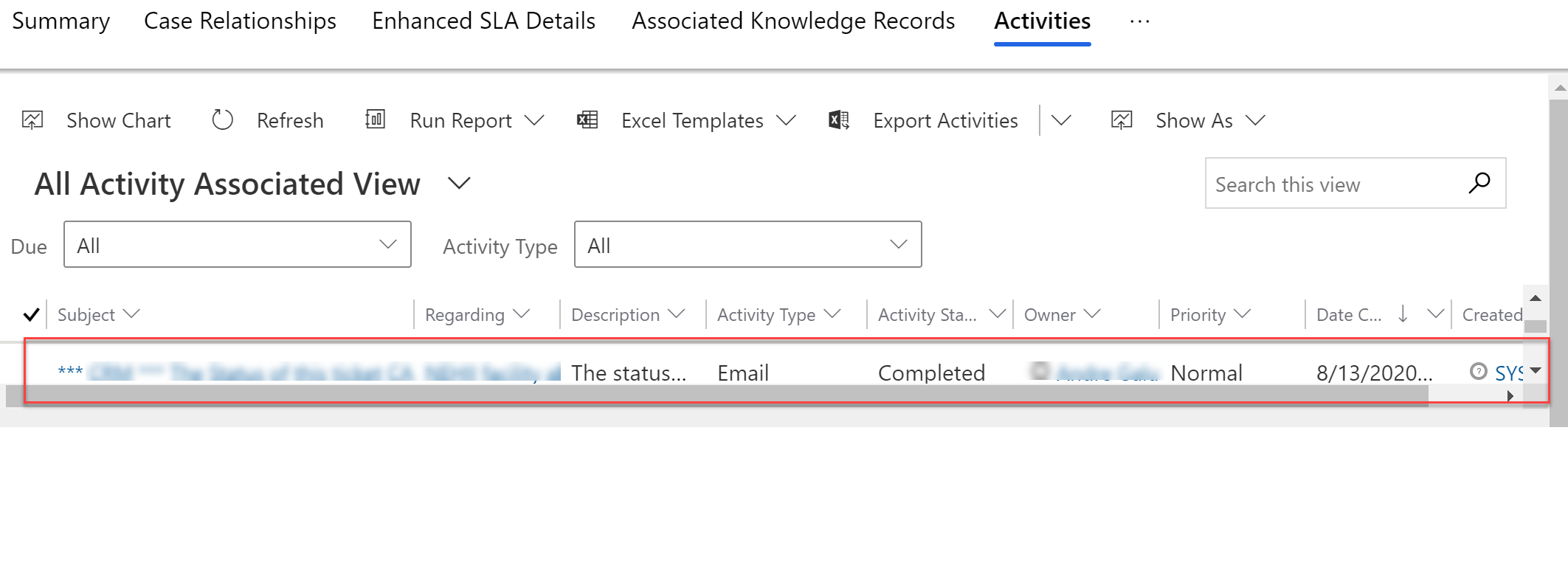
D365-issue.png

Thanks!

I have the same question (0)
  • Pankaj Gogoi Profile Picture
    3,177 on at

    Hi DawnK,

    I think we can't increase that. If you change your screen resolution you can probably see more rows. You have to use the Search box and filter by Activity Type options. You can also insert a custom Activity Sub Grid.

    Good Luck

    Best Regards

    PG

  • DawnK Profile Picture
    90 on at

    Thanks for your answer.  I thought one of the benefits of the new UI is not having to have custom grids? :(

    And how would you make a sub-grid for Audit History?

  • LuHao Profile Picture
    40,892 on at

    Hi DawnK,

    The UCI view will not only show a row of records. Can you look at it in another browser?

  • Suggested answer
    Roma Gupta Profile Picture
    725 on at

    Hi

    I am on new UI, and I see multiple records at my end which is 250. I have my personal settings done to view 250 records. Could you update & see if this helps?

    8625.Capture.PNG

    Regards

    Roma

  • Ibrazrilevic Profile Picture
    90 on at

    Hi DawnK,

    What kind of browser are you using? Because the grid should automatically look like my screenshot (it should expand automatically):

    4532.Screenshot_5F00_1.png

    Kind regards

  • DawnK Profile Picture
    90 on at

    Hi Roma, yes I am also at 250 per page.  Just to clarify, this is using the Related -> Activities on the form and not a custom sub-grid in a section on the form.

  • DawnK Profile Picture
    90 on at

    I am using Chrome.  I tried in both Firefox and IE with the same results.  If there are no activities associated with the record, the screen does look like your screen shot.

    To clarify, this is using the Related -> Activities and not a sub-grid that I created.

  • Roma Gupta Profile Picture
    725 on at

    Hi DawnK

    I did check again at my side on Related -> Activities grid shows multiple & not 1 record. Could you clear cache & try again.

    Regards

    Roma

  • DawnK Profile Picture
    90 on at

    Cache cleared.  Still only seeing 1-2 records at a time.  :(

    Thanks!

  • DawnK Profile Picture
    90 on at

    Cache cleared.  Still only seeing 1-2 records at a time.  :(

    Thanks!

Under review

Thank you for your reply! To ensure a great experience for everyone, your content is awaiting approval by our Community Managers. Please check back later.

Helpful resources

Quick Links

Responsible AI policies

As AI tools become more common, we’re introducing a Responsible AI Use…

Neeraj Kumar – Community Spotlight

We are honored to recognize Neeraj Kumar as our Community Spotlight honoree for…

Leaderboard > Microsoft Dynamics 365 | Integration, Dataverse, and general topics

#1
Martin Dráb Profile Picture

Martin Dráb 45 Most Valuable Professional

#2
iampranjal Profile Picture

iampranjal 36

#3
Satyam Prakash Profile Picture

Satyam Prakash 31

Last 30 days Overall leaderboard

Product updates

Dynamics 365 release plans
