web
You’re offline. This is a read only version of the page.
close
Skip to main content

Announcements

No record found.

News and Announcements icon
Community site session details

Community site session details

Session Id :
Finance | Project Operations, Human Resources, ...
Answered

Edit Payables Checks "Comment" Field

(0) ShareShare
ReportReport
Posted on by

Hello:

For prepayments, can the "Comment" field in the Edit Payables Checks window be referenced in EFT files?

Thanks!

John

Categories:
I have the same question (0)
  • cdinh Profile Picture
    295 User Group Leader on at

    Hi John,

    Yes, you can add a "Comment" Field in your EFT File.

    Here are the steps:

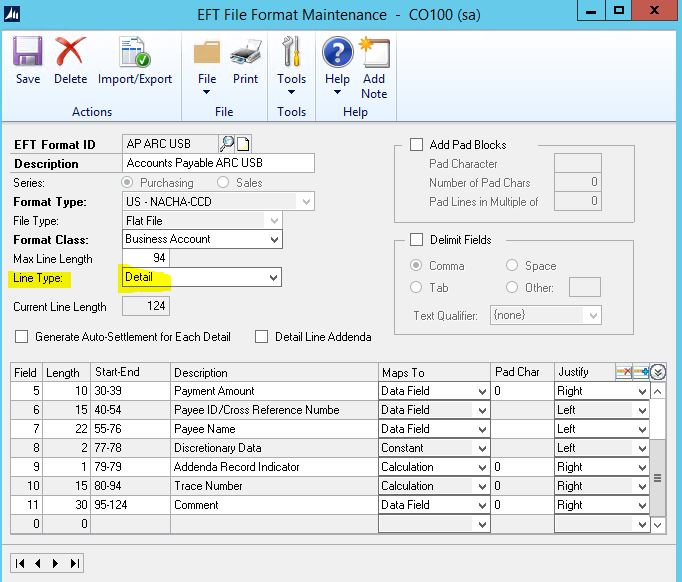
    1. You need to add a Comment field in your EFT File Format >> Select Line Type = Detail >> In my example I position it at the very end...field 11, then set your length (max 30) and description.
    EFT-FIle-Format-Detail.JPG

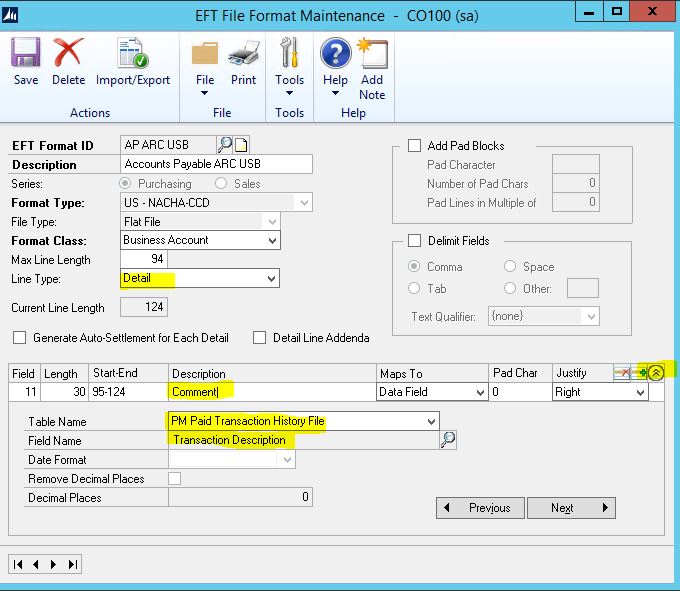
    2.  On  field 11, click on show button on the right to display table mappings.

    Look for Table Name <PM Paid Transaction History File > and Field Name < Transaction Description.  <SAVE>
    EFT-FIle-Format-Detail2.JPG

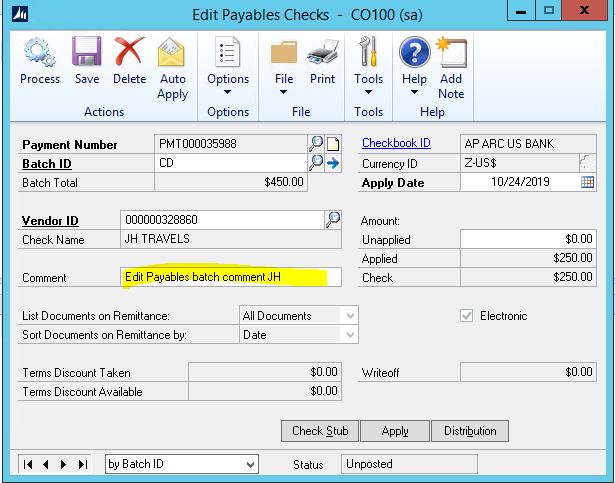
    3. In Edit Payables Check Comment, enter your description.

    Edit-Payable-Comment--Glo.JPG

    Note:  You may need to go to Purchasing >> Transaction >> Edit Check -- if you have more than one record 
    Edit-Payable-Comment-JH.JPG

    4.  Generate EFT like you normally do.

    GenerateEFT.JPG

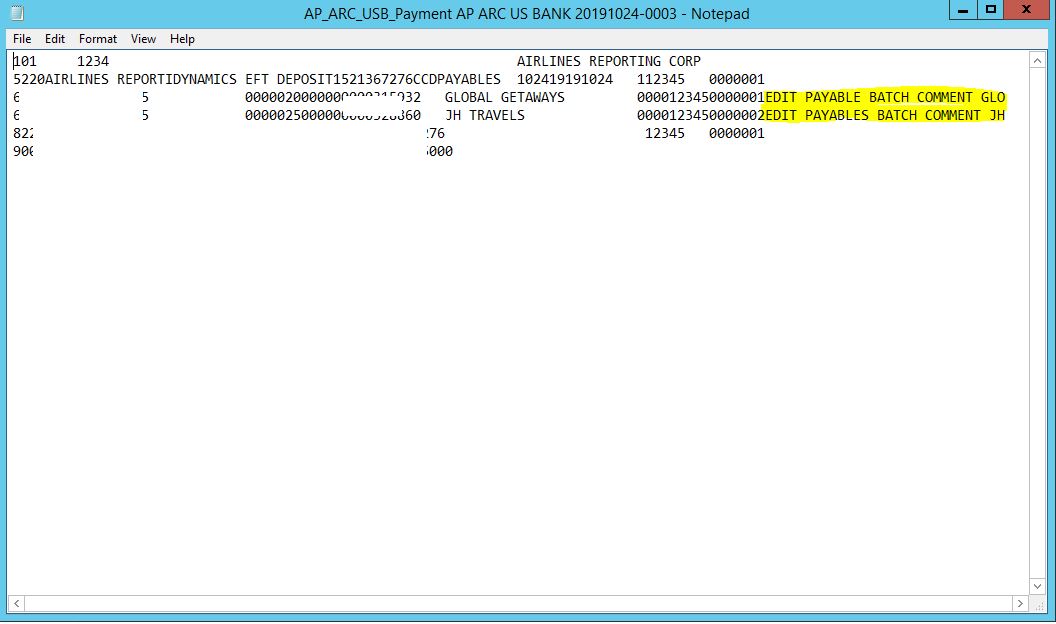
    Here you go... EFT File with Comment.
    EFT-File-with-comment.JPG

    Hope this helps!

    Regards,

    Cecile Dinh

  • Community Member Profile Picture
    on at

    Hi Cecile:

    Thank you, for that great information!  

    I have a question.  If the end user is processing prepayments where the checks cut are not yet applied to anything, will those prepayments appear in the PM Paid Transaction History File?  That is the only "roadblock", in terms of using that particular table.

    John

  • cdinh Profile Picture
    295 User Group Leader on at

    Hi John,

    If you are using "Select Checks" it automatically apply the Invoice to payment because you are selecting which Invoice are to be paid.

    Yes, those payments will become HIST after posting and will appear PM Paid Transaction History file.

    If the payment is entered in "Manual Payment" window, it will be in OPEN status after posting if there's no Invoice applied to it.

    Regards,

    Cecile

  • Community Member Profile Picture
    on at

    Hi There, Cecil"

    The end user cuts checks for prepayment, without applying them to invoices in the Edit Payables Checks window.  So, it sounds like the checks would not be in history.

    Does the EFT File Format Maintenance window reference any open payables table?

    John

  • cdinh Profile Picture
    295 User Group Leader on at

    Hi John,

    I see - when the end user process the Select Checks, he goes to "EDIT CHECK" then the Edit Payable window will show up.

    In my example earlier, it was done by selecting  " Edit Check Batch" window and selecting the Invoices to be paid.

    But either way, the "Comment" will still show in the EFT File even if it is in OPEN table or Unapplied.

    Record 1:  Open payment or unapplied

    Inquiry-OPEN-Check1.JPG

    Record 2: Open payment or unapplied

    Inquiry-OPEN-Check.JPG

    Here is your EFT File would look like:

    EFT-File-OPEN.JPG

    Regards,


    Cecile Dinh

  • Community Member Profile Picture
    on at

    Hi Cecile:

    For such open and unapplied checks, what table in the EFT File Format Maintenance window would be used?

    John

  • cdinh Profile Picture
    295 User Group Leader on at

    Hi John,

    You would still use PM Paid Transaction History File and field name Transaction description for OPEN or Unapplied. 

    2117.EFT-FIle-Format-Detail2.JPG

    Best regards,


    Cecile Dinh

  • Community Member Profile Picture
    on at

    Hi Cecile:

    I tested this, here on my laptop, and the prepayment did not go into the PM Paid Transaction History file but into the PM Transaction Open File, instead.

    Does the EFT File Format Maintenance window offer "PM Transaction Open File" in the Table Name drop-down list?

    John

  • Verified answer
    cdinh Profile Picture
    295 User Group Leader on at

    Hi John,

    If you look at the SQL Table, yes it will show in OPEN table.  But the testing I did in EFT File format is exactly what I've shown in the screenshot above.  Both open and history goes into EFT file.  Have you configured your EFT File Format yet?

    Regards,

    Cecile

  • Community Member Profile Picture
    on at

    Hi Again, Cecile!

    I have not.  I'm suprised that the EFT File Format Maintenance window pulls data from the open table, even upon referencing the PM Paid Transaction History table.

    Thanks, for verifying!  I really appreciate the help!

    John

Under review

Thank you for your reply! To ensure a great experience for everyone, your content is awaiting approval by our Community Managers. Please check back later.

Helpful resources

Quick Links

Introducing the 2026 Season 1 community Super Users

Congratulations to our 2026 Super Stars!

Meet the Microsoft Dynamics 365 Contact Center Champions

We are thrilled to have these Champions in our Community!

Congratulations to the March Top 10 Community Leaders

These are the community rock stars!

Leaderboard > Finance | Project Operations, Human Resources, AX, GP, SL

#1
Giorgio Bonacorsi Profile Picture

Giorgio Bonacorsi 658

#2
André Arnaud de Calavon Profile Picture

André Arnaud de Cal... 468 Super User 2026 Season 1

#3
Syed Haris Shah Profile Picture

Syed Haris Shah 333 Super User 2026 Season 1

Last 30 days Overall leaderboard

Product updates

Dynamics 365 release plans
