web
You’re offline. This is a read only version of the page.
close
Skip to main content

Notifications

Announcements

No record found.

Community site session details

Community site session details

Session Id :
Finance | Project Operations, Human Resources, ...
Answered

Unable to create an alert when workflow status is "Stopped (error)"

(1) ShareShare
ReportReport
Posted on by 211

Hi All,

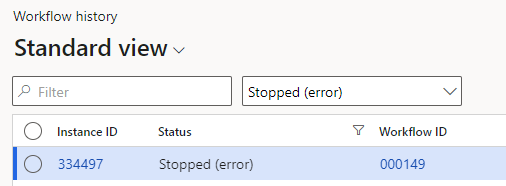
I've attempted to set up alerts for when a workflow has an issue and the status becomes "stopped (error)"
pastedimage1662644276034v1.png

However, when setting up the alert "stopped (error)" is not a value I can specify

pastedimage1662644318152v2.png

If I use "Failed" I don't get an alert for "stopped (error)".

How can I create an alert for the "stopped (error)" status?

I have the same question (0)
  • GirishS Profile Picture
    27,827 Moderator on at

    Hi MBates,

    Can you check the value of status field in the WorkFlowWorkItemTable against the workflow instance id - I think there will be no work item created against your workflow instance.

    Thanks,

    Girish S.

  • Suggested answer
    André Arnaud de Calavon Profile Picture
    301,037 Super User 2025 Season 2 on at

    Hi MBates237,

    The issue with this form is that there are multiple data sources used where the alerts can create a trigger for only one of the tables used as data source. It is now showing all fields from the Workflow work items table where this status field is part of the Workflow tracking status table.

    In the workflow configuration, you can setup notifications when a workflow instance gets stopped. This would be the recommended way for your requirement.

    As an alternative, you can consider using business events and use Power Automate to send an email alert. This might need some development to trigger an event when the workflow instance gets in a stopped state.

  • Suggested answer
    Gaurangkumar Jani Profile Picture
    4,534 User Group Leader on at

    hi MBates237

    I would suggest enabling notification from Workflow Configuration instead of creating Alert notification.

    This might help you : docs.microsoft.com/.../workflow-faq

    Thanks,

  • Verified answer
    Gino Roesems Profile Picture
    14 on at
    This post is from a while ago, but I can give the solution I use to generate an alert rule for stopped workflows, across all workflows and without having to set it separately in each workflow. 
    The trick is to query the WorkflowTrackingStatusTable table through the 'systablebrowser' and that way you can set the alert rule you want.

    https://.......dynamics.com/?mi=SysTableBrowser&tableName=workflowtrackingstatustable&cmp=...

Under review

Thank you for your reply! To ensure a great experience for everyone, your content is awaiting approval by our Community Managers. Please check back later.

Helpful resources

Quick Links

Responsible AI policies

As AI tools become more common, we’re introducing a Responsible AI Use…

Neeraj Kumar – Community Spotlight

We are honored to recognize Neeraj Kumar as our Community Spotlight honoree for…

Leaderboard > Finance | Project Operations, Human Resources, AX, GP, SL

#1
Martin Dráb Profile Picture

Martin Dráb 544 Most Valuable Professional

#2
André Arnaud de Calavon Profile Picture

André Arnaud de Cal... 450 Super User 2025 Season 2

#3
Sohaib Cheema Profile Picture

Sohaib Cheema 250 User Group Leader

Last 30 days Overall leaderboard

Product updates

Dynamics 365 release plans
