web
You’re offline. This is a read only version of the page.
close
Skip to main content

Notifications

Announcements

No record found.

Community site session details

Community site session details

Session Id :
Microsoft Dynamics GP (Archived)

Project Accounting - Sub Account Format

(0) ShareShare
ReportReport
Posted on by 12

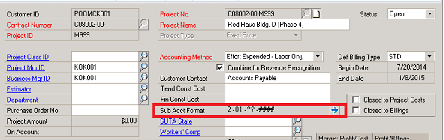
Where is the Sub Account Format changed?
Change2Project_5F00_Segment_5F00_2.png

Background

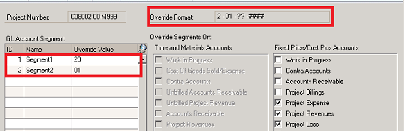
Just did a modification to the COA where we added a new segment to the front of the Account number.  Now we are trying to get the new segments to appear in Project.  The New Segment is Segment 1 in the COA and the names appearing in the second picture are how it appears now, but the option to choose more than two segments is not there.

What I need is to know What Table, What field (s) need to be updated so that we can get to the end result

In the Pre-converted system

Segment 1 represented the City where the work is going on

Segment 2 identified the professional services / displine engaged in the project

None of the values in those segments will need to change.

What we are trying to add - in all cases - is a NEW SEGMENT 1 - that is populated with a 2

So that

New Seg 1 is populated with 2

Old Seg 1 becomes New Seg 2 with same values

Old Seg 2 becomes New Seg 3 with same values

Therefore pre conversion the Sub Account Format looked like

20-01-####

Now with the new COA format we need the Sub Account Format to look like

2-20-01-####

*This post is locked for comments

I have the same question (0)
  • Suggested answer
    Bill Campbell Profile Picture
    12 on at

    So far I have identified the following tables that work for me

    PA41301  Segment Override Header

    PA41302  Segment Override Detail

    PA91301  Contract Segment Override Header

    PA91304  Contract Segment Override Detail

    PA91403  Segment Override Template Header

    PA91404  Segment Override Template Detail

    PA92301  Contract Template Segment Header

    PA92304  Contract Template Segment Detail

    Now I have to figure out the Scripting to make all the changes I need.   Fifty Percent of the deal was identifying the places to work.

    More information when I have done some of the scripting work.

  • Suggested answer
    Bill Campbell Profile Picture
    12 on at

    That was a great long weekend project.

    We had to identify each segment based on the Project and Contract and build the related scripts that would update each one of them based on rules.

    We did not get complicated and we were pretty much writing scripts and executing them as we went along.

    At the end of the day we needed to update the PA41304 Project Segments and the PA91302 Contract Segments.

    Then we found some unposted Timesheets that needed to belong to the new account segment and we had to push all the 'old' account index to the 'new' account index.

    Overall a project that I would like to not have to do again, however, it is something that is doable.

    Case Closed

Under review

Thank you for your reply! To ensure a great experience for everyone, your content is awaiting approval by our Community Managers. Please check back later.

Helpful resources

Quick Links

Responsible AI policies

As AI tools become more common, we’re introducing a Responsible AI Use…

Neeraj Kumar – Community Spotlight

We are honored to recognize Neeraj Kumar as our Community Spotlight honoree for…

Leaderboard > 🔒一 Microsoft Dynamics GP (Archived)

#1
Community Member Profile Picture

Community Member 2

#2
mtabor Profile Picture

mtabor 1

#2
Victoria Yudin Profile Picture

Victoria Yudin 1

Last 30 days Overall leaderboard

Featured topics

Product updates

Dynamics 365 release plans



