web
You’re offline. This is a read only version of the page.
close
Skip to main content

Notifications

Announcements

No record found.

Community site session details

Community site session details

Session Id :
Finance | Project Operations, Human Resources, ...
Answered

On the All Sales Orders grid, clicking on "Customer account" renders "You are not authorized to access table 'Customers' (CustTable)" but user has access to "All Customers"

(0) ShareShare
ReportReport
Posted on by 166

Hello everyone.

As stated above, error when clicking on customer account from All Sales Orders (same issue when clicking on the Invoice Account from the Customer Invoice Journal)
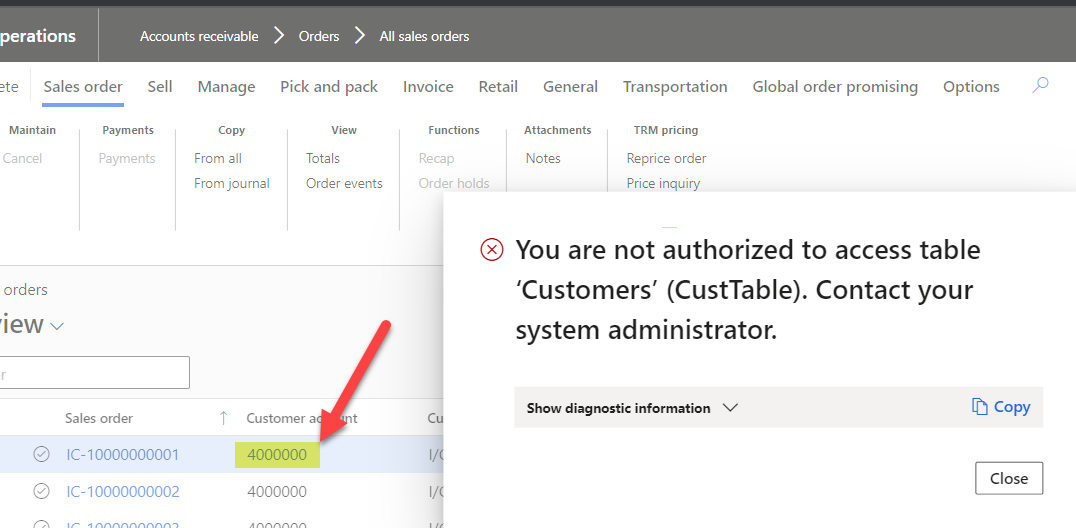
pastedimage1635359764627v3.png

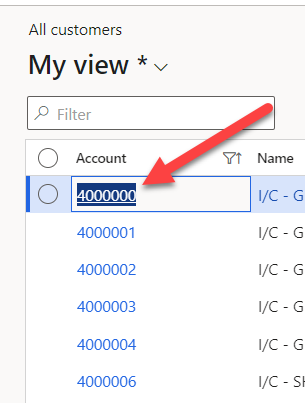
no issues accessing All Customers

pastedimage1635359908086v4.png

Also, able to click on and display the customer.

SysAdmin role has no issues performing this process, so is it a privilege missing?

Any thoughts?

Thanks,

Paul

I have the same question (0)
  • Suggested answer
    André Arnaud de Calavon Profile Picture
    301,030 Super User 2025 Season 2 on at

    Hi Paul,

    When clicking the link, the All customers form is not opened. The CustTable form is opened with the details of a specific customer. For this the menu item CustTable is called for the details. Ensure the display menu item CustTable is part of the security role for this user. That should solve your issue.

  • Paul V Profile Picture
    166 on at

    Hi Andre.

    Thanks for the info.

    I checked the Custtable Menu Item Display and it is set for the role.

    I have 2 security roles I am testing side by side.  The OOTB "Accounts Receivable Manager" and a custom role "Sales Ops" .

    No issues with the  "Accounts Receivable Manager", so I compared an extract of the security privilege's of both roles where resourcename = "Custtable".

    The only difference is that the TableField resource type has "2" for Create Access, Delete Access and Update Access for the AR Manager but "1" for the Sales Ops.

    Otherwise, they are exactly the same (See below screen shot of AR Manager)

    pastedimage1635441903952v1.png

    Thanks

    Paul

  • André Arnaud de Calavon Profile Picture
    301,030 Super User 2025 Season 2 on at

    Hi Paul,

    The marked line has a relation with a table field; so I don't think this one is related. I'm not able to view all details from the screenshot you shared. Can you check all line where the resourcename starts with "Custtable"?

  • Paul V Profile Picture
    166 on at

    Hi Andre

    Yes, not a very good screen shot on my part.

    I exported all resourcenames that start with Custtable for both the OOTB Accounts Receivable Manager and our custom Sales Ops role.

    I sorted by Context/Resource, Privilege, Resource type, Role then Duty to try to match up the 2 roles and I "Hid" (column B) any that matched or I thought were not applicable.  

    Still I'm not finding any records where Read access is "denied" . 

    The AR Role is highlighted in yellow.

    Thanks for your advice and assistance

    Paul

    SysSecRelatedObjects.xlsx

  • Paul V Profile Picture
    166 on at

    I think it's the top line below giving us the issue, what does the resource type "Form Data Source" and the "Context \ Resource" breakdown below represent (i.e. why is Custtable shown 3X?).

    pastedimage1636663187166v2.png

    pastedimage1636663314527v3.png

  • Verified answer
    André Arnaud de Calavon Profile Picture
    301,030 Super User 2025 Season 2 on at

    Hi Paul,

    Apologies, I reviewed the Excel file you shared before, but I forgot to answer. The Unset on the Read permissions needs to be set to 'Grant'.

    To directly answer your "3X" question. There are multiple data sources on the form. So, for all these three data sources the permissions needs to be corrected. Note that there are two other lines (Excel row 43,44) where also the permission needs to be set to 'Grant' for the read access.

Under review

Thank you for your reply! To ensure a great experience for everyone, your content is awaiting approval by our Community Managers. Please check back later.

Helpful resources

Quick Links

Responsible AI policies

As AI tools become more common, we’re introducing a Responsible AI Use…

Neeraj Kumar – Community Spotlight

We are honored to recognize Neeraj Kumar as our Community Spotlight honoree for…

Leaderboard > Finance | Project Operations, Human Resources, AX, GP, SL

#1
Martin Dráb Profile Picture

Martin Dráb 611 Most Valuable Professional

#2
André Arnaud de Calavon Profile Picture

André Arnaud de Cal... 529 Super User 2025 Season 2

#3
Sohaib Cheema Profile Picture

Sohaib Cheema 285 User Group Leader

Last 30 days Overall leaderboard

Product updates

Dynamics 365 release plans