web
You’re offline. This is a read only version of the page.
close
Skip to main content

Notifications

Announcements

No record found.

Community site session details

Community site session details

Session Id :
Small and medium business | Business Central, N...
Answered

Bank automatic reconciliation

(0) ShareShare
ReportReport
Posted on by 915

Hi

in bank account reconciliation, when I click on automatic matching.  How does the system match the transactions. What are the fields that the system compare, is it only amount? Or is their a set of fields used
Thanks

Ola

I have the same question (0)
  • Suggested answer
    JAngle Profile Picture
    133 on at

    Amount, description and date in that order I believe. Description is checked in transaction info, document no. and external doc. no. too. Most of the logic is in codeunit 1252 "Match Bank Rec. Lines", but it calls a few other objects too.

  • Verified answer
    Community Member Profile Picture
    on at

    Ola,

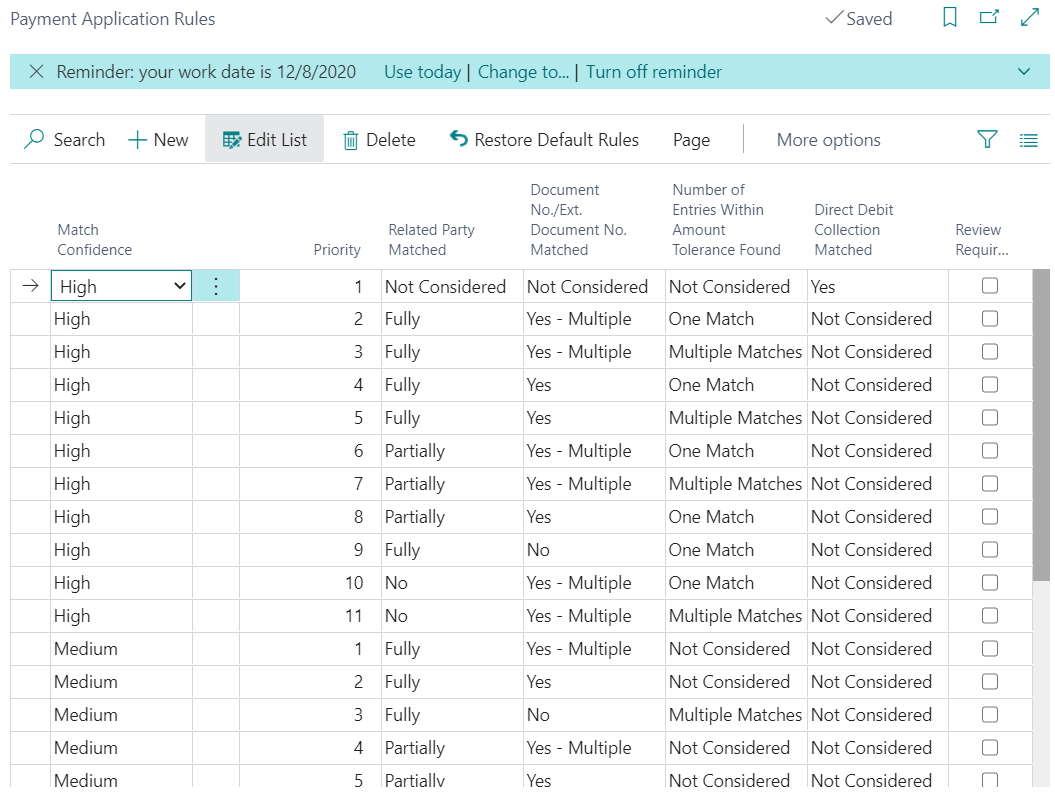
    In addition to what Josh wrote, the automatic matching is built from the Payment Application Rules you establish. To set up a Payment Application Rule search for Payment Application Rules. The rules are based on High to Low to indicate the quality of the data matching of the record. The automatic application function is based on prioritized matching criteria. First the function tries, in prioritized order, to match text in the five Related-Party fields on a journal line with text in the bank account, name, or address of customers or vendors with unpaid documents representing open entries. Then, the function tries to match text in the Transaction Text and Additional Transaction Info fields on a journal line with text in the External Document No. and Document No. fields on open entries. Last, the function tries to match the amount in the Statement Amount field on a journal line with the amount on open entries.
    pastedimage1610310367047v1.png

    On the page, you will see the Matching Confidence, Priority, Related Party Matched, and other fields that define the Application Rule. The above pic are the standard BC generic rules. Here is a link to the documentation on the rules: https://docs.microsoft.com/en-us/dynamics365/business-central/receivables-how-set-up-payment-application-rules

    Hope this helps you.

    Thanks,

    Steve

  • Ola Darwish Profile Picture
    915 on at

    Thanks Josh and Steven

    This is very helpful information- but I meant how does the system reconcile if I clicked automatic matching in bank account reconciliation window - knowing that I uploaded the left hand side of the screen using a CSV file from the bank.  so the steps i follow is to upload it via this screen then let system match automatically. so i wanted to know how does the system match the bank statement that I uploaded to the bank ledger entries on the right side

    8561.Untitled.png

    what is the logic that the system match the 2 sides - what are the fields that are matched ?

    Thanks 

    Ola

  • Suggested answer
    JAngle Profile Picture
    133 on at

    It uses something called “Match Confidence”. This is a score based on the three criteria’s already described. Highest score is for an amount match and then it drops for a text or date match. The text one is the most complex but the amount is exact and the date is within the tolerance you set before you run it. You can see the match confidence per imported line. It is used as a filter for the sow matched and none matched action buttons.

  • Ola Darwish Profile Picture
    915 on at

    Thanks Josh.  

Under review

Thank you for your reply! To ensure a great experience for everyone, your content is awaiting approval by our Community Managers. Please check back later.

Helpful resources

Quick Links

Responsible AI policies

As AI tools become more common, we’re introducing a Responsible AI Use…

Neeraj Kumar – Community Spotlight

We are honored to recognize Neeraj Kumar as our Community Spotlight honoree for…

Leaderboard > Small and medium business | Business Central, NAV, RMS

#1
OussamaSabbouh Profile Picture

OussamaSabbouh 3,143

#2
Jainam M. Kothari Profile Picture

Jainam M. Kothari 1,694 Super User 2025 Season 2

#3
YUN ZHU Profile Picture

YUN ZHU 1,067 Super User 2025 Season 2

Last 30 days Overall leaderboard

Featured topics

Product updates

Dynamics 365 release plans
