web
You’re offline. This is a read only version of the page.
close
Skip to main content

Notifications

Announcements

No record found.

Community site session details

Community site session details

Session Id :
Small and medium business | Business Central, N...
Suggested Answer

New Doc. No. per payment - Suggest Vendor Payments

(0) ShareShare
ReportReport
Posted on by 1,914

Hello all,

I trust that you are well.

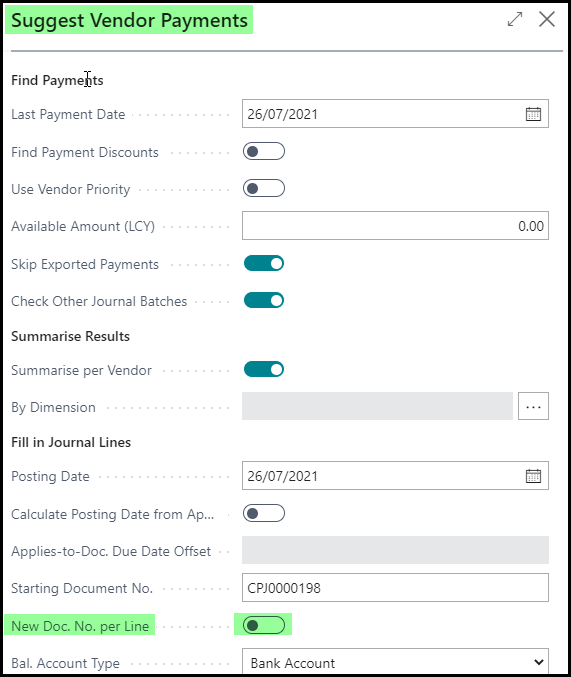
In D365 Business Central, when I use the Suggest Vendor Payment function, I have ensured that the 'New Doc. No. per payment' is not selected.

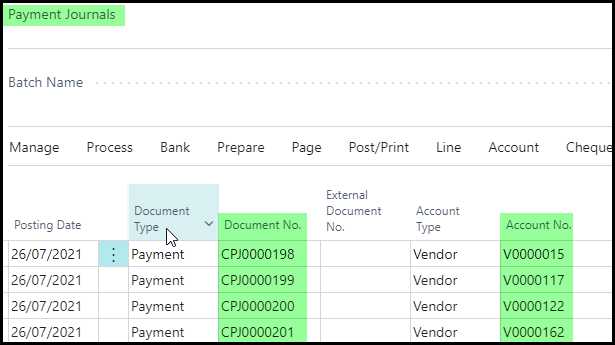
this still seems to give me a new document no. for each payment.

Screenshots below.
pastedimage1627287254531v1.png

pastedimage1627287331558v2.png

Any idea why this would be the case and how I could resolve this?

This might be a bug because i tried this at 2 different customers and got the same result.

Regards,

Jay

I have the same question (0)
  • Suggested answer
    JAngle Profile Picture
    133 on at

    Is it a conflict with having a number series set for the journal batch? Try removing it and keying in a “Starting Document No.”. Might be a work around but in general you may want to report it as a bug.

  • Jay The Wizard Profile Picture
    1,914 on at

    Hey Josh,

    Thank you for the prompt response.

    I have tried that already and it still gives me a new no. per payment.

    I normally post here if I feel that I have tried all avenues.

    Where do I report this as bug please?

    Regards,

    Jay

  • moh_rizkimaulana Profile Picture
    on at

    Hi Jay,

    By default, for each vendor, the system will apply 1 document no.

    Since you set "Summarize per Vendor" to TRUE, then for each line will create new document no.

    But, if you set "Summarize per Vendor" to FALSE, then document no. will be increment by 1 only after the vendor is different from the previous line.

    And, when you combine the parameter "Summarize per Vendor" to FALSE with "New Doc. No. per line" to TRUE, then document no. will increment by 1 for each line even for the same vendor.

    Thank you and Best Regards.

  • Jay The Wizard Profile Picture
    1,914 on at

    Hello moh_rizkimaulana,

    Thank you for your response.

    This does seem to be an issue with the way the system handles the payment journals.

    The work around is to ensure that the Document Number is the same for all payments if you have just one balancing line.

    The Microsoft Consultant has mentioned that this is how the system works and to perhaps add this to the BC_Ideas portal.

    I will be doing this, but for now that is the resolution.

    I am in discussions with our developer to see the best way to handle this.

    Again,

    Thank you all for your response.

    Regards,

    Jay

  • Suggested answer
    Marco Mels Profile Picture
    on at

    Hello Jay,

    Thank you for sharing this to the community. It helps others.

    Thanks.

Under review

Thank you for your reply! To ensure a great experience for everyone, your content is awaiting approval by our Community Managers. Please check back later.

Helpful resources

Quick Links

Responsible AI policies

As AI tools become more common, we’re introducing a Responsible AI Use…

Neeraj Kumar – Community Spotlight

We are honored to recognize Neeraj Kumar as our Community Spotlight honoree for…

Leaderboard > Small and medium business | Business Central, NAV, RMS

#1
OussamaSabbouh Profile Picture

OussamaSabbouh 3,010

#2
Jainam M. Kothari Profile Picture

Jainam M. Kothari 1,270 Super User 2025 Season 2

#3
YUN ZHU Profile Picture

YUN ZHU 1,085 Super User 2025 Season 2

Last 30 days Overall leaderboard

Featured topics

Product updates

Dynamics 365 release plans