web
You’re offline. This is a read only version of the page.
close
Skip to main content

Announcements

No record found.

News and Announcements icon
Community site session details

Community site session details

Session Id :
Finance | Project Operations, Human Resources, ...
Answered

Generate payments (bank file electronic reporting) dialogue is missing some parameters

(0) ShareShare
ReportReport
Posted on by 141

We use Electronic Reporting to get a bank file export of our vendor payments to upload to the bank.

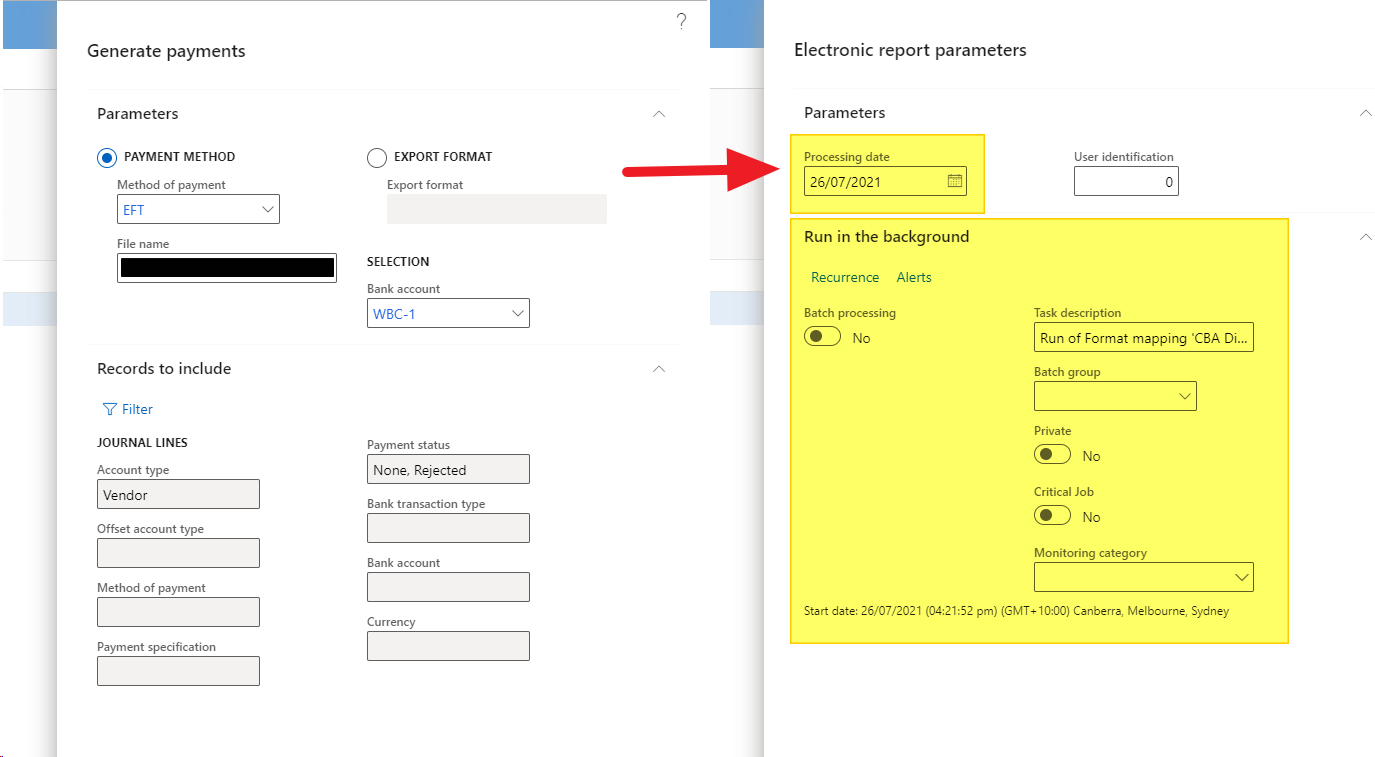
In the Vendor Payment Journal, when you click on Generate Payments to get the bank file, this is Client A's environment which is what I'm expecting to see:
pastedimage1627281923488v1.png

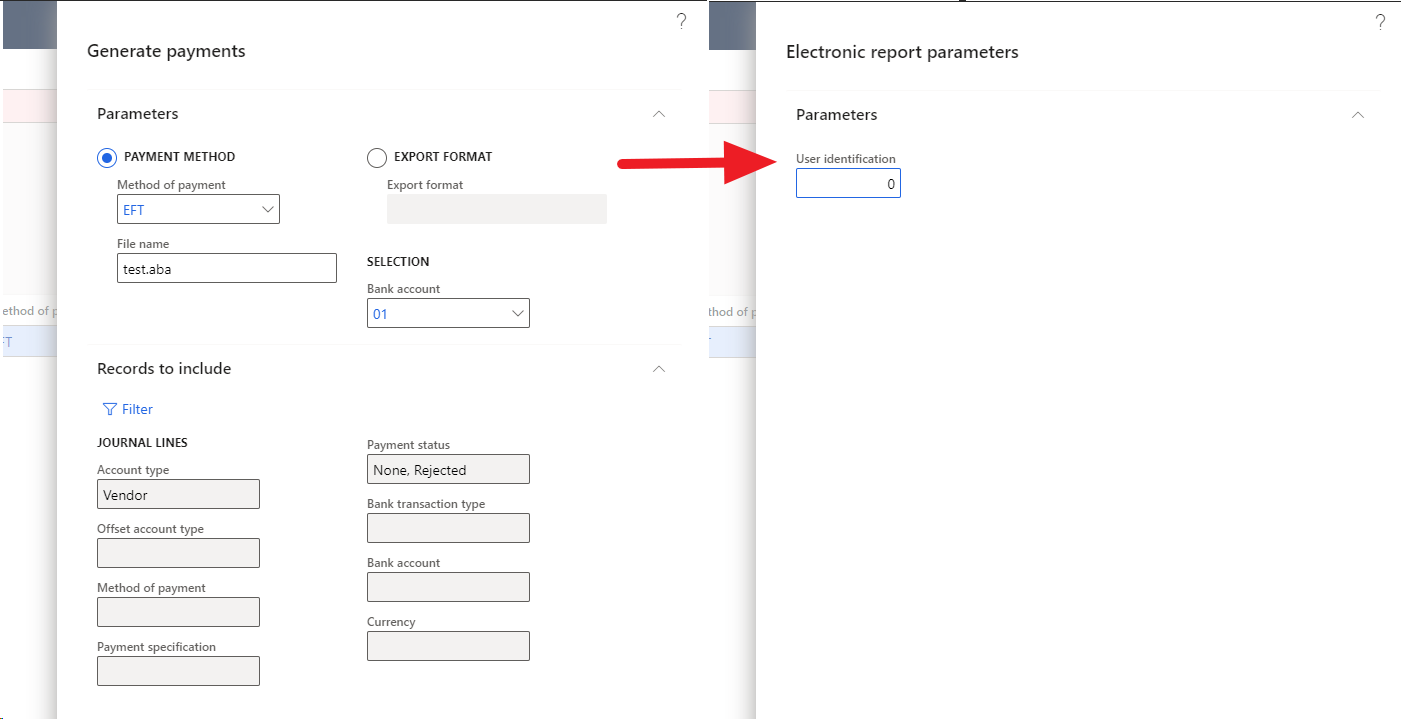
However in Client B, we've done nearly exactly the same thing with importing the Electronic Reporting config and setting it up in Vendor Method of Payments, but that yellow chunk of parameters are missing in the second view of the dialogue:
pastedimage1627282059656v2.png

Does anyone know why and how to get Client B to show the same things as Client A? I've checked all our parameters and settings and made them identical across Client A and B and still no luck.

I have the same question (0)
  • Suggested answer
    Ludwig Reinhard Profile Picture
    Microsoft Employee on at

    Hi,

    Can you please check the electronic reporting destinations that are setup in both clients?

    There are specific settings there and it sounds that they were made differently.

    Best regards,

    Ludwig

  • Lexicon_ Profile Picture
    141 on at

    Hi Ludwig,

    Both clients have the destinations empty.

    Should I configure it for the misbehaving Client B anyway?

  • Suggested answer
    Ludwig Reinhard Profile Picture
    Microsoft Employee on at

    Hi,

    There must be a difference in those versions.

    Can you check the exact D365FO build number and compare whether there are different features enabled in the client A and client B machines?

    Best regards,

    Ludwig

  • Lexicon_ Profile Picture
    141 on at

    Thank you Ludwig!

    Still no luck after checking versions and features, but we have closed this issue via other means (making another environment).

  • Verified answer
    Lexicon_ Profile Picture
    141 on at

    Issue closed but without answers. We just made another environment in Client B and it ended up working in the new environment. No clue why but we don't care anymore. FinOps is an enigma.

  • Ludwig Reinhard Profile Picture
    Microsoft Employee on at

    Hi Lexicon,

    Next time you run into a similar issue, you can open a ticket with the MS support. They can do a screensharing session with you, which might help them identifying what might be wrong.

    Anyway, good to hear that you got your issue fixed.

    Have a good day ahead.

    Best regards,

    Ludwig

Under review

Thank you for your reply! To ensure a great experience for everyone, your content is awaiting approval by our Community Managers. Please check back later.

Helpful resources

Quick Links

Introducing the 2026 Season 1 community Super Users

Congratulations to our 2026 Super Stars!

Meet the Microsoft Dynamics 365 Contact Center Champions

We are thrilled to have these Champions in our Community!

Congratulations to the April Top 10 Community Leaders

These are the community rock stars!

Leaderboard > Finance | Project Operations, Human Resources, AX, GP, SL

#1
Giorgio Bonacorsi Profile Picture

Giorgio Bonacorsi 804

#2
André Arnaud de Calavon Profile Picture

André Arnaud de Cal... 639 Super User 2026 Season 1

#3
Subra Profile Picture

Subra 528

Last 30 days Overall leaderboard

Product updates

Dynamics 365 release plans
