web
You’re offline. This is a read only version of the page.
close
Skip to main content

Notifications

Announcements

No record found.

Community site session details

Community site session details

Session Id :
Microsoft Dynamics 365 | Integration, Dataverse...
Suggested Answer

Create Table and update in CRM

(0) ShareShare
ReportReport
Posted on by 340

Hello,

can I create a table in dynamics 365 and update this table when a button is clicked in dynamics from an excel file and it will make changes to record base on the program and the click of a button.

I have the same question (0)
  • LeoAlt Profile Picture
    16,331 Moderator on at

    Hi partner,

    You could use Microsoft Flow to create table or update records in Dynamics 365 from excel.

    community.dynamics.com/.../create-dynamics-365-records-from-an-excel-using-microsoft-flow

    Best Regards,

    Leo

  • Johnseito Profile Picture
    340 on at

    This is what I want to do.

    I want to upload an excel file into dynamics and base on the data on the file that I uploaded. I want this file to change who the record is assign to.

    This is on a basic level.

    But on a more complicated and more sophisticated level I want to create a button with form and the user can choose to upload an excel file and choose what record they want to change and who to change it to.

    I want to start with the simple and basic way first.

    Any ideas or thoughts on this ?

  • Suggested answer
    LeoAlt Profile Picture
    16,331 Moderator on at

    Hi partner,

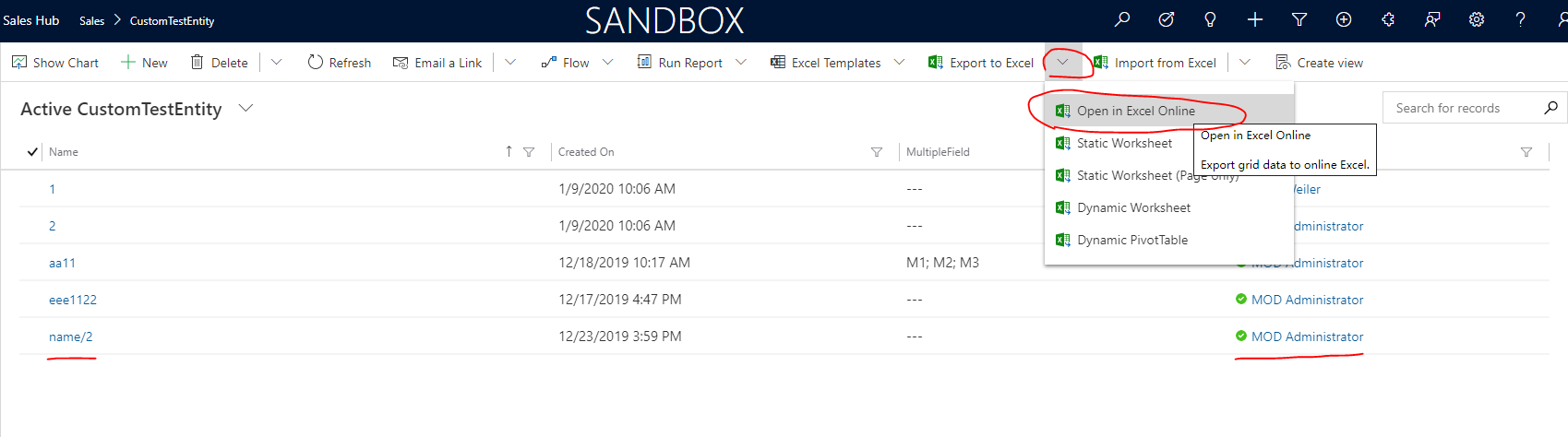
    According to your description, if you are using D365 V9.X online, I recommend you to use "execel Online" feature.

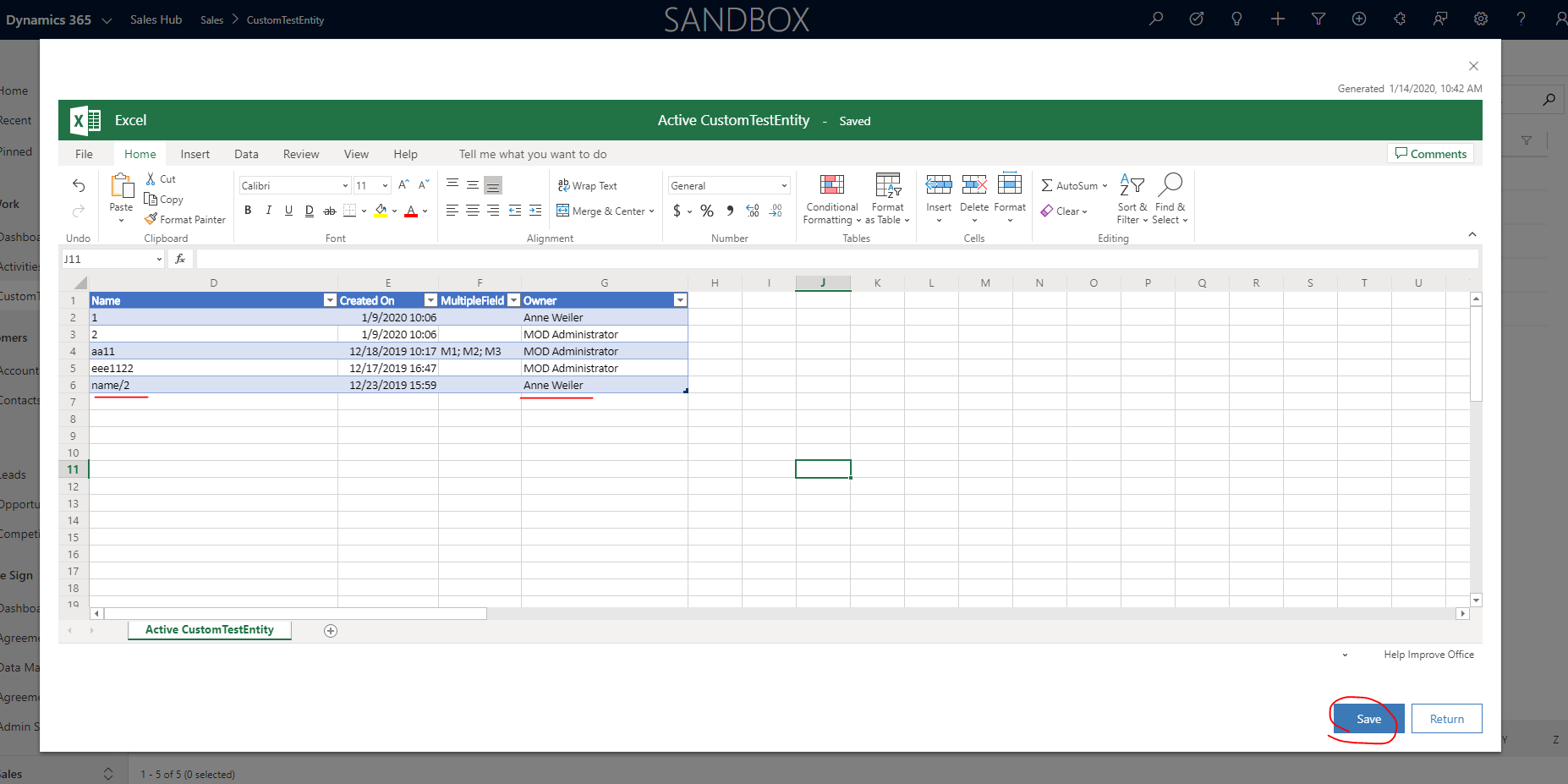
    For example I want to assign a customentity record to another user, I just need to click on "Open in excel online" and change the data and save.
    pastedimage1578969654138v1.png

    pastedimage1578969695797v2.png

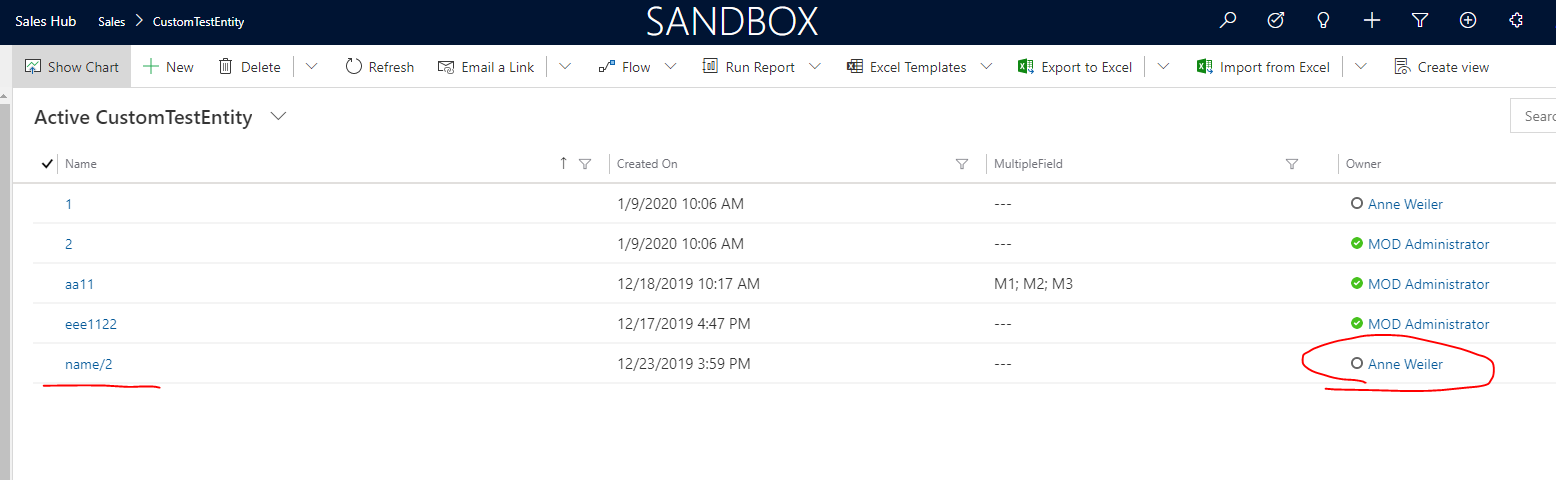
    And wait a minute, the owner will be changed to the user we selected before in excel online.
    pastedimage1578970051639v3.png

    https://docs.microsoft.com/en-us/powerapps/user/export-to-excel-online

    Add a custom ribbon on the form to open an excel file and get the update from excel to D365, this requirement needs a huge and complicated development project.

    For the sake of system performance and data security, this is not recommended, If you really want to do this, you can check with the Microsoft partners.

    Best Regards,

    Leo

  • Johnseito Profile Picture
    340 on at

    I want to change the record to different owner by certain conditions. I don’t want to create record with excel or MS Flow.

    And Microsoft partner doesn’t provide help or support for customization or coding.

  • LeoAlt Profile Picture
    16,331 Moderator on at

    Hi Johnseito,

    The sample I showed to you is not creating a new record, it's changing a record's owner to another user like you said "assign to other users".

    Import data from excel is not only create new records, if the records you want to update in excel have been existed in D365, they will be updated, not created.

    Best Regards,

    Leo

Under review

Thank you for your reply! To ensure a great experience for everyone, your content is awaiting approval by our Community Managers. Please check back later.

Helpful resources

Quick Links

Responsible AI policies

As AI tools become more common, we’re introducing a Responsible AI Use…

Neeraj Kumar – Community Spotlight

We are honored to recognize Neeraj Kumar as our Community Spotlight honoree for…

Leaderboard > Microsoft Dynamics 365 | Integration, Dataverse, and general topics

#1
Siv Sagar Profile Picture

Siv Sagar 93 Super User 2025 Season 2

#2
#ManoVerse Profile Picture

#ManoVerse 74

#3
Martin Dráb Profile Picture

Martin Dráb 64 Most Valuable Professional

Last 30 days Overall leaderboard

Product updates

Dynamics 365 release plans



