web
You’re offline. This is a read only version of the page.
close
Skip to main content

Announcements

No record found.

News and Announcements icon
Community site session details

Community site session details

Session Id :
Customer experience | Sales, Customer Insights,...
Answered

Clone a solution-URGENT!!

(0) ShareShare
ReportReport
Posted on by 8

Hi, 

Need urgent help. 

In Dev i had the folllowing:

Unmanaged Main Solution A 1. 0

Unmanaged Patch A1.1

Unmanaged Patch A1.2

Unmanaged Patch A1.3

Imported the same in UAT:

Managed Main Solution A

Managed Patch A1, A2 and A3

I then Cloned the solution in Dev : Unmanaged Main Solution A 2.0. 

When i am now trying to import the managed verison in UAT to  upgrade to the new solution i am getting below error, which i know is due to components in Patch A1.2:

pastedimage1617285923912v2.png

My question is how to get rid of the error not sure why is this happening. 

If i remove Patch A1.2 from UAT and then upgrade with A2.0 will it bring back all the changes that i removed from UAT under the patch A1.2 since i want those changes. 

Also to let you know while importing the new solution i applied the below check boxes as highlighted in yellow:
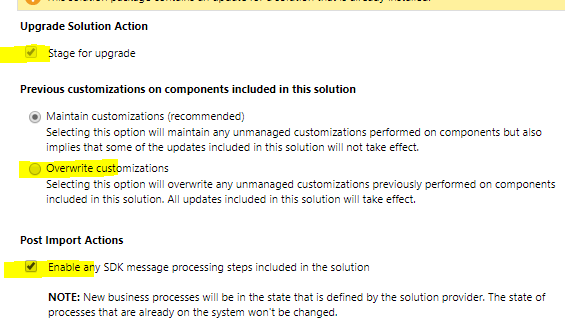
pastedimage1617286146263v3.png

Also if it matters we are d365 on-premise

Please suggest the best way forward. 

Thanks,

I have the same question (0)
  • Suggested answer
    Rui Carvalho Profile Picture
    Microsoft Employee on at

    Hi,

    The error is expected if the system is trying to delete components that have dependencies.

    You need to understand what components are those that the system is trying to delete and understand if you need them or not.

    If you need you should add them to your solution upgrade (A2.0).

    If not you need to deal with the dependencies properly.

  • PS10 Profile Picture
    8 on at

    Hi Rui,

    Thanks for your reply.

    You are right i found out that in the upgraded solution(A2.0) there were two components missing, after adding them in to the upgraded solution in DEV, I was able to import it back and apply the upgrade in another environment.

    Thanks,

    PS

Under review

Thank you for your reply! To ensure a great experience for everyone, your content is awaiting approval by our Community Managers. Please check back later.

Helpful resources

Quick Links

Introducing the 2026 Season 1 community Super Users

Congratulations to our 2026 Super Stars!

Congratulations to our 2025 Community Spotlights

Thanks to all of our 2025 Community Spotlight stars!

Leaderboard > Customer experience | Sales, Customer Insights, CRM

#1
ManoVerse Profile Picture

ManoVerse 189 Super User 2026 Season 1

#2
CU11031447-0 Profile Picture

CU11031447-0 100

#3
NeerajPawar Profile Picture

NeerajPawar 66

Last 30 days Overall leaderboard

Product updates

Dynamics 365 release plans
