web
You’re offline. This is a read only version of the page.
close
Skip to main content

Notifications

Announcements

No record found.

Community site session details

Community site session details

Session Id :
Microsoft Dynamics GP (Archived)

EFT Manual Transactions Showing Up in SafePay

(0) ShareShare
ReportReport
Posted on by

All,

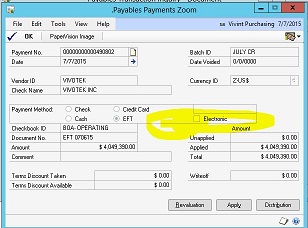
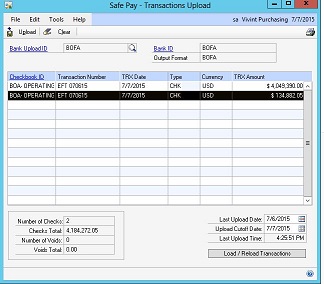
Our AP department is entering Manual EFT records in following this practice below.  However thesey continue to show up in SafeaPay Batches (see pictures).  What can we do to stop this from occurring?

Purchasing Page | Transactions | Manual Payments

To enter a manual payment:

1.  Open the “Payables Manual Payment Entry” window in Dynamics GP (above).

2.  Tab through Payment Number.

3.  Create or select a batch. Batches are optional for manual payments.

4.  Enter the date of the actual check and enter or select a vendor ID.

5.  Under Payment Method, mark EFT but do not check Electronic.

6.  Enter EFT and date in the document number field.

7.  Enter the amount of the payment and apply the payment. Click the “Apply” button and select the invoice to which you’ll apply the manual payment. Click “OK” to close the apply screen.

8.  Save the payment if you entered a batch ID.  If you do not have a batch, click “Post.”

9.  Open the “Batches” window—Transactions | Purchasing | Batches. To print an edit list to verify the entries (if you entered a batch ID), choose File | Print. Choose “Post” if you entered an individual transaction.
EFT-PCO.JPGEFT2.JPG

Any help is apprecaited!

Thank you,

Donnette

*This post is locked for comments

I have the same question (0)
  • Community Member Profile Picture
    on at

    Hi all,

    This problem persists. Does anyone have a suggestion for a solution?

    Thank you,

    Donnette

  • Community Member Profile Picture
    on at

    I am having the same issue.  It appears to be a bug.  What I did in the meantime is checked the box to omit checks with alpha characters in the transaction type entry window.

Under review

Thank you for your reply! To ensure a great experience for everyone, your content is awaiting approval by our Community Managers. Please check back later.

Helpful resources

Quick Links

Responsible AI policies

As AI tools become more common, we’re introducing a Responsible AI Use…

Neeraj Kumar – Community Spotlight

We are honored to recognize Neeraj Kumar as our Community Spotlight honoree for…

Leaderboard > 🔒一 Microsoft Dynamics GP (Archived)

#1
Community Member Profile Picture

Community Member 2

#2
Victoria Yudin Profile Picture

Victoria Yudin 1

#2
mtabor Profile Picture

mtabor 1

Last 30 days Overall leaderboard

Featured topics

Product updates

Dynamics 365 release plans