web
You’re offline. This is a read only version of the page.
close
Skip to main content

Announcements

No record found.

News and Announcements icon
Community site session details

Community site session details

Session Id :
Small and medium business | Business Central, N...
Suggested Answer

Code to avoid Duplicate records

(0) ShareShare
ReportReport
Posted on by 10

When we create new customer in business central, at the time of new record, if Customer name and email is similar with other previous customers, then system will populate notification that record already exits.

I have the same question (0)
  • Suggested answer
    JAngle Profile Picture
    157 on at

    Is this a request for code to perform this? I’d think a codeunit with event subscribers to both fields OnAfterValidate is a good start. You can then create a subsequent procedure in the codeunit that creates a notification. Follow this guide: docs.microsoft.com/.../devenv-notifications-developing

    This blog has same code relating to notifications: https://yzhums.com/4120/

  • Suggested answer
    IB-29041624-0 Profile Picture
    1,187 Moderator on at

    I would be a little careful with implementing a function like this because i think it can be hard to really make it work in a good way for the users.

    What f.example with customers having branch offices where only the address is different?

    And be careful so you do not break any logic that might be used later for creating customers from other sources than manual input.

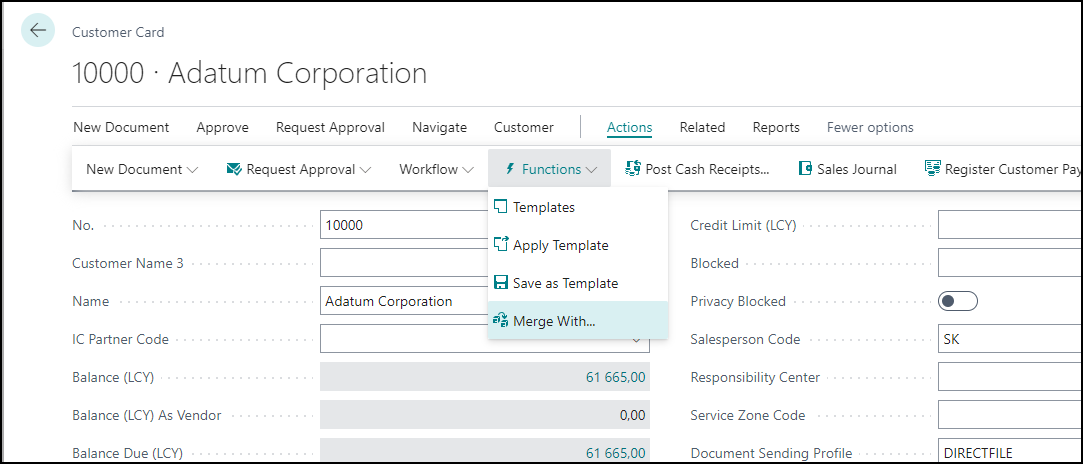
    In the standard system there is a merge function that can be used to merge customers if you for some reason got a doublet.
    pastedimage1660948481375v1.png

    In my experience it is better to create a page that can show go to from time to time that can show you potential doublets and then you can check if they actually are doublets or not.

    I know many users wish for functions like this when they are new to a system, but then after a while they really don't see a need for it any more.

    But Josh have given you a good approach if you really want to go ahead with it.

Under review

Thank you for your reply! To ensure a great experience for everyone, your content is awaiting approval by our Community Managers. Please check back later.

Helpful resources

Quick Links

Introducing the 2026 Season 1 community Super Users

Congratulations to our 2026 Super Stars!

Meet the Microsoft Dynamics 365 Contact Center Champions

We are thrilled to have these Champions in our Community!

Congratulations to the April Top 10 Community Leaders

These are the community rock stars!

Leaderboard > Small and medium business | Business Central, NAV, RMS

#1
OussamaSabbouh Profile Picture

OussamaSabbouh 2,138 Super User 2026 Season 1

#2
YUN ZHU Profile Picture

YUN ZHU 1,279 Super User 2026 Season 1

#3
AndrewThomas81 Profile Picture

AndrewThomas81 1,192

Last 30 days Overall leaderboard

Featured topics

Product updates

Dynamics 365 release plans
