Hi,
When you add <div data-editorblocktype="Button"> around your "a attribute" (link) and using the designer toolbox (on the right in the screen) D365 for Marketing designer will automaticly add VML element to the HTML. This results in buttons that are not displayed correctly in Micorsoft Outlook, example;
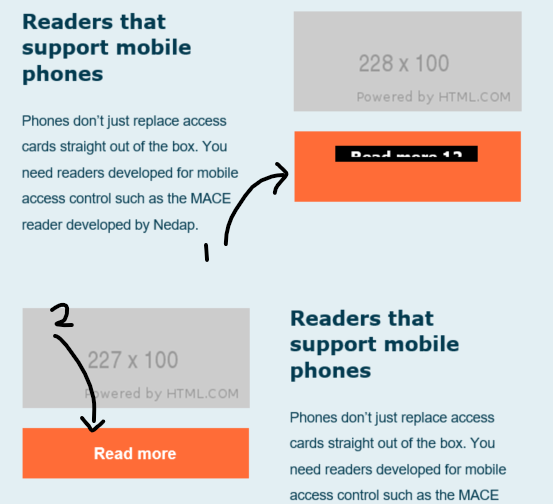
- The first button is the incorrect one (with <div data-editorblocktype="Button">)
- The second button is the one how it should be (this one is without <div data-editorblocktype="Button">)
The automaticly added VML-code;
<!--[if mso]><div align=""><v:rect xmlns:v="urn:schemas-microsoft-com:vml" xmlns:w="urn:schemas-microsoft-com:office:word" href="http://link/" style='height:20px;v-text-anchor:middle;width:178px;' strokecolor='rgba(0, 0, 0, 0)' stroke='false' strokeweight='0' fillcolor='rgba(0, 0, 0, 0)' data-msdyn-tracking-id='6925d55b16ac21559907217027'><w:anchorlock></w:anchorlock><center style='color:rgb(255, 255, 255);font-family:Tahoma,Arial,sans-serif;font-size:16px;font-weight:bold; mso-line-height-rule:exactly;line-height:16px'>Read more 12</center></v:rect></div><![endif]-->
Original HTML code with <div data-editorblocktype="Button">
<table width="100%" cellpadding="0" cellspacing="0">
  <tbody><tr>
	<td mc:edit="block_17" class="active-t btn-03" align="center" style='background:#ff6c37;mso-padding-alt:14px 24px;font:700 16px/20px Arial, Helvetica, sans-serif;border:1px solid #ff6c37;border-radius:4px;'>
	  <a style='display:block;text-decoration:none;color:#fff;padding:14px 24px;' href='http://link/">Read more 12</a>
	</td>
  </tr>
</tbody></table>
Orginal HTML code without:
<table width="100%" cellpadding="0" cellspacing="0">
  <tbody><tr>
	<td mc:edit="block_17" class="active-t btn-03" align="center" style='background:#ff6c37;mso-padding-alt:14px 24px;font:700 16px/20px Arial, Helvetica, sans-serif;border:1px solid #ff6c37;border-radius:4px;'>
	  <div data-container='true'><div data-editorblocktype='Button'><a style='display:block;text-decoration:none;color:#fff;padding:14px 24px;' href='http://link/">Read more 12</a></div></div>
	</td>
  </tr>
</tbody></table>
Is there anyway to disable this automatic functionality or to influence the styling of the VML element?
Thank you in advance!


