web
You’re offline. This is a read only version of the page.
close
Skip to main content

Notifications

Announcements

Community site session details

Community site session details

Session Id :
Customer experience | Sales, Customer Insights,...
Answered

Importing Notes on Accounts to Dynamics CRM

(0) ShareShare
ReportReport
Posted on by 265

Hello Everyone, 

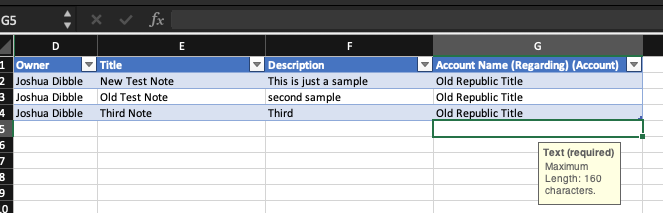
I am attempting to run a test import, including notes held in a different CRM. I have downloaded the note import template and added a field to the heading of "Account Name (Regarding) (Account)." This is to match the note to the account it belongs to. I will worry about Overriding createdOn dates later. 

Here is what my import template looks like.
 Screen-Shot-2020_2D00_07_2D00_15-at-4.23.30-PM.png

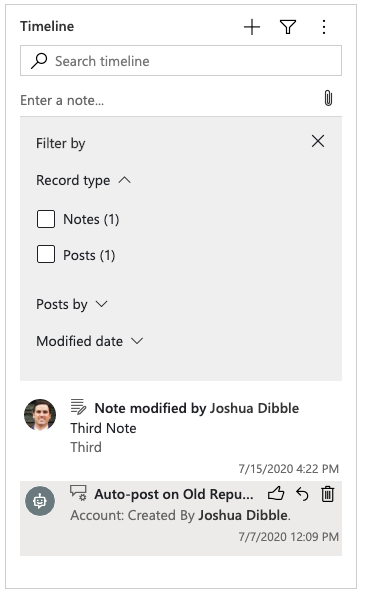
I can see that after importing this data that it only imported the last note on the template to the account instead of all three. 
Screen-Shot-2020_2D00_07_2D00_16-at-11.00.16-AM.png

How can I get the form right so that I can add a couple of hundred notes at a time, and they all track to the right account as separate notes?

I am willing to reward the persons who help me with my questions. I so appreciate your time and help. 

All the best, 

Josh

Additional Photo of hidden columns A,B,C that come downloaded from the template of note import 

Screen-Shot-2020_2D00_07_2D00_16-at-11.56.52-AM.png

Screen-Shot-2020_2D00_07_2D00_16-at-11.59.29-AM.png

I have the same question (0)
  • a33ik Profile Picture
    84,331 Most Valuable Professional on at

    Josh,

    Your images are not available.

  • Dribblej Profile Picture
    265 on at

    I edited the post and re attached the images. I hope you can see them now.

  • a33ik Profile Picture
    84,331 Most Valuable Professional on at

    Josh,

    Now I see it. Can you please expand columns A-C and give a screenshot that will shows those columns?

  • Dribblej Profile Picture
    265 on at

    I updated the original post with the photos of the first 3 column headers. When I download the templete for importing notes thats what comes with it. I have been adding the Regarding Account Name manually.

  • Verified answer
    Bipin D365 Profile Picture
    28,983 Moderator on at

    Hi,

    I got it why it is only creating third notes. SInce you have added 3 hidden fields and it will create first record and for second record it will be update so updated the first notes with second data. Now for the thrid record also it will be update and updated with thrid notes. This is why you see only one notes with third notes details on account.

    To fix this issue, follow below approach which i have tried in my trial and it is working as expected.

    1. Create CSV file with only four column

    CQ52.PNG

    2. Save this file on your local machine. Now navigate to Settings->Data Management->Import Data->Browse csv File->Next->next->Select Notes entity in dropdown

    CQ47.PNG

    3. Click Next and map Account lookup to set based on full name

    CQ48.PNG

    CQ49.PNG

    4. Now map Owner lookup based on full name

    CQ50.PNG

    4. click next ->next->submit->wait for the import to complete

    5. check account record and see below image all 3 records notes are imported successfully

    CQ51.PNG

    If found helpful, Please mark my answer verified.

  • Verified answer
    a33ik Profile Picture
    84,331 Most Valuable Professional on at

    Bipin generally speaking stole my idea but seems that this is truth - instead of inserts your import just updates existing records. So in order to import the data you can follow steps that Bipin suggested.

  • Dribblej Profile Picture
    265 on at

    Thank you so much Bipin!

  • Dribblej Profile Picture
    265 on at

    Thank you so much Andrew.

  • Dribblej Profile Picture
    265 on at

    If I wanted to add the overidecreatedon (Record Created On) field to this can I just add that field manually to the header and add the dates the note was orginally created on so it reflects this date in the import onto the account?

  • Ralf_WiFa Profile Picture
    29 on at

    Good day!

    I followed step by step your introduction in this post hower I'm receiving the following error.

    Do you have any idea what cloud be the error source? 

    0083.error.png

Under review

Thank you for your reply! To ensure a great experience for everyone, your content is awaiting approval by our Community Managers. Please check back later.

Helpful resources

News and Announcements

Season of Giving Solutions is Here!

Quick Links

Responsible AI policies

As AI tools become more common, we’re introducing a Responsible AI Use…

Neeraj Kumar – Community Spotlight

We are honored to recognize Neeraj Kumar as our Community Spotlight honoree for…

Leaderboard > Customer experience | Sales, Customer Insights, CRM

#1
Pallavi Phade Profile Picture

Pallavi Phade 98

#2
Tom_Gioielli Profile Picture

Tom_Gioielli 79 Super User 2025 Season 2

#3
TAHER Mehdi Profile Picture

TAHER Mehdi 48

Last 30 days Overall leaderboard

Product updates

Dynamics 365 release plans

