web
You’re offline. This is a read only version of the page.
close
Skip to main content

Announcements

No record found.

News and Announcements icon
Community site session details

Community site session details

Session Id :
Microsoft Dynamics AX (Archived)

Control Alignment under Amount Column with Debit and Credit values

(0) ShareShare
ReportReport
Posted on by

Dear All,

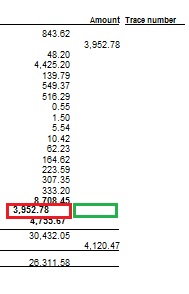
I have a question about the alignment of controls on the reports. I have the LedgerTransactionList Report where I am printing the monthly debit and credit subtotals. The problem I am facing is that, as the Amount column has both debit and credit values and there are no separate columns for the debit and credit values, when I want to print monthly subtotals I can only align one control either debit one or credit one, by using the ModelFieldName property of the control. As you can see in the image the debit monthly subtotal of 8708.45 is properly aligned but the credit monthly subtotal of 3,952.78 is not. It should be somewhere where I have placed the green box.
debit_2D00_credit_2D00_subtotal_2D00_alignment.jpg

Right now I am using the Left property to position the control in red.

Is there a way that under the Amount column, the credit monthly subtotal comes neatly under credit values?

Thanks in advance for your time and help.

*This post is locked for comments

I have the same question (0)
  • Verified answer
    syed baber Profile Picture
    11,633 on at

    Hi Sajid,

    Try to use the EDT AmountMSTDebCred for your subTotal field. I believe it will do the task which you are after.

    Please verify and let me know if you have further queries.

    Thanks,

    Baber.

  • Community Member Profile Picture
    on at

    Dear Baber,

    Thanks for guiding me in the right direction. Fixed 95% of the problem.

    I did the following steps:

    1. Changed the data type of the two variables holding monthly subtotals and EDT of the two controls showing debit and credit monthly subtotals to AmountMSTDebCred.

    2. The ModelFieldName of the two controls for debitMonthlySubtotal and creditMonthlySubtotal were set to same field/column Amount.

    It fixed the issue but the only small problem which remains is that in case the subtotal of credit values is 0.00 for a given month instead of printing creditMonthlySubtotal under credit values the control prints it over the debitMonthlySubtotal.

    For the creditMonthlySubtotal of 167.69 as it is not 0.00 the value got printed correctly under the debit values.

    debit_2D00_credit_2D00_subtotal_2D00_alignment_2D00_2.jpg

    For the creditMonthlySubtotal of 0.00 the value printed over the debitMonthlySubtotal as shown in the screenshot below.

    debit_2D00_credit_2D00_subtotal_2D00_alignment_2D00_2.jpg

    So basically the problem is with printing monthlyCreditSubtotal when it is 0.00 as it does not print to the right side, the green box. For other months where the monthlyCreditSubtotal is not 0.00 it prints perfectly fine on the right side.

    Thanks for you time an patience.

    Sajid

  • Verified answer
    syed baber Profile Picture
    11,633 on at

    Hi Sajid,

    Glad that it helped. There is a property on EDT AmountMSTDebCred which is "ShowZero". If you set it to No, the value will not be displayed if it is zero. Please verify if this fulfils your requirement. It it does, then I would suggest you to create a new EDT  which extends from AmountMSTDebCred, instead of modifying this as it may impact other areas in the system.

    Please let me know if you have further queries related to this.

    Thanks,

    Baber.

  • Community Member Profile Picture
    on at

    Yes Baber,

    That was what I guessed and your expert opinion endorses that. I did that. It solved my problem. I hope Accounting people will not bother to have 0.00 when there is no credit value for that month.

    Thanks for your great help.

    Have a nice day.

  • syed baber Profile Picture
    11,633 on at

    Make sure to create a new EDT which extends from AmounstMSTDebCred instead of changing the original EDT.

    Thanks,

    Baber.

Under review

Thank you for your reply! To ensure a great experience for everyone, your content is awaiting approval by our Community Managers. Please check back later.

Helpful resources

Quick Links

Introducing the 2026 Season 1 community Super Users

Congratulations to our 2026 Super Stars!

Meet the Microsoft Dynamics 365 Contact Center Champions

We are thrilled to have these Champions in our Community!

Congratulations to the April Top 10 Community Leaders

These are the community rock stars!

Leaderboard > 🔒一 Microsoft Dynamics AX (Archived)

#1
CP04-islander Profile Picture

CP04-islander 39

#2
Michel ROY Profile Picture

Michel ROY 14

#3
imran ul haq Profile Picture

imran ul haq 8

Last 30 days Overall leaderboard

Featured topics

Product updates

Dynamics 365 release plans
