web
You’re offline. This is a read only version of the page.
close
Skip to main content

Announcements

No record found.

News and Announcements icon
Community site session details

Community site session details

Session Id :
Finance | Project Operations, Human Resources, ...
Suggested Answer

Reporting RDL Sandboxing rules addon not working

(0) ShareShare
ReportReport
Posted on by 72

Hello!

I'm trying to enable Reporting RDL Sandboxing rules addon in dev-vm from the UI.

Visual studio verson is 2019 and report server configuration is following
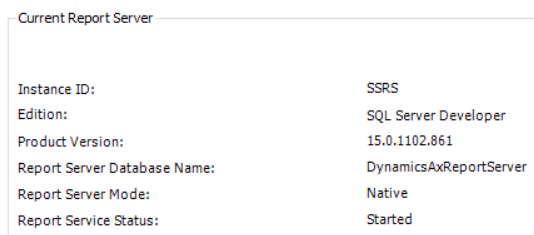
pastedimage1681117027258v2.png

For some reason i get following error, when trying to enable add on through visual studio
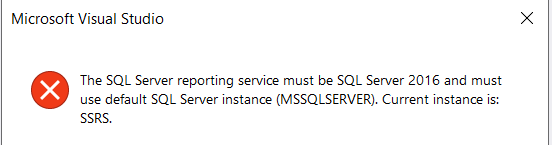
pastedimage1681116799226v1.png

the current instance is indeed SSRS.

But whole system is created through LCS and the UI without any manual steps.

Is there any way to bypass this error, and enable RDL Sandboxing rules?

I have the same question (0)
  • André Arnaud de Calavon Profile Picture
    303,363 Super User 2026 Season 1 on at

    Hi mbazioss,

    What is the business case to enable RDL Sandboxing rules on this environment? It is used to manage access in case of a web farm of report servers.

  • mbazioss Profile Picture
    72 on at

    Hi Andre.

    The issue we have is that we created a custom report in dev vm, and all seemed fine.

    Then we deployed it on sandbox and there other rules apply(when RDLSandboxing is enabled), so the run of the report was not successful.

    We want to investigate the issues that we have when trying to run report on sandbox, on dev machine.

  • mbazioss Profile Picture
    72 on at

    Hi again! after some hours of investigation i figured out the reason!

    From following url

    learn.microsoft.com/.../enable-and-disable-rdl-sandboxing

    section -> Example Configuration i copied the <RDLSandboxing>  

    node as last node on rsreportserver.config file. 

    pastedimage1681125403468v1.png

    Lastly i restarted SQL Server Reporting Services

  • Suggested answer
    Komi Siabi Profile Picture
    13,190 Most Valuable Professional on at

    Great!

    Now that you have it activated, you should be able to have the same error on dev, resolve it, then redeploy to the Test environment. 

Under review

Thank you for your reply! To ensure a great experience for everyone, your content is awaiting approval by our Community Managers. Please check back later.

Helpful resources

Quick Links

Introducing the 2026 Season 1 community Super Users

Congratulations to our 2026 Super Stars!

Congratulations to our 2025 Community Spotlights

Thanks to all of our 2025 Community Spotlight stars!

Leaderboard > Finance | Project Operations, Human Resources, AX, GP, SL

#1
André Arnaud de Calavon Profile Picture

André Arnaud de Cal... 509 Super User 2026 Season 1

#2
Giorgio Bonacorsi Profile Picture

Giorgio Bonacorsi 375

#3
Adis Profile Picture

Adis 268 Super User 2026 Season 1

Last 30 days Overall leaderboard

Product updates

Dynamics 365 release plans



