web
You’re offline. This is a read only version of the page.
close
Skip to main content

Announcements

No record found.

News and Announcements icon
Community site session details

Community site session details

Session Id :
Microsoft Dynamics AX (Archived)

Error Message: 'Summary account for customer "X" in posting profile "Y" does not exist' when printing

(0) ShareShare
ReportReport
Posted on by

Hello and good day

i have tried to do all suggested sulotions to this matter that is provided by our SLA partner & this website, and still it is very troubling, and here are the condetions that is happening in it

* happens only in general journal, when the line is consisted of Vendor in the account, and customer in the offset account

* Validating & Posting goes smoothly with no errors

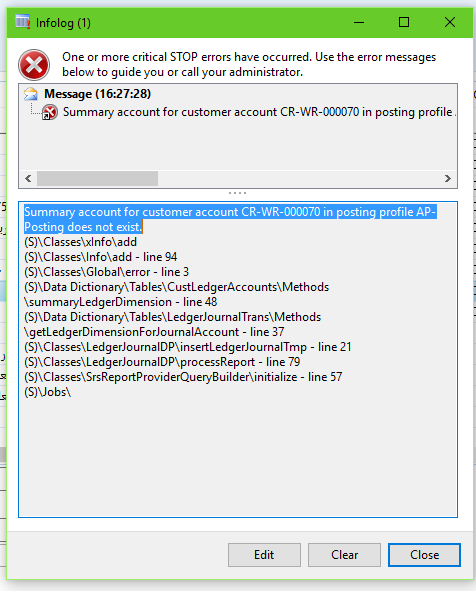
* error shows only when trying to print out the journal, and the following message appears
issueITBE10008.png

[[ Summary account for customer account CR-WR-000070 in posting profile AP-Posting does not exist. ]]

note: the printing of the journal is very important to our company policy

let us start fresh and i need your help on this issue, i fresh set of eyes can help

(using Dynamics AX 2012 R2)

*This post is locked for comments

I have the same question (0)
  • Verified answer
    Brandon Wiese Profile Picture
    17,790 on at

    This is a bug we've seen before in these forums.  In another post I actually found the piece of code responsible for it in the report.

    As a work around, I believe you can break your vendor/customer voucher into 2 different lines and the error will go away.  It stems from having only one Posting profile field on the LedgerJournalTrans record, which the report tries to use for both the customer and vendor record, so unless you're posting profiles are identically named in A/R and A/P, can never work.

  • Brandon Wiese Profile Picture
    17,790 on at

    Here was the other thread.

    community.dynamics.com/.../475919

  • Community Member Profile Picture
    on at

    Thank you for your help, i also checked the thread, apparently we need to start updating our modules.

    your suggestion for breaking it into 2 lines worked.

  • Mohamed K. Soliman Profile Picture
    25 on at

    I solved this issue by created a posting Profile in Vendor Posting Profile with the given name in the error MSG 

    and it worked for me.

  • Community Member Profile Picture
    on at

    Customer posting profiles worked for me

    Click Accounts receivable > Setup > Customer posting profiles.

    Use this form to set up the profiles that control the posting of customer transactions to the general ledger.

Under review

Thank you for your reply! To ensure a great experience for everyone, your content is awaiting approval by our Community Managers. Please check back later.

Helpful resources

Quick Links

Introducing the 2026 Season 1 community Super Users

Congratulations to our 2026 Super Stars!

Meet the Microsoft Dynamics 365 Contact Center Champions

We are thrilled to have these Champions in our Community!

Congratulations to the March Top 10 Community Leaders

These are the community rock stars!

Leaderboard > 🔒一 Microsoft Dynamics AX (Archived)

#1
CP04-islander Profile Picture

CP04-islander 39

#2
Michel ROY Profile Picture

Michel ROY 14

#3
imran ul haq Profile Picture

imran ul haq 8

Last 30 days Overall leaderboard

Featured topics

Product updates

Dynamics 365 release plans
