web
You’re offline. This is a read only version of the page.
close
Skip to main content

Notifications

Announcements

No record found.

Community site session details

Community site session details

Session Id :
Microsoft Dynamics AX (Archived)

AX 2012 R2 CU9 compatibility for Sql Server, Virtual Machine and Operating System

(0) ShareShare
ReportReport
Posted on by 561

Hi,

We are using the below OS and Sql Server for AX 2012 R2 CU9,

Current Windows Version: Windows Server 2008 R2 Enterprise SP1

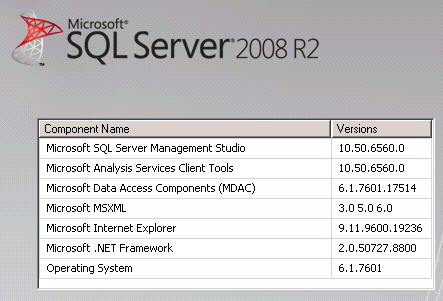
Current Sql Server Version: Sql Server 2008 R2 10.50.6560 (SP3)
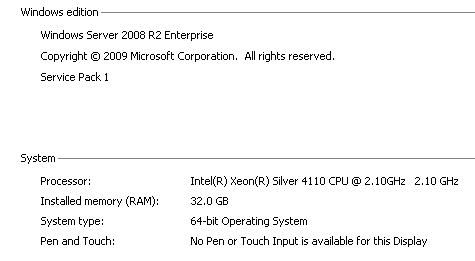
1541.d2.PNG

4265.d1.PNG

I need to know the AX 2012 R2 CU9 compatibility for Sql Server, Virtual Machine and Operating System.

Which Sql Server Latest Version Supports AX 2012 R2 CU9

Which Virtual Machine Latest Version Supports  AX 2012 R2 CU9

Which Operating System Latest Version Supports AX 2012 R2 CU9 and Sql Server.

Could you please provide me any details?

Thanks

Shan

*This post is locked for comments

I have the same question (0)
  • Suggested answer
    nmaenpaa Profile Picture
    101,162 Moderator on at

    You can find this information in Dynamics AX 2012 System Requirements document. And that document you will find easily with a web search.

  • shanawaz davood basha Profile Picture
    561 on at

    Hi Nikolaos,

    Thanks for reply.

    If we want to upgrade only the sql server from  sql server 2008 R2 SP3  to       Sql server 2014 SP2/ sql server 2012 sp3,

    What are the necessary steps to do when we upgrade the sql server from sql server 2008 R2 SP3    to          Sql server 2014 SP2/ sql server 2012 sp3?

    Could you please provide me any details?

    Thanks

    Shan

  • shanawaz davood basha Profile Picture
    561 on at

    Hi Nikolaos,

    We are planning to move the sql server database to another server with upgraded higher version.

    What are the necessary steps to do?

    Could you please provide me any details?

    Thanks

    Shan

  • André Arnaud de Calavon Profile Picture
    301,146 Super User 2025 Season 2 on at

    Hi Shan,

    Like Nikolaos mentioned, you first have to verify compatibility in the system requirements guide. www.microsoft.com/.../details.aspx.

    In this guide, you can see if you need to upgrade AX 2012 to be able to be compatible with the new SQL server version as well.

    If your version is compatible, you can install a new database server. Then stop the AOS services. Copy the database to the new DB server. Change the AOS configuration files to point to the new database server. To be sure, stop the old DB server or suspend the database before starting the AOS services again.

Under review

Thank you for your reply! To ensure a great experience for everyone, your content is awaiting approval by our Community Managers. Please check back later.

Helpful resources

Quick Links

Responsible AI policies

As AI tools become more common, we’re introducing a Responsible AI Use…

Neeraj Kumar – Community Spotlight

We are honored to recognize Neeraj Kumar as our Community Spotlight honoree for…

Leaderboard > 🔒一 Microsoft Dynamics AX (Archived)

#1
Martin Dráb Profile Picture

Martin Dráb 4 Most Valuable Professional

#1
Priya_K Profile Picture

Priya_K 4

#3
MyDynamicsNAV Profile Picture

MyDynamicsNAV 2

Last 30 days Overall leaderboard

Featured topics

Product updates

Dynamics 365 release plans