web
You’re offline. This is a read only version of the page.
close
Skip to main content

Notifications

Announcements

No record found.

Community site session details

Community site session details

Session Id :
Microsoft Dynamics CRM (Archived)

How to edit Quote Report template?

(0) ShareShare
ReportReport
Posted on by

Hey guys,

I want to edit the layout of our quote report in CRM 2011 on-premise.  Right now we're using a rather roundabout method of mail merges so that we can stick to the company template with our logo on it, and the report method is much easier.

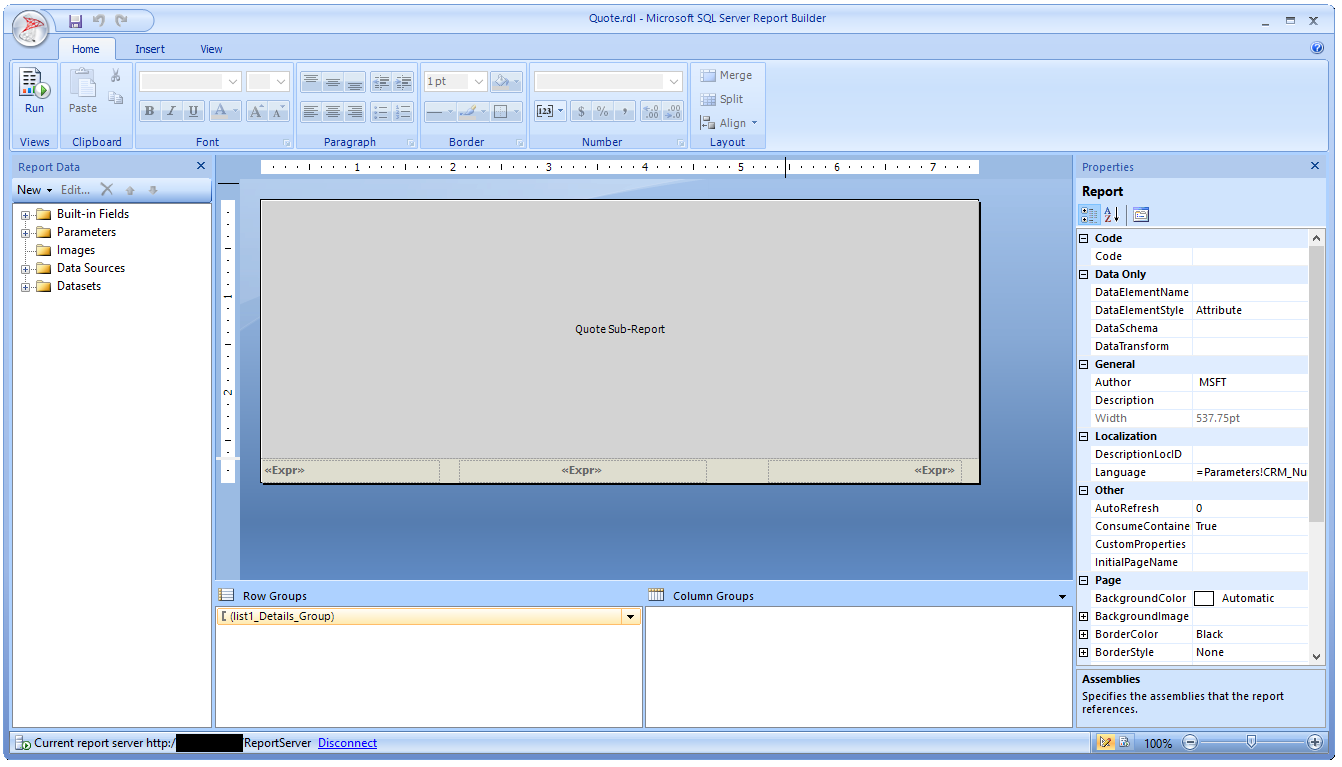
When I open the Quote.rdl file, this is all I see:
BxyQ2Wa_5B00_1_5D00_.png

I cannot find any way to edit that sub-report.  I can right-click on it and select "Sub-report properties" but nothing that gives me a graphical editor where I can insert a logo and rearrange the fields to fit a template.

Is there a different program I should be using? I've tried Visual Studio but I'm not good with code which is why the Report Builder is a godsend... when it works, at least!

*This post is locked for comments

I have the same question (0)
  • Jason M. Cosman Profile Picture
    5,234 Moderator on at

    Hello drfsupercenter;

    The Sub-report is actually a different report. You would have to find it and then you'll get the editor in which you wish for.

  • Community Member Profile Picture
    on at

    Is it stored as a .rdl file like the main report? I would have figured it was self-contained hence the term SUB report...

  • Jason M. Cosman Profile Picture
    5,234 Moderator on at

    It's stored as a separate .rdl file like the main report yes. If you were to click into that sub report region it should show you the name of the report it's referencing. I believe it's like Quote Detail or something of that nature. Subreports are done quiet often and can be very useful. Your able to pass parameters you want down to the subreport which causes further filtering.

  • Community Member Profile Picture
    on at

    OK, I found it.  When I try to run it though, I get this:

    "The selected data extension MSCRM is not installed or cannot be loaded.  Verify that the selected data extension is installed on the client for local reports and on the report server for published reports."

    Do I need to install something else to be able to preview the reports?

  • Jason M. Cosman Profile Picture
    5,234 Moderator on at

    I assume you have BIDS installed in visual studio as well? If it's a sub report might not be able to directly run it if it's expecting content or a passed in paremter.

  • Community Member Profile Picture
    on at

    Good point about the sub-report, but I can't run any of them at all, I get errors about FetchXML sources... I think I have BIDS but I'm not sure.  Can you link me to the exact file I need for the SQL Server Report Builder that I have?

Under review

Thank you for your reply! To ensure a great experience for everyone, your content is awaiting approval by our Community Managers. Please check back later.

Helpful resources

Quick Links

Responsible AI policies

As AI tools become more common, we’re introducing a Responsible AI Use…

Neeraj Kumar – Community Spotlight

We are honored to recognize Neeraj Kumar as our Community Spotlight honoree for…

Leaderboard > 🔒一 Microsoft Dynamics CRM (Archived)

#1
SA-08121319-0 Profile Picture

SA-08121319-0 4

#1
Calum MacFarlane Profile Picture

Calum MacFarlane 4

#3
Alex Fun Wei Jie Profile Picture

Alex Fun Wei Jie 2

Last 30 days Overall leaderboard

Featured topics

Product updates

Dynamics 365 release plans



