web
You’re offline. This is a read only version of the page.
close
Skip to main content

Announcements

No record found.

News and Announcements icon
Community site session details

Community site session details

Session Id :
Microsoft Dynamics AX (Archived)

how to know table name in AX 2012

(0) ShareShare
ReportReport
Posted on by 60

Hi all ,

i need help ,,, 

My case is : i imported release products using Data Import Export  Framework 

i found Search name empty 
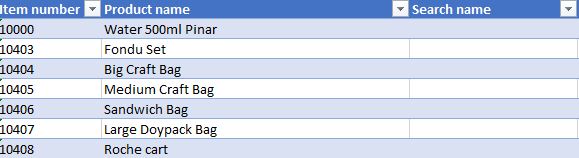
3173.1.JPG

how to solve this problem

should i update using SQL 

I Need to know the table name in side database

how to find it ..there is any way to know any display name  

how to find Search Name ,,,, what is the name in AOT

*This post is locked for comments

I have the same question (0)
  • Verified answer
    Sohaib Cheema Profile Picture
    49,664 Super User 2026 Season 1 on at

    Search name is saved in NameAlias(Field) of InventTable.

    You can update data using excel add-in or using DIXF. interaction with direct SQL is non-healthy sometimes.

  • Verified answer
    Vilmos Kintera Profile Picture
    46,149 on at

    You can right click the field in AX for which you would like to know what table and field/display method does it belong to, and select the Personalize option. You will see the information in the bottom right text control.

  • André Arnaud de Calavon Profile Picture
    305,125 Super User 2026 Season 1 on at

    Hi Ekrami,

    In AX2012 the search name is stored in the table EcoResProduct. The released products table (InventTable) has a field Product which is linked with the record ID of the EcoResProduct table.

  • Ekrami Mikhail Profile Picture
    60 on at

    Thank you Sohaib for your advise .. i will try using DIXF OR EXCEL

  • Ekrami Mikhail Profile Picture
    60 on at

    Thank you Sohaib for your advise ,, i will do this

  • Ekrami Mikhail Profile Picture
    60 on at

    Thank you Andre ,, i check the table in database & i found search name is have data but not shown .

  • Ekrami Mikhail Profile Picture
    60 on at

    Thanks Vilmos ,,,

  • Verified answer
    André Arnaud de Calavon Profile Picture
    305,125 Super User 2026 Season 1 on at

    Hi Ekrami,

    Your question was about a table name. The value was indeed empty, as it was already empty in the screenshot you provided.

    You can use the Product entity in DIXF to update the Search name.

  • Suggested answer
    Community Member Profile Picture
    on at

    Hi Ekrami Mikhail,

    Please try this JOB to update NameAlias Data. It will work.

    static void UpdateNameAlias(Args _args)
    {
         SysExcelApplication application;
         SysExcelWorkbooks workbooks;
         SysExcelWorkbook workbook;
         SysExcelWorksheets worksheets;
         SysExcelWorksheet worksheet;
         SysExcelCells cells;
         COMVariantType type;
         Name name;
         FileName filename;
         int row =1;
         int i=0;
         InventTable         inventTableLoc;
         ItemId              itemid;
         TransDate           transdate;
         str                 nameAlias;
         Dialog dialog;
         DialogField dialogField;
         ;
         application = SysExcelApplication::construct();
         workbooks = application.workbooks();
         dialog = new Dialog("FileOpen");
         dialogfield = dialog.addField(extendedTypeStr(Filenameopen), "File Name");
         dialog.run();

         if (dialog.run())
         {
            filename = (dialogfield.value());
         }
         try
         {
         workbooks.open(filename);
         }
         catch (Exception::Error)
         {
         throw error("File cannot be opened.");
         }
         workbook = workbooks.item(1);
         worksheets = workbook.worksheets();
         worksheet = worksheets.itemFromNum(1);
         cells = worksheet.cells();
         do
         {
             ttsBegin;
         row++;
         itemid    = cells.item(row, 1).value().bStr();
         nameAlias = cells.item(row, 2).value().bStr();
         inventTableLoc = InventTable::find(itemid,true);
         inventTableLoc.NameAlias = nameAlias;
         inventTableLoc.update();
             ttsCommit;
         i++;
         type = cells.item(row+1, 1).value().variantType();
         }
         while (type != COMVariantType::VT_EMPTY);
         application.quit();
         info("Done");
         info(strFmt("%1", i));
    }

    Thanks,

    Suresh

  • Suggested answer
    Ekrami Mikhail Profile Picture
    60 on at

    Dear Andre

    can u help me i need SQL Query for updating field NAMEALIAS ( InventTable )

    Repeated-Item.JPG

    Dear Andre above image show NAMEALIAS empty except some i filled manually from AX Client

    i have about 400 item i need to update

    when i'm checking  Released Product ( EcoResProductTranslation ) in Database i found all item duplicated like this image below

    lRepeated-Item.JPG

    Appreciate 

Under review

Thank you for your reply! To ensure a great experience for everyone, your content is awaiting approval by our Community Managers. Please check back later.

Helpful resources

Quick Links

Introducing the 2026 Season 1 community Super Users

Congratulations to our 2026 Super Stars!

Meet the Microsoft Dynamics 365 Contact Center Champions

We are thrilled to have these Champions in our Community!

Congratulations to the April Top 10 Community Leaders

These are the community rock stars!

Leaderboard > 🔒一 Microsoft Dynamics AX (Archived)

#1
CP04-islander Profile Picture

CP04-islander 24

#2
Michel ROY Profile Picture

Michel ROY 14

#3
imran ul haq Profile Picture

imran ul haq 8

Last 30 days Overall leaderboard

Featured topics

Product updates

Dynamics 365 release plans
