web
You’re offline. This is a read only version of the page.
close
Skip to main content

Notifications

Announcements

No record found.

Community site session details

Community site session details

Session Id :
Finance | Project Operations, Human Resources, ...
Suggested Answer

My Visual studio freeze and crash

(0) ShareShare
ReportReport
Posted on by 901

Hello guys,

What could be the reason when Visual Studio freeze and crash ? like this ->
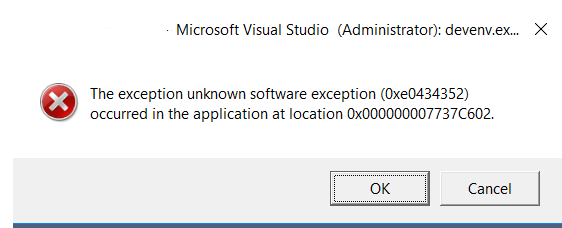
pastedimage1631207065830v1.png

I don't know what's wrong but this is inside my VM, when it used to be fine all this time. but today I cannot do anything since every time I tried to type something in code editor, it will freeze then just shut down.

Could it be some memory failure ? 

Could this happened because the VM before this happened is forced to shut down while I still opened my VS ? For cost saving issue, my company recently applied scheduled shut down, and sometime when I leave my VS open then for some reason leave my work, then the VM is forced to shut down on that scheduled time.

When it happened, if I run again my VM, then open back Visual studio, I will get the message like there is a "dump file" which I've been asking whether to save or not. Always choose no, because it's not really important. Could it be because of this "regular" shut down abruptly damaged my Visual Studio installation ?

Kindly advice,

Thanks

I have the same question (0)
  • Suggested answer
    Sheikh Sohail Profile Picture
    6,125 on at

    Hi

    Please restart the VM and disable the Batch job services and DMF services, and try to use IISExpress.

  • Tony zhong Profile Picture
    901 on at

    Hi Sohail,

    I did restart my VM, but the case still happened. However for the batch job services and DMF, I'm quite confuse what is the relation of it? just to make sure, these 2 right ? ->

    pastedimage1631502567689v1.png

    Also about IISExpress, did u mean debug ? but I haven't start to run anything, it is just open some data entity and open its method.  A simple "enter key" to make a new line already make it freeze and after a while Visual Studio shut down. It is VS version 2017, btw.

    Thanks,

  • Tony zhong Profile Picture
    901 on at

    Hi,

    Anything special with override method "mapEntityToDataSource" ? because I just realized, it is happened in this method.

    When I override this method, and get this template ->

       public void mapEntityToDataSource(DataEntityRuntimeContext _entityCtx, DataEntityDataSourceRuntimeContext _dataSourceCtx)

       {

           super(_entityCtx, _dataSourceCtx);

       }

    Edit this code will makes it freeze, only by add new line (enter)

    Thanks

  • Suggested answer
    Sheikh Sohail Profile Picture
    6,125 on at

    Hi

    how many resources are in use by Batch services, you can verify in the task manager, and might be possible your VS is freezing because of the unavailability of the resources to execute the processes

  • Tony zhong Profile Picture
    901 on at

    Hi,

    I think this is not relates to Batch services, since this is only a Devbox with no real batch job and I also didn't add any custom batch job so it should be standard for F&O operational. And I checked the memory usage and processor is still low.

    It is something to do with data entity view which somehow makes it crash. It is not happening with normal classes or any places which usually we can put code in it.

    And I once succeeded to just copy all the methods from the original to my custom entity (because it is a duplication only, I removed the methods before). The methods copying is "no choice" because I cannot write anything to create new method. But succeeded once, and I can remarks some what I think not needed at the time and it is working just fine.

    But today is happening again, just because I want to un-remarks what I just remarks days before.

    This behavior is very strange.

    Thanks

  • MartinHegg Profile Picture
    5 on at

    Try to remove the word wrap checkbox in d365 extensions/options/text editor/X++/Word wrap.

Under review

Thank you for your reply! To ensure a great experience for everyone, your content is awaiting approval by our Community Managers. Please check back later.

Helpful resources

Quick Links

Responsible AI policies

As AI tools become more common, we’re introducing a Responsible AI Use…

Neeraj Kumar – Community Spotlight

We are honored to recognize Neeraj Kumar as our Community Spotlight honoree for…

Leaderboard > Finance | Project Operations, Human Resources, AX, GP, SL

#1
Martin Dráb Profile Picture

Martin Dráb 664 Most Valuable Professional

#2
André Arnaud de Calavon Profile Picture

André Arnaud de Cal... 522 Super User 2025 Season 2

#3
Sohaib Cheema Profile Picture

Sohaib Cheema 303 User Group Leader

Last 30 days Overall leaderboard

Product updates

Dynamics 365 release plans
