web
You’re offline. This is a read only version of the page.
close
Skip to main content

Notifications

Announcements

No record found.

Community site session details

Community site session details

Session Id :
Small and medium business | Business Central, N...
Suggested Answer

How to show only posted sales order in my Sales archive field

(0) ShareShare
ReportReport
Posted on by 200

Here I have field sales order archive where I have used table relation for getting orders, but I wanted to only show the posted sales order details in my field how can be done?
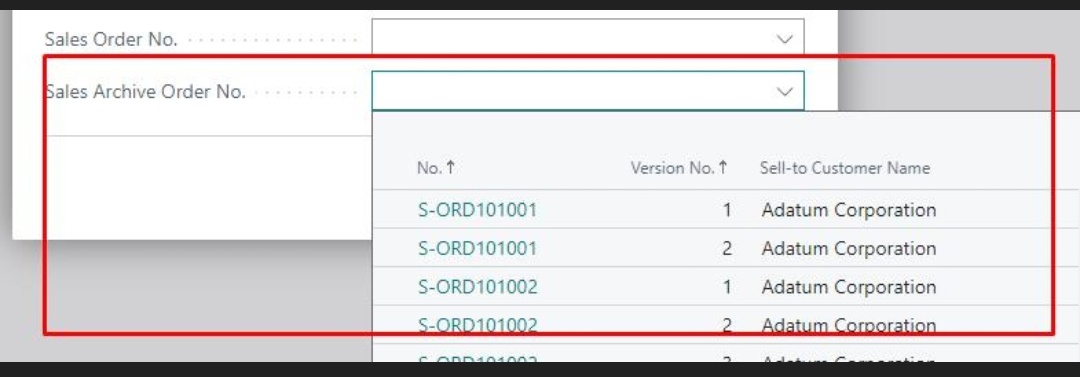
page 50418 EnquiryFilter

{

    Caption = 'EnquiryFilter';

    PageType = XmlPort;

    UsageCategory = Administration;

    ApplicationArea = all;

    layout

    {

        area(content)

        {

            group(General)

            {

                field(SalesNo; SalesNo)

                {

                    ApplicationArea = All;

                    TableRelation = "Sales Header"."No.";

                    Caption = 'Sales Order No.';

                    Editable = true;

                    trigger OnValidate()

                    begin

                        if (Rec.ExternalDocNo <> '') Or (Rec.shipToCode <> '') or (Rec.BillPostCode <> '') or (Rec.SalesOrderNo <> '') then begin

                            Rec.SalesOrderNo := SalesNo;

                            Rec.Modify();

                        end

                        else begin

                            Rec.Init();

                            Rec.No := CreateGuid();

                            Rec.SalesOrderNo := SalesNo;

                            Rec.Insert();

                        end;

                    end;

                }

                field(SalesArchiveNo; SalesArchiveNo)

                {

                    ApplicationArea = All;

                    TableRelation = "Sales Header Archive"."No.";

                    Caption = 'Sales Archive Order No.';

                    Editable = true;

                    trigger OnValidate()

                    begin

                        if ((Rec.ExternalDocNo <> '') Or (Rec.shipToCode <> '') or (Rec.BillPostCode <> '') or (Rec.SalesOrderArchive <> '')) and (Rec.SalesOrderNo = '') then begin

                            Rec.SalesOrderArchive := SalesArchiveNo;

                            Rec.Modify();

                        end

                        else begin

                            Rec.Init();

                            Rec.No := CreateGuid();

                            Rec.SalesOrderArchive := SalesArchiveNo;

                            Rec.Insert();

                        end;

                    end;

                }

            }

        }

    }

    var

        SalesNo: Code[20];

        SalesArchiveNo: Code[20];

        ExternalDOCNo: Code[35];

        PostCode: Code[50];

        shipToCode: Code[50]

;

        Archive: Boolean;

        Rec: Record EnquiryFilter;

}

I have the same question (0)
  • Suggested answer
    GER_Nico Profile Picture
    117 on at

    The posted invoices are stored in the "Sales Invoice Header" table. So use this table in the TableRelation instead of the "Sales Header" table.

    As far as I know, there are no archived posted invoices.

  • Dividutt Profile Picture
    200 on at

    Yes I can but, can I filter Sales header archive table by showing only posted sales order in my field.

    As I code according to sales archive order so?

  • Suggested answer
    Nitin Verma Profile Picture
    21,698 Moderator on at

    Hi,

    For Posted Archives records you can use below fields from Sales header Archive table.

  • Dividutt Profile Picture
    200 on at

    Hi where to use this field in my code , ,where I used sales archive field?

    Little confused on how to use it?

  • Suggested answer
    Nitin Verma Profile Picture
    21,698 Moderator on at

    Hi,

    you can use this field when look up archive table

  • Dividutt Profile Picture
    200 on at

    Sorry, I am getting Boolean error.

Under review

Thank you for your reply! To ensure a great experience for everyone, your content is awaiting approval by our Community Managers. Please check back later.

Helpful resources

Quick Links

Responsible AI policies

As AI tools become more common, we’re introducing a Responsible AI Use…

Neeraj Kumar – Community Spotlight

We are honored to recognize Neeraj Kumar as our Community Spotlight honoree for…

Leaderboard > Small and medium business | Business Central, NAV, RMS

#1
OussamaSabbouh Profile Picture

OussamaSabbouh 3,143

#2
Jainam M. Kothari Profile Picture

Jainam M. Kothari 1,694 Super User 2025 Season 2

#3
YUN ZHU Profile Picture

YUN ZHU 1,067 Super User 2025 Season 2

Last 30 days Overall leaderboard

Featured topics

Product updates

Dynamics 365 release plans
