Hi Adhha Adnan,
You can check the standard code with the developer to find out which field value is mapped in PO confirmation report to display the item description.
I think the detail what shows in 'Text' box in PO line under 'General' section; the same value is reflected in the confirmation report.
Otherwise; it may be picked directly from the Released products form for that item. Below screen shot is taken from D365 for your understanding.
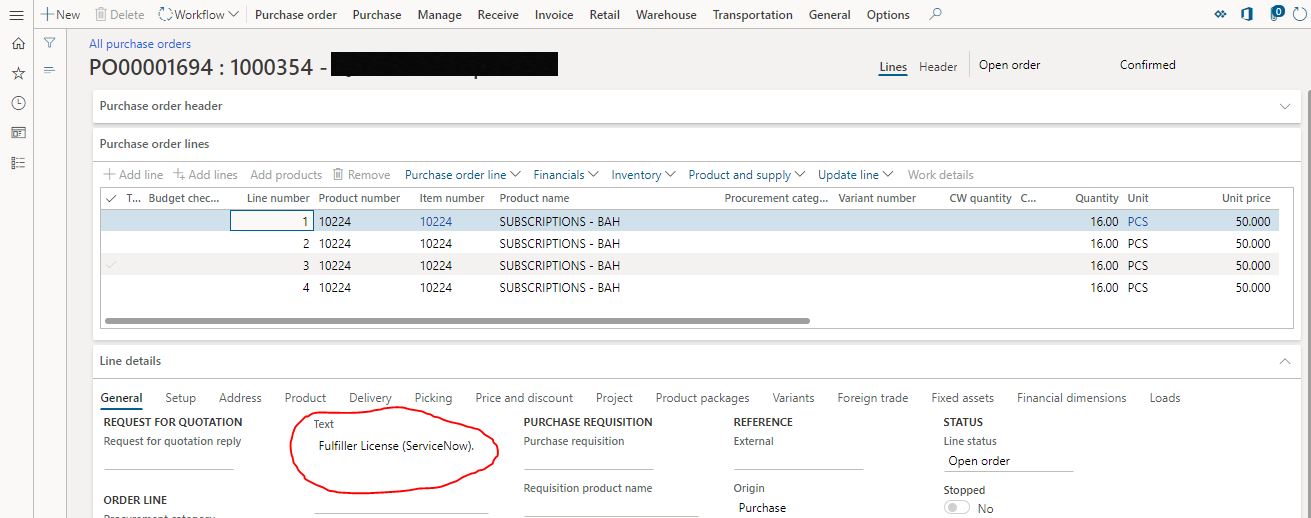
You might be getting a requirement from the client to display the same description whatever is mentioned in the above 'Text' area in PO line for the item.
Because in this 'Text' box, by default the item description will display once you select that item in PO. But you can further add any description in addition to the item description in this 'Text' area which need to be displayed in PO confirmation report.
In that case, if currently this field value is not mapped in standard PO confirmation report; you can then map this field to display.
Best regards,
Sourav Dam
Please take time to click 'Yes' against the answers that help you guide in right direction to help other community members.


