web
You’re offline. This is a read only version of the page.
close
Skip to main content

Notifications

Announcements

No record found.

Community site session details

Community site session details

Session Id :
Microsoft Dynamics 365 | Integration, Dataverse...
Suggested Answer

Email Signature goes blank when pressing save

(0) ShareShare
ReportReport
Posted on by 5

Every time an email signature is written, when it's time to save the signature editor just goes blank.

I also checked for OnSave or OnLoad events but there aren't any as well.

I've tried searching for this situation online, but haven't found one, so leaves me guessing if it's something that is configured wrong. I didn't work from the start on the environment and the people who did aren't available to be asked so I'm just going a bit in the dark for what could be the problem.

[View:/cfs-file/__key/communityserver-discussions-components-files/761/Media1.mp4:320:240]
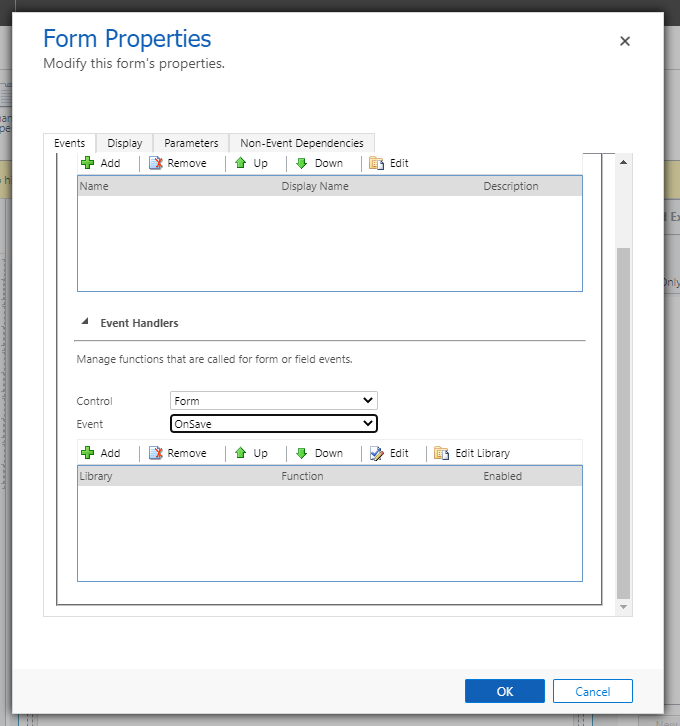
2728.PNG

I have the same question (0)
  • Suggested answer
    Ricardo Gimenez Profile Picture
    on at

    Hey,

    Please, follow this procedure and let me know if you can create the Signature. Try execute as System Administrator and after as a common user. Also, try to do it considering different browsers:

    https://docs.microsoft.com/en-us/dynamics365/customerengagement/on-premises/basics/create-signature-dynamics-365-email-queue

    Thanks,

  • VancouverSleep Profile Picture
    5 on at

    Hi Ricardo,

    Thank you for your suggestion, but I got the same result. I've noticed that the email signature created on the old UI works and I can add it to an email inside UCI and it shows up like it's supposed to, but if I try and see the content of the signature on the UCI, nothing shows up, the signature editor is blank. So the problem appears to only be happening on the UCI.

  • Suggested answer
    Bipin D365 Profile Picture
    28,983 Moderator on at

    Hi ,

    it seems to be a strange issue. As you have already mention that there is no custom code present.

    I would recommend to log support ticket with microsoft.

    admin.powerplatform.microsoft.com/

    Please Mark My Answer Verified If I Were Helpful

Under review

Thank you for your reply! To ensure a great experience for everyone, your content is awaiting approval by our Community Managers. Please check back later.

Helpful resources

Quick Links

Responsible AI policies

As AI tools become more common, we’re introducing a Responsible AI Use…

Neeraj Kumar – Community Spotlight

We are honored to recognize Neeraj Kumar as our Community Spotlight honoree for…

Leaderboard > Microsoft Dynamics 365 | Integration, Dataverse, and general topics

#1
Martin Dráb Profile Picture

Martin Dráb 41 Most Valuable Professional

#2
iampranjal Profile Picture

iampranjal 39

#3
Satyam Prakash Profile Picture

Satyam Prakash 35

Last 30 days Overall leaderboard

Product updates

Dynamics 365 release plans



