web
You’re offline. This is a read only version of the page.
close
Skip to main content

Announcements

No record found.

News and Announcements icon
Community site session details

Community site session details

Session Id :
Microsoft Dynamics AX (Archived)

Launch Update checklist issue in AX2012FPK to AX2012R3 during In Place Data Upgrade

(0) ShareShare
ReportReport
Posted on by 6,534

Hi,

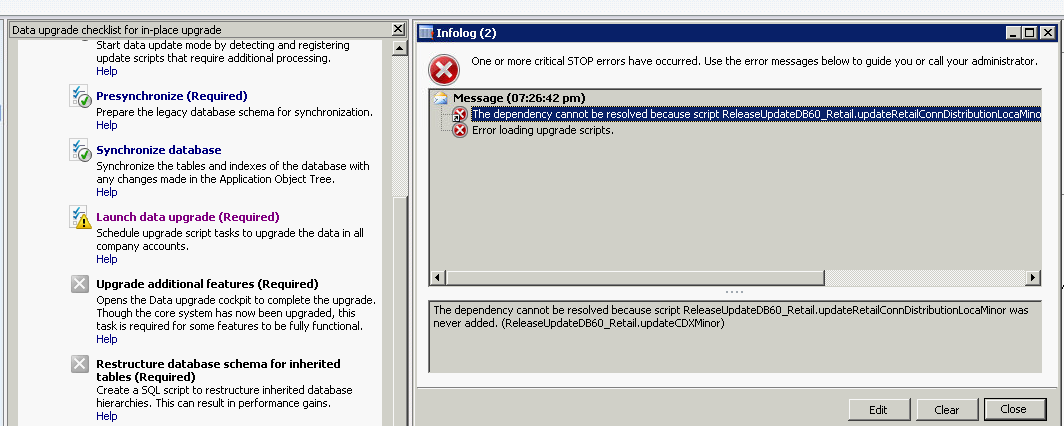
We are upgrading the AX2012FPK to AX2012R3 during the Data Upgrade checklist for In Place Upgrade, when processing the Launch Update Checklist am getting the following issue, please help me how to fix this issue.

Error Msg "The dependency cannot be resolved because script ReleaseUpdateDB60_Retail.updateRetailConnDistributionLocaMinor was never added. (ReleaseUpdateDB60_Retail.updateCDXMinor)"
*This post is locked for comments

I have the same question (0)
  • Verified answer
    rudra Profile Picture
    6,534 on at

    Hi ,

    After removing the dependency attribute and re-compiling in the above mentioned method solved this issue.

    Ooops finally my Upgrade completed successfully.

  • Community Member Profile Picture
    on at

    HI Rudra,

    Thanks for your post on this issue.

    Could you please suggest how you remove the dependency attribute, as mentioned in the error info log. we are also facing the similar issue in Launch data upgrade script.


  • Jacqueline Olson Profile Picture
    641 on at

    I resolved this error by running this against the ax db.  My customer is not using Retail.

    I deleted the record with method= 'updateCDXMinor' first then tried running the "Launch data Upgade".  I then  got a new error on a different method (the 2nd line).

    Update RELEASEUPDATEMINORSCRIPTS  set Finished =1 where classname = 'ReleaseUpdateDB60_retail' and method = 'updateCDXMinor'

    Update RELEASEUPDATEMINORSCRIPTS  set Finished =1 where classname = 'ReleaseUpdateDB60_retail' and method = 'updateRetailLoyaltyCardTransMinor'

    Hope above helps!

    Jackie Olson

  • Qamar1982 Profile Picture
    80 on at

    Hi Experts, 

    I am facing same problem. while upgrading contoso db CU8 to Cu13.

    i had applied the provided solution but it did not for me.

    After Query executed i have run full compile from command prompt, Full CIL from AOT and synchronization db.

    same error received.

    moreover during synchronization i found one more error "unable to logon on Microsoft Dynamics AX"

    Please help me if anyone has face this issue.

    Regards,

    Qamar Iqbal 

  • Community Member Profile Picture
    on at

    You should delete the wrong records from ReleaseUpdateMinorScripts table (ClassName='ReleaseUpdateDB60_Retail', Finished=0), and recompile the involved class.

Under review

Thank you for your reply! To ensure a great experience for everyone, your content is awaiting approval by our Community Managers. Please check back later.

Helpful resources

Quick Links

Introducing the 2026 Season 1 community Super Users

Congratulations to our 2026 Super Stars!

Meet the Microsoft Dynamics 365 Contact Center Champions

We are thrilled to have these Champions in our Community!

Congratulations to the April Top 10 Community Leaders

These are the community rock stars!

Leaderboard > 🔒一 Microsoft Dynamics AX (Archived)

#1
CP04-islander Profile Picture

CP04-islander 39

#2
Michel ROY Profile Picture

Michel ROY 14

#3
imran ul haq Profile Picture

imran ul haq 8

Last 30 days Overall leaderboard

Featured topics

Product updates

Dynamics 365 release plans
