web
You’re offline. This is a read only version of the page.
close
Skip to main content

Notifications

Announcements

Community site session details

Community site session details

Session Id :
Service | Customer Service, Contact Center, Fie...
Suggested Answer

Out of Hours Alert

(0) ShareShare
ReportReport
Posted on by 11

Hello,


I would like to set an email alert to go out when a Case is created outside of business hours.


Business hours have been defined in a Customer Service Calendar and a Holiday Schedule for this year. I would like to check against these calendars to confirm if the Case was created inside or outside the business hours so then I can then have my outside business hours alert.


What would be the best way to do this?


Many thanks,


Mike

I have the same question (0)
  • Community Member Profile Picture
    on at

    Hi Mike,

    A customer service schedule determines the business hours for each day in a week and also the weekly off. Customer Service uses these details for time tracking of service-level agreements (SLAs).

    However, sla can’t send email alert when case is created out of business hours, it just can extend the countdown.

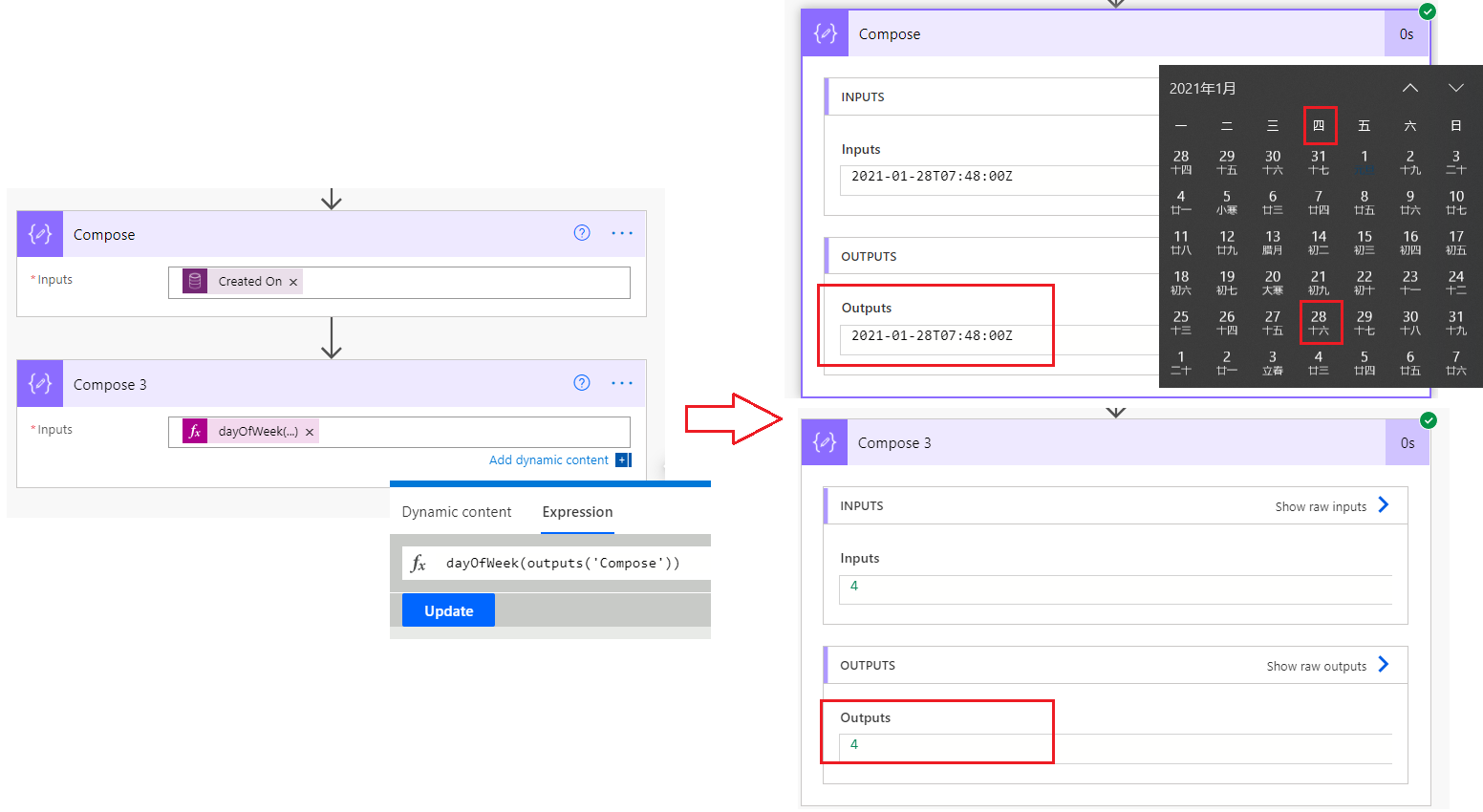
    So you have to compare created on field value with business hours directly, the flow maybe one way, but it just can check specific date is a weekday by using the dayOfWeek function.

    which returns a number – 0 is Sunday, 6 is Saturday, and anything in between is a weekday.

    For example:
     pastedimage1615282627309v1.png

    For time of the date field, it’s hard to compare,i have not found a way to compare time.

    So you have to check created on field of the case manually to specify whether the case was created during or outside business hours.

    Regards,

    Leah Ju

    Please mark as verified if the answer is helpful. Welcome to join hot discussions in Dynamics 365 Forums.

  • Mike Gaffaney Profile Picture
    11 on at

    Thanks Leah,

    What I was thinking is that when the case is created, a workflow / process was started which then checked the time the case was created and cross referenced that against the SLA which details the Business Hours. If the case creation date and time is outside of the Business Hours then it sends the email.

    My reason for doing that cross reference is that I need to take into account public holidays as well as the normal working week.

    Thanks for your example, your instructions are very clear and I can follow those but unfortunately it does not solve my problem.

    Many thanks,

    Mike

  • Suggested answer
    Fubar Profile Picture
    2,761 on at

    Not sure if there is now a simple SDK/API call or not - there wasn't the last time we worked with Calendars and non-working time (we had to do an SLA date - but the opposite of what the SLA does - x time before a date taking into account the non-working) - ours was a custom Action (basically a plugin registered to an Action).  

    Accessing the Calendars is a bit of a pain - and the documentation was not very good.   The details are stored in Calendar Rules in the Calendars and to access them needed to use ExpandCalendarRequest/ExpandCalendarResponse to convert the calendar rules to an array of available time blocks for the specified period (then check if the date-time is in an available block etc).  docs.microsoft.com/.../microsoft.crm.sdk.messages.expandcalendarrequest

    Couldn't find any thing quickly other than an old blog posts

    www.inogic.com/.../

    salimadamoncrm.com/.../

Under review

Thank you for your reply! To ensure a great experience for everyone, your content is awaiting approval by our Community Managers. Please check back later.

Helpful resources

News and Announcements

Season of Giving Solutions is Here!

Quick Links

Responsible AI policies

As AI tools become more common, we’re introducing a Responsible AI Use…

Neeraj Kumar – Community Spotlight

We are honored to recognize Neeraj Kumar as our Community Spotlight honoree for…

Leaderboard > Service | Customer Service, Contact Center, Field Service, Guides

#1
Tom_Gioielli Profile Picture

Tom_Gioielli 24 Super User 2025 Season 2

#2
TAHER Mehdi Profile Picture

TAHER Mehdi 14

#3
Fameeda Yaseen Profile Picture

Fameeda Yaseen 10

Last 30 days Overall leaderboard

Featured topics

Product updates

Dynamics 365 release plans
