web
You’re offline. This is a read only version of the page.
close
Skip to main content

Notifications

Announcements

Community site session details

Community site session details

Session Id :
Microsoft Dynamics CRM (Archived)

Roll-Up Field for YTD Sales in the Product Entity

(0) ShareShare
ReportReport
Posted on by

Hi all,

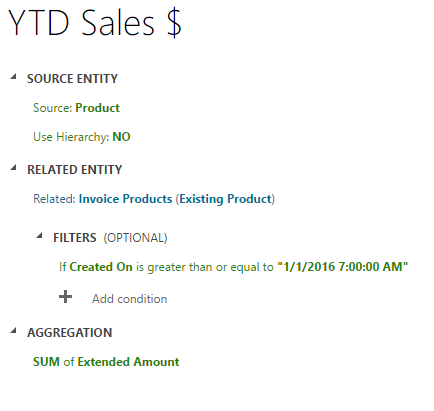
I'm trying to display the YTD and LYTD Sales for each item in Microsoft CRM 365. Right now I have it set up as a Roll-Up field:
38562.Capture.PNG

This summarizes the sales of the item, and works well.

The thing is that this roll-up field will not start over when we reach 2017. Someone has to manually change the roll-up field each year, which I want to avoid.

Does anyone have an idea of how to set up the field to only calculate for 2016, and then start over in january for the sales in 2017? 

If possible I would also want to display the total sales for 2012, 2013, 2014 and 2015 - and I want these fields to be dynamic. So when we reach 2017, I want the total sales for 2013, 2014, 2015 and 2016 to show. 

Any ideas?

Thanks

*This post is locked for comments

I have the same question (0)
  • Suggested answer
    Drew Poggemann Profile Picture
    4 on at

    Hi Lund,

    This really won't work in a rollup field unless you create multiple rollup fields with filters that track by each year.

    I would suggest looking at an approach to display as a chart in CRM or even use PowerBI to do this type of summarization and bring these back into Dynamics 365.  You will save a lot of work and have much more flexibility using PowerBI to summarize the information.

    Hope this helps.

    Thanks much,

  • Lund Profile Picture
    on at

    Hi Drew,

    Thank you very much for your answer.

    So I think you're right about the chart. What would your approach be to create a chart that displays the total sales for each product for 2016 compared with the sales for 2015. I want the name of the product to be displayed on the x-axis and sales on the y -axis. Something like the picture below shows:

    5861.Capture.PNG

    Thanks

    Olivia

  • Verified answer
    Drew Poggemann Profile Picture
    4 on at

    Hi Olivia,

    I created in PowerBI as this is much easier to work with to accomplish what you are asking to do (with a lot more)! :)

    The data in my test environment online has no invoice data so I used estimated amount tied to opportunity products so I brought in accounts, opportunities, opportunity products, products into my Power BI Desktop environment using ODATA feed against my Dynamics 365 online test environment.  You connect to the following URL:  https://<<environmentname>>.api.crm.dynamics.com/api/data/v8.2/ 

    Once I connected then I put in a line and clustered column chart to display the information. Note, I am displaying by quarter vs. month because my data is not separated good enough by month but it is very easy to change by just removing the quarter from the shared access and it will display the months. :)

    Screen-Shot-2016_2D00_11_2D00_26-at-7.24.07-AM.png

    I hope this is what you were looking to do.  You can even add a slicer to the visualization to bring in by product as right now this is across all products.

    A tutorial that should even help more:  https://powerbi.microsoft.com/en-us/documentation/powerbi-service-tutorial-combo-chart-merge-visualizations/#create-a-combo-chart-with-two-axes

    Thanks much,

  • MattPPi Profile Picture
    45 on at

    OK, here's my idea.

    I have a bunch of YTD fields on a form, and I have exactly the same problem. The current year to date value is hard coded.

    I created a new field in the entity that I'm looking at (in this case, I think it's Product).

    I called the field FirstOfYear, and defined it as a date field.

    Now, I just need to populate it with January 1, 12:00AM of the current year. Then I can update the calculation fields to compare created date to the new field.

    So my problem is, how to populate this field. I can do a bulk data update to take care of this year, but what about next year.

    I can do a Javascript that will update the field, but when should I run it, and how do I call it?

    I have a feeling that I'm trying to re invent the wheel with this approach.

    I can do this with power BI, but this is a form on a Dynamics 365 implementation.

    Maybe a batch bulk update that will run on the 1st of every year, and update this field for all existing records, and a web service that will run a javascript to add the value to any newly created records.

    Again, I feel like I'm re inventing the wheel, and there is an easier way to do this.

  • Dineshkumar Sivakumar Profile Picture
    10 on at

    1.You can create a scheduled flow that runs every year and update the field to particular value.

    2. If you dont want to go with flow - you can create a workflow with wait untill condition and update the date with A CUSTOM WORFKLOW ACTIVITY.

    [2nd option will be blocking CRM resource as it will wait untill an year and is not recommended]

Under review

Thank you for your reply! To ensure a great experience for everyone, your content is awaiting approval by our Community Managers. Please check back later.

Helpful resources

News and Announcements

Season of Giving Solutions is Here!

Quick Links

Responsible AI policies

As AI tools become more common, we’re introducing a Responsible AI Use…

Neeraj Kumar – Community Spotlight

We are honored to recognize Neeraj Kumar as our Community Spotlight honoree for…

Leaderboard > 🔒一 Microsoft Dynamics CRM (Archived)

#1
Shidin Haridas Profile Picture

Shidin Haridas 2

#2
Abdullah13 Profile Picture

Abdullah13 1

Last 30 days Overall leaderboard

Featured topics

Product updates

Dynamics 365 release plans



