web
You’re offline. This is a read only version of the page.
close
Skip to main content

Announcements

News and Announcements icon
Community site session details

Community site session details

Session Id :
Microsoft Dynamics CRM (Archived)

An error has occurred . Try this Action again ... While SetRegard through Outlook .. MS CRM 2011

(0) ShareShare
ReportReport
Posted on by 1,372 Super User 2026 Season 1

We are facing a strange behavior of CRM in Outlook client for a specific machine .. While doing SetRegard whenever look for view change below error message occurred 
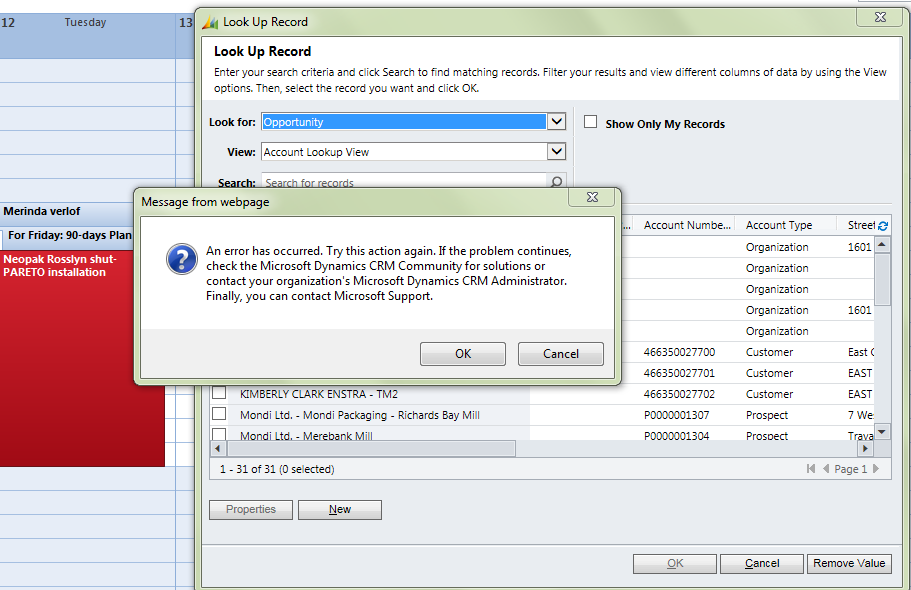
image001-_2800_1_2900_.png

We have taken below steps to get rid this off :

1) Uninstalled completely and Reinstall Outlook CRM Client and configured

2) Tried with UR 17 & UR 18

3) Reset IE , history delete, temp data delete .

4) Outlook reinstalled and configured

Trace log also has not any clue, and issue is coming only for specific user machine. Anyone faced it earlier ? 

*This post is locked for comments

I have the same question (0)
  • Community Member Profile Picture
    on at

    Does the user have permissions to the Opportunity? Also check the Append/Append To permissions for Opportunity and Activity.

  • Manoj - ManoVerse Profile Picture
    1,372 Super User 2026 Season 1 on at

    This is not a permission issue. Error comes when we change any look up item whether it is account ,opportunity or any other entity

  • Community Member Profile Picture
    on at

    I assume you have used the CRM Diagnostics trace tool.

    I have seen references to missing privileges hidden in these traces and also a weird one with the cache of outlook.

    http://blog.xrm.com/index.php/2012/05/quick-fix-outlook-error-attempting-track-item-microsoft-dynamics-crm-2011/

  • TonyN Profile Picture
    695 on at

    Make sure Google Chrome is not the default browser.

  • RakeshJ Profile Picture
    Microsoft Employee on at

    Hello Manoj,

    1. Is the user a system administrator?

    2. What is the URs installed in clients and server ? Try bringing the CRM client and server on to the same rollups and validate the behavior.

    3. What is the bit version between client and Outlook ?

    4. Try configuring the CRM org using this user profile on one of the working machine and validate the behavior.

    5. Try configuring the CRM org with the user profile of working user in affected user's machine and validate the behavior.

    Do let me know if that helps.

    Regards

    Rakesh

    Microsoft Dynamics CRM Support.

Under review

Thank you for your reply! To ensure a great experience for everyone, your content is awaiting approval by our Community Managers. Please check back later.

Helpful resources

Quick Links

Season of Sharing Community Challenge Launch!

Jump in, show your community spirit, and win prizes!

Women in Power Builds Momentum

Expanding mentorship, skilling, and AI innovation

Congratulations to the May Top 10 Community Leaders

These are the community rock stars!

Leaderboard > 🔒一 Microsoft Dynamics CRM (Archived)

Last 30 days Overall leaderboard

Featured topics

Product updates

Dynamics 365 release plans
