web
You’re offline. This is a read only version of the page.
close
Skip to main content

Notifications

Announcements

No record found.

Community site session details

Community site session details

Session Id :
Microsoft Dynamics CRM (Archived)

Access Is Denied when send out email

(0) ShareShare
ReportReport
Posted on by

Hi All,

When I press "Send" an email, I got the following error
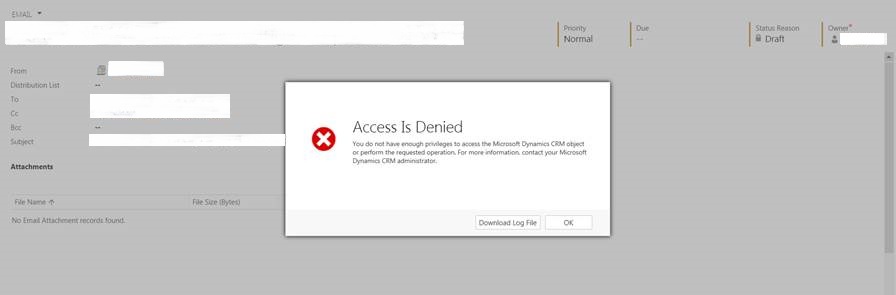
error20150812.jpg

And this is the downloaded log file

Unhandled Exception: System.ServiceModel.FaultException`1[[Microsoft.Xrm.Sdk.OrganizationServiceFault, Microsoft.Xrm.Sdk, Version=6.0.0.0, Culture=neutral, PublicKeyToken=31bf3856ad364e35]]: Cannot update subject or description unless email is in draft statusDetail: 
<OrganizationServiceFault xmlns:i="www.w3.org/.../XMLSchema-instance" xmlns="schemas.microsoft.com/.../Contracts">
  <ErrorCode>-2147187962</ErrorCode>
  <ErrorDetails xmlns:d2p1="schemas.datacontract.org/.../System.Collections.Generic" />
  <Message>Cannot update subject or description unless email is in draft status</Message>
  <Timestamp>2015-08-11T15:58:08.4337301Z</Timestamp>
  <InnerFault i:nil="true" />
  <TraceText i:nil="true" />
</OrganizationServiceFault>


I don't understand why it said "Cannot update subject or description unless email is in draft status", normally I didn't change the subject nor the description when I send out an email.

Can anyone tell me how to trace the problem?

*This post is locked for comments

I have the same question (0)
  • Victor Crespo Profile Picture
    on at

    Hello

    Have you changed something in your configuration of Email (Exchange, Server-Side Synchronization)

    If you did change some configuration, please review that, since this can be the cause of your issue.

    Please, review this links to find out more about this error:

    social.microsoft.com/.../crm-2011-cannot-update-subject-or-description-unless-email-is-in-draft-status

    Thank you for using Microsoft Dynamics Communities

    Victor Crespo

    Support Engineer | Dynamics CRM Online Support

  • Community Member Profile Picture
    on at

    Hi Victor,

    Thank you for your prompt reply, I read this post before, but seems different to my case.

    There is no configuration changed recently. 

    And the email is just send by replying an incoming email, not updating email that have been sent.

  • Victor Crespo Profile Picture
    on at

    Hello

    If this is happens in a very specific situation, I would recommend you to open a Support Ticket in Officce 365.

    Doing this, a Support Engineer will work directly with you to solve the issue

    Please review this link to create one:

    blogs.technet.com/.../how-to-create-service-requests-to-contact-office-365-support.aspx

    Thank you

    Victor Crespo

    Support Engineer | Dynamics CRM Online Support

  • Maarten Docter Profile Picture
    2 on at

    When analyzing this with Fiddler, I see the following:

    After clicking the "Send" button, the state of the email is internally changed, but the subject control still seems to issue/trigger an update via the '/AppWebServices/InlineEditWebService.asmx' web service...but this fails because the e-mail already has a state of something like 'Pending Send'.

    So this seems to be a synchronization issue from within the GUI controls (trigger an update after sending).

    As proposed, I will file an Office 365 incident and see what Microsoft Support says about this. If the answer is useful, I will append it to this thread.

  • Calum Profile Picture
    15 on at

    Hi Maarten,

    Did you ever get a resolution to this from Microsoft Support?

    We are frequently experiencing the same issue.

    Warm Regards,

    Calum

  • Community Member Profile Picture
    on at

    Did you check the BU of the contact ? Does it belong to the same BU as the person sending the email ?

  • Suggested answer
    Maarten Docter Profile Picture
    2 on at

    Hi Calum,

    Sorry for the late reply and for not updating this thread with the feedback I got from Microsoft Support.

    It's a known issue which won't be fixed by Microsoft because it's related to the old legacy CRM form rendering. You need to switch to the new form rendering to get it resolved:

    CAUSE:

    “Use legacy form rendering” option from the system settings is set to No.


    RESOLUTION:

    Recommended settings is to change the “Use legacy form rendering” to Yes > Click on Ok. 

    Hope this helps!

    Kind regards,

    Maarten

  • Community Member Profile Picture
    on at

    Hi Maarten,

    May I know where is the "Use legacy form rendering" option?

  • Calum Profile Picture
    15 on at

    Hi Maarten,

    Many thanks for the info.

    I will see if this resolves the error.

    Warm Regards

    Calum

  • Calum Profile Picture
    15 on at

    Hi Doll Doll,

    If you go to Settings > Administration > System Settings then scroll to the bottom of the 'General' Tab, you will find the setting there.

    Warm Regards,

    Calum

Under review

Thank you for your reply! To ensure a great experience for everyone, your content is awaiting approval by our Community Managers. Please check back later.

Helpful resources

Quick Links

Responsible AI policies

As AI tools become more common, we’re introducing a Responsible AI Use…

Neeraj Kumar – Community Spotlight

We are honored to recognize Neeraj Kumar as our Community Spotlight honoree for…

Leaderboard > 🔒一 Microsoft Dynamics CRM (Archived)

#1
SA-08121319-0 Profile Picture

SA-08121319-0 4

#1
Calum MacFarlane Profile Picture

Calum MacFarlane 4

#3
Alex Fun Wei Jie Profile Picture

Alex Fun Wei Jie 2

Last 30 days Overall leaderboard

Featured topics

Product updates

Dynamics 365 release plans



