web
You’re offline. This is a read only version of the page.
close
Skip to main content

Notifications

Announcements

No record found.

Community site session details

Community site session details

Session Id :
Microsoft Dynamics AX (Archived)

Inventory transaction: How to change Value Open from YES to NO

(0) ShareShare
ReportReport
Posted on by

Dear All,

There are some transactions from old period (2014) in my system that have Value Open set to YES, so when I do Recalculation I got error message "Unit cost Price xxxx can be wrong as the transaction cannot be fully settled".

I did check and found that these transactions have the Value open set to YES as below screenshot:
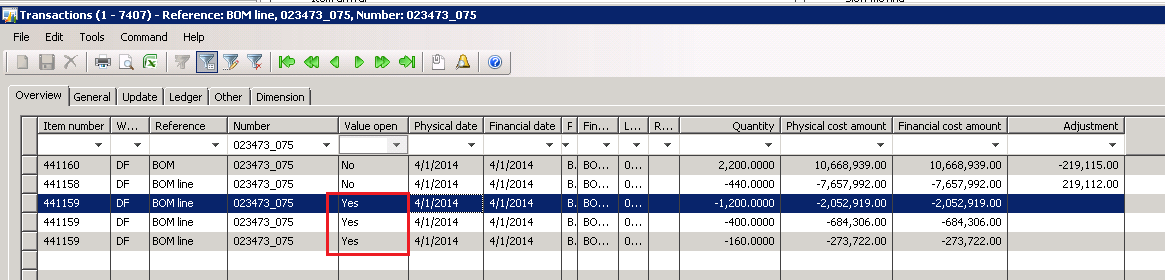
valueopen.PNG

Can you please let me know why the Financial has been posted but Value Open didn't set to NO?

How can I change this Value Open to NO?

Thank you

*This post is locked for comments

I have the same question (0)
  • Suggested answer
    Ludwig Reinhard Profile Picture
    Microsoft Employee on at

    Hi nglehang,

    the message says that the transactions have not fully been settled and might consequently been (partially) settled once again at the time you run the next inventory recalculation/close. Once it is fully settled, the value open field changes to NO.

    What inventory valuation method do you use?

    Best regards,

    Ludwig

  • Guy Terry Profile Picture
    28,924 Moderator on at

    ... and do you have 'Include physical value' ticked (next to the Inventory model on the Item Model Group?

    It could be that there is no financially updated receipt to settle these issues to.

  • Community Member Profile Picture
    on at

    Hi Ludwig & Guy,

    Here is my setup:

    6787.00.PNG

    6787.00.PNG

    Those transactions are from periods that already closed. Is there any way to change Value Open from YES to NO?

    Thank you for your support

  • Ludwig Reinhard Profile Picture
    Microsoft Employee on at

    Hi,

    Have you already reviewed Terry's answer regarding the physical inventory parameter?

    Best regards,

    Ludwig

  • Verified answer
    Guy Terry Profile Picture
    28,924 Moderator on at

    You're using Weighted average. That model can only close issue transactions if there are enough financially updated receipt transactions.

    So lets check that...

    Check your 'Dimension groups' setup; which dimensions have 'Financial inventory' ticked? Make a note.

    Go to the Items list and find the 441159 item. Get AX to show all Inventory transactions for that item (probably Inventory -> Transactions). Use 'Dimensions display' to show only those dimensions which have 'Financial inventory' ticked.

    Find the BOM Line transactions. Considering only the dimensions which have 'Financial inventory' ticked, make a note of each dimension value on the BOM Line transactions. Turn on 'Filter by Grid' (Ctrl + G). Filter the records to show only transactions with the same dimensions as your BOM Line transactions. (e.g. If your BOM Lines are on Site '01', and Site is the only Financially tracked dimension, filter all the items transactions to show only Site '01').

    Now add another filter for the field 'Receipt status'. Filter where the receipt status is 2 or 3. Does it show any transactions which are older than the BOM Line transactions?

  • Community Member Profile Picture
    on at

    Thank you a lot for your support, Terry.

    I will do check as your guideline.

  • JordonGe Profile Picture
    5 on at

    Then how to solve it ?

Under review

Thank you for your reply! To ensure a great experience for everyone, your content is awaiting approval by our Community Managers. Please check back later.

Helpful resources

Quick Links

Responsible AI policies

As AI tools become more common, we’re introducing a Responsible AI Use…

Neeraj Kumar – Community Spotlight

We are honored to recognize Neeraj Kumar as our Community Spotlight honoree for…

Leaderboard > 🔒一 Microsoft Dynamics AX (Archived)

#1
Priya_K Profile Picture

Priya_K 4

#1
Martin Dráb Profile Picture

Martin Dráb 4 Most Valuable Professional

#3
Ali Zaidi Profile Picture

Ali Zaidi 2

Last 30 days Overall leaderboard

Featured topics

Product updates

Dynamics 365 release plans
